How to record
Timer Recording
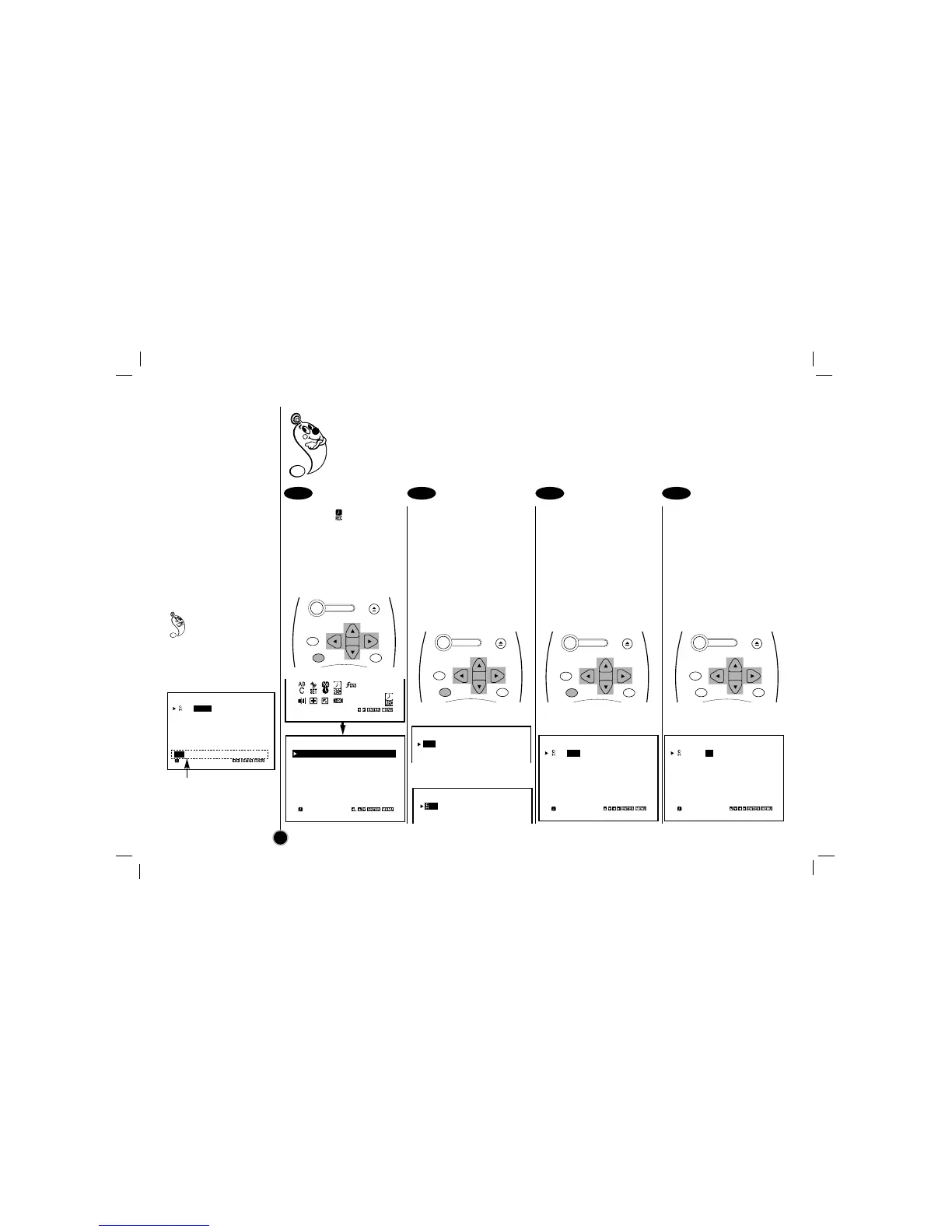
Select the item on the
main menu with
FF
or
GG
,
and then press ENTER.
If all programs have already
been entered, FULLY
PROGRAMMED message
will appear.
Press ENTER to start
setting the timer record
event.
Press
EE
or
DD
to select
channel number (or
LINE1, LINE2) and then
press
GG
to move to next
option.
Press
EE
or
DD
to select
month and then press
GG
to move to day item.
You can select date option
by pressing ENTER (Details
are on the left).
Press
EE
or
DD
to select
day and then press
GG
to
move to set time.
This VCR can be programmed to record up to 7 programs within a period of 1 year. For unattended
recording, the timer needs to know the channels to be recorded and the starting and ending times.
• Check that the VCR clock is set correctly.
• Insert a video cassette with protection tab into your VCR.
• If you have connected the CATV using the CATV converter, set the CHANNEL to match the cable
box output channel (usually CH3 or 4). Change the channel on the CATV converter instead of VCR.
20
1 2 3 4
Press ENTER to
select date option
on the DATE item.
1~31=One time recording
DLY(Daily)=Same Mon~Fri
Weekly(SUN~SAT)=Same
time once a week
Date options
Press
FF
or
GG
to select a
date option then press
ENTER.
CH DATE T I M E
04 JUL 5
– – : – – – – : – – SP
– – – – – – – –– – : – – – – : – – SP
– – – – – – – –– – : – – – – : – – SP
– – – – – – – –– – : – – – – : – – SP
– – – – – – – –– – : – – – – : – – SP
– – – – – – – –– – : – – – – : – – SP
– – – – – – – –– – : – – – – : – – SP
DLY SU MO TU WE TH FR SA
CH DATE T I M E
– – – – – – – –– – : – – – – : – – SP
– – – – – – – –– – : – – – – : – – SP
– – – – – – – –– – : – – – – : – – SP
– – – – – – – –– – : – – – – : – – SP
– – – – – – – –– – : – – – – : – – SP
– – – – – – – –– – : – – – – : – – SP
– – – – – – – –– – : – – – – : – – SP
DELETE:
CH DATE T I M E
– – – – – – – –– – : – – – – : – – SP
– – – – – – – –– – : – – – – : – – SP
– – – – – – – –– – : – – – – : – – SP
CH DATE T I M E
04
– – – – –– – : – – – – : – – SP
– – – – – – – –– – : – – – – : – – SP
– – – – – – – –– – : – – – – : – – SP
CH DATE T I M E
04
JUL 5
– – : – – – – : – – SP
– – – – – – – –– – : – – – – : – – SP
– – – – – – – –– – : – – – – : – – SP
– – – – – – – –– – : – – – – : – – SP
– – – – – – – –– – : – – – – : – – SP
– – – – – – – –– – : – – – – : – – SP
– – – – – – – –– – : – – – – : – – SP
CH DATE T I M E
04
JUL 5
– – : – – – – : – – SP
– – – – – – – –– – : – – – – : – – SP
– – – – – – – –– – : – – – – : – – SP
– – – – – – – –– – : – – – – : – – SP
– – – – – – – –– – : – – – – : – – SP
– – – – – – – –– – : – – – – : – – SP
– – – – – – – –– – : – – – – : – – SP
POWER
EJECT
CH+/TRK+
CH—/TRK—
CLEAR
ENTER
MENU
POWER
EJECT
CH+/TRK+
CH—/TRK—
CLEAR
ENTER
MENU
POWER
EJECT
CH+/TRK+
CH—/TRK—
CLEAR
ENTER
MENU
POWER
EJECT
CH+/TRK+
CH—/TRK—
CLEAR
ENTER
MENU



 To Next Page