EVOS
®
FL and EVOS
®
FL Color User Guide
21
Time Lapse
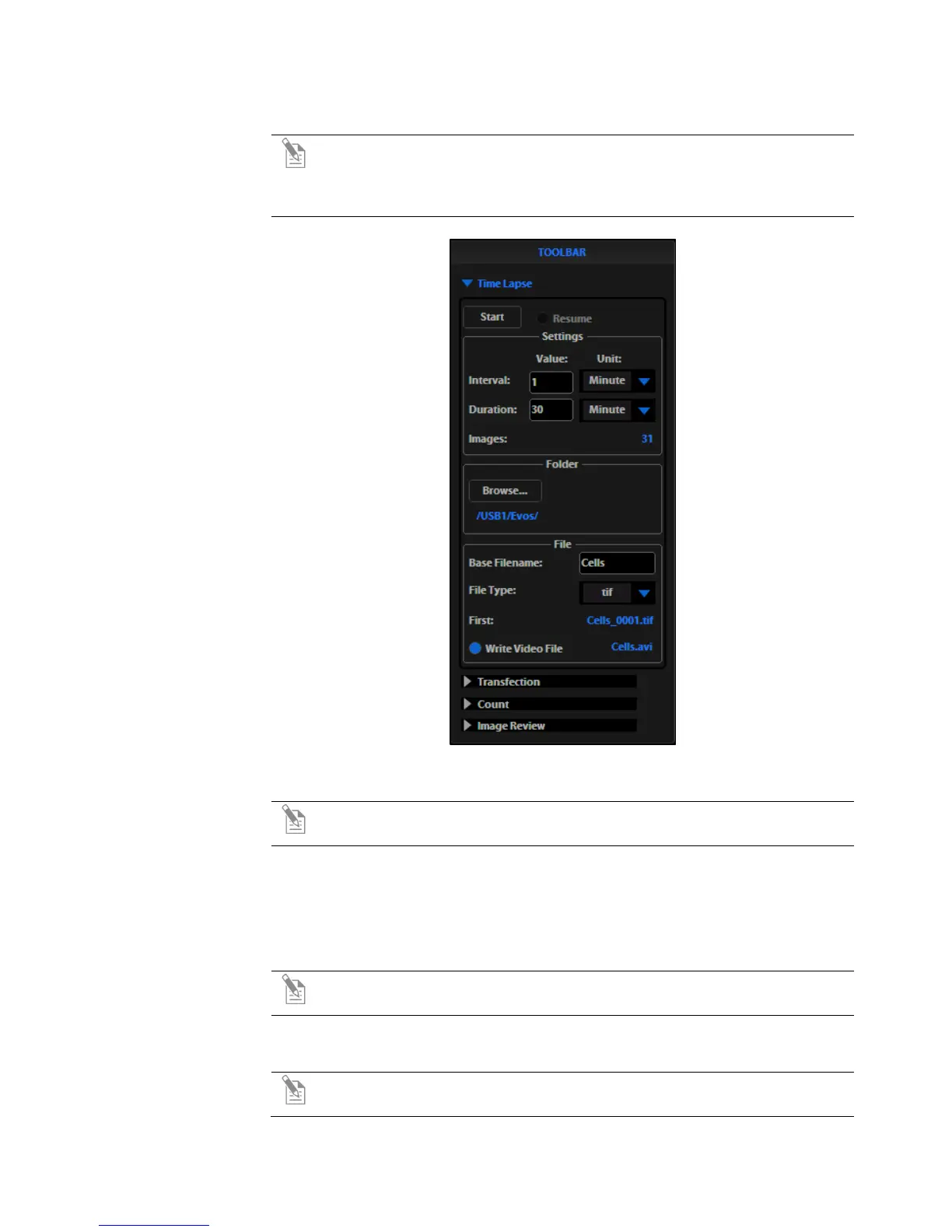
Note: The Time Lapse feature allows you program the instrument to
record time lapse images. To create a video (.avi) file, select the Write
Video File option prior to running the time lapse session (lower left corner
of the Time Lapse Tool bar window (Figure 11).
Figure 11 Toolbar: Time Lapse
Setting Up Time
Lapse Parameters
Note: After parameters have been selected, the software will calculate the
approximate number of images (Figure 11).
1. Once the specimen is focused and ready, tighten the stage brakes to prevent
the stage from drifting during the session.
2. Open the Toolbar and select the Time Lapse tool.
3. Click the Interval text field and enter a numeric value (defines the frequency
of image capture).
Note: Use the drop-down menu to choose a unit of measure (for example,
minutes) for the interval value entered.
4. Click the Duration text field and enter a numeric value (defines the period of
time for which the experiment will run).
Note: Use the drop-down menu to choose a unit of time (for example,
hours) for the interval value entered.


 To Next Page