8
EVOS
®
FL and EVOS
®
FL Color User Guide
User Interface (UI) Controls
UI controls are software-driven controls for using the FL menu system.
Note: Periodically, Life Technologies adds functionality and other
improvements to the EVOS
®
user interface. We recommend keeping your
EVOS
®
FL Imaging System up to date with the latest software. If you have
any questions about software updates, contact your local distributor. If you
do not have your distributor information, refer to the EVOS
®
FL Imaging
System product page at www.lifetechnologies.com/evosfl or contact
Technical Support (see page 54) for instructions on how to perform the
software updates.
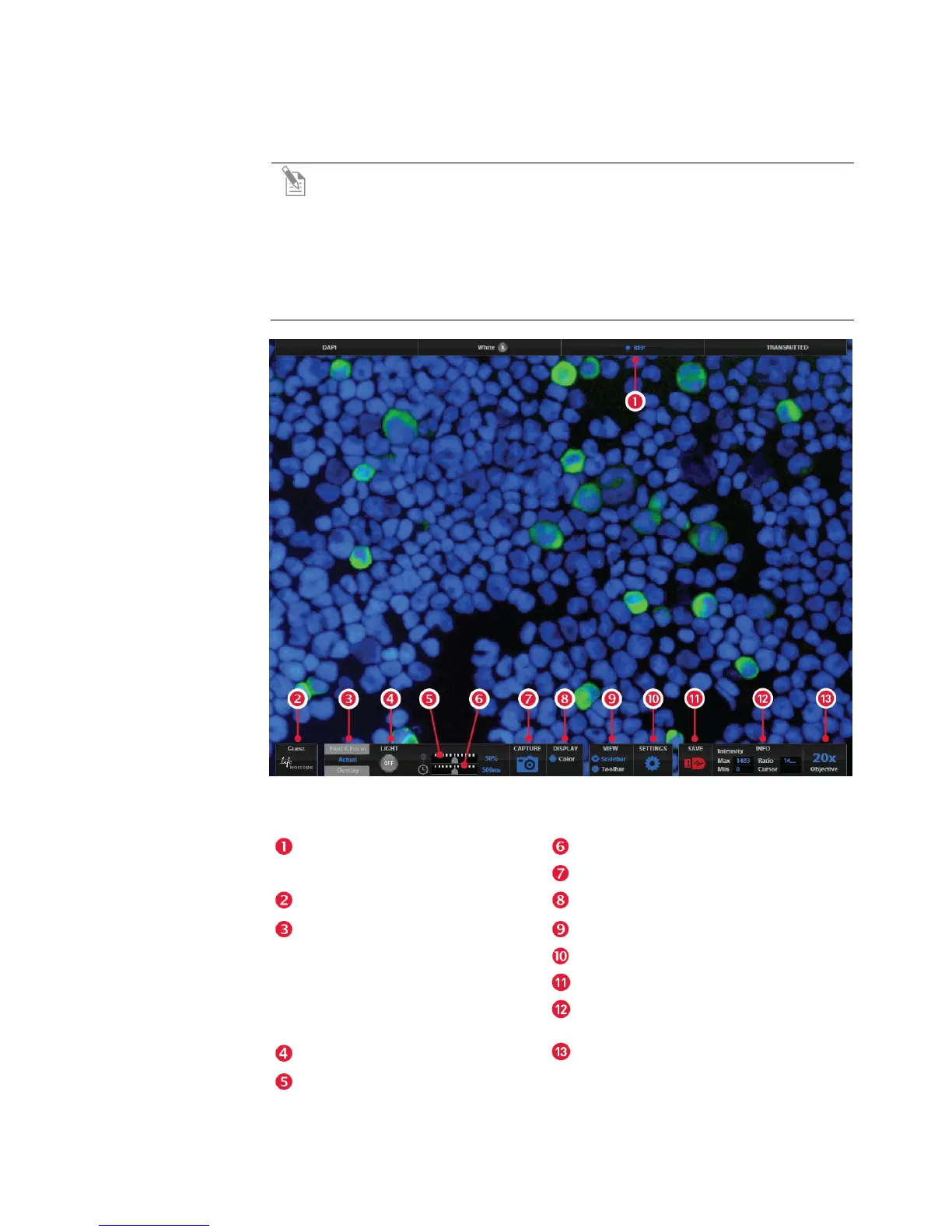
Figure 3 UI Controls Reference
Channel Indicator Bar with the
Active Channel highlighted
Exposure Time Slider
Image Capture Button
Login Button
Color Option
Control Bar Tabs
• Find & Focus
• Actual – Exposure Time Slider
• Overlay – Overlay Color Dialog
Box
Scalebar/Toolbar Options
Settings Control Button
Save Image Button
Info Display Bar
Light ON/OFF
Selected Objective
Illumination Slider


 To Next Page