EVOS
®
FL and EVOS
®
FL Color User Guide
29
Image Review
The Image Review tool allows you to review still images or play video files from the
USB drive or network connection. You may also use this tool to rename or delete saved
files.
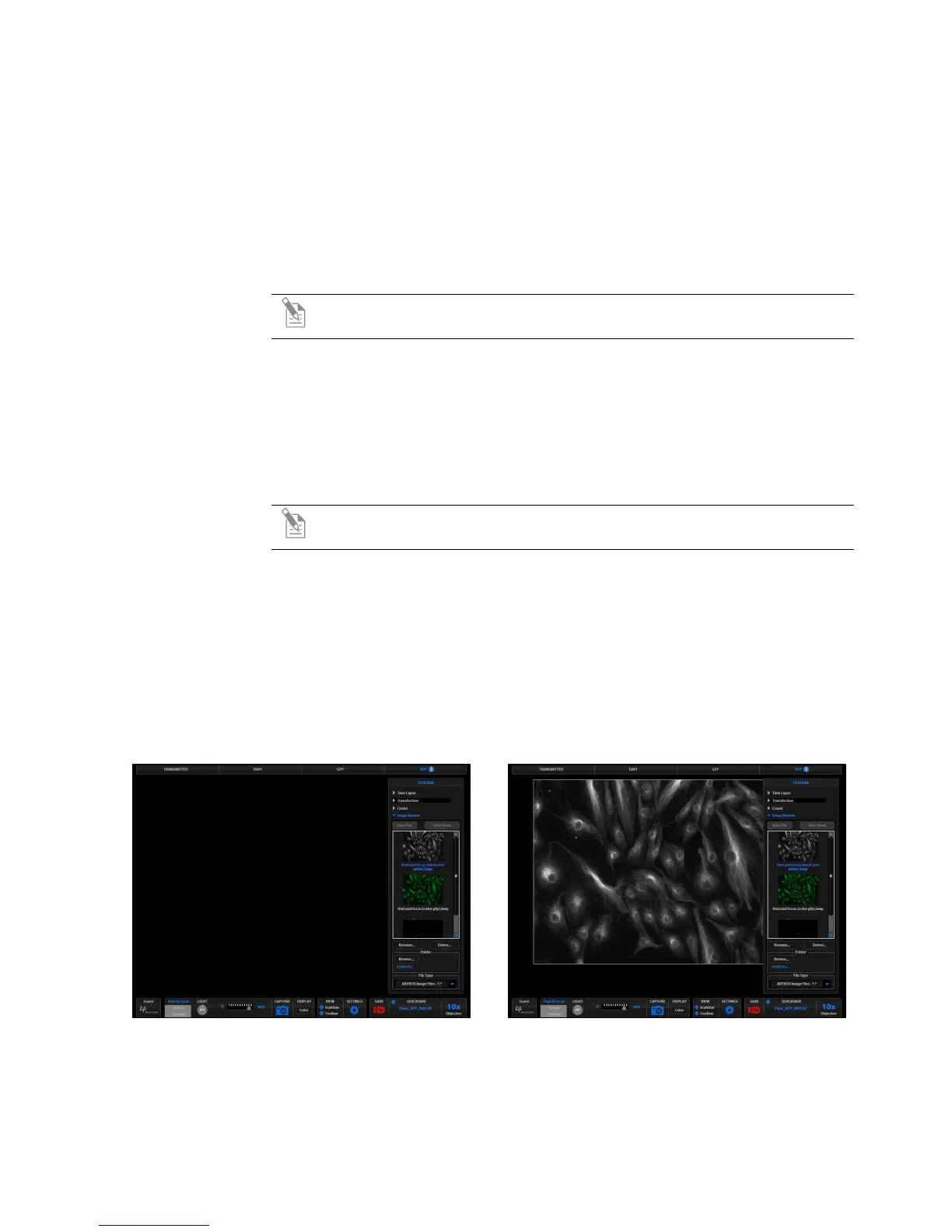
1. Open the Toolbar and expand the Image Review tool.
2. The preview list displays thumbnail images for all viewable files in the
selected directory (the top-level USB directory is selected by default). If there
are no viewable files in the directory, the preview area will be empty.
Note: The File Type drop-down menu filters files by type. By default, it is
set to display all files with .png, .tif, .jpg, .bmp, or .avi extensions.
3. If the image or video file you wish to review is not in the directory displayed,
click the Browse button to find and open the desired directory.
4. Use the scroll bar as needed to search the preview list for the desired file.
Click the image to select it. The selected file name appears orange.
5. Click the View File button to display the image in the image review window.
This button toggles between “View File” and “Hide File”. Hiding the file
closes the image review window.
Note: Double-clicking the thumbnail image will also toggle between
displaying and hiding the file.
6. To zoom the image in the review window, double-click the area of interest;
right-click to restore normal magnification. See “Live/Captured Zoom and
Scalebar Option” (page 23) for more detailed instructions.
7. To rename a file, select it and click the Rename button. The Virtual Keyboard
will pop up. Enter the new file name and click the Accept button.
8. To delete a file, select it and click the Delete button. A confirmation dialog box
will pop up. It is not possible to recover a deleted file.
9. Use the Slide Show button to display each image thumbnail within the image
review window continuously.
Figure 20 Image Review Tool: Find and select a
file
Figure 21 Image Review Tool: View, rename, or
delete a file


 To Next Page