30
EVOS
®
FL and EVOS
®
FL Color User Guide
6. Optional Settings
Date/Time Settings
Note: Changing settings in the Service tab will affect the instrument’s
performance. If service beyond the date/time setting is needed, please
contact your EVOS
®
distributor or contact Technical Support (page 54).
To ensure accurate date and time
information on saved image files, verify
the EVOS
®
date/time settings before
your capture session.
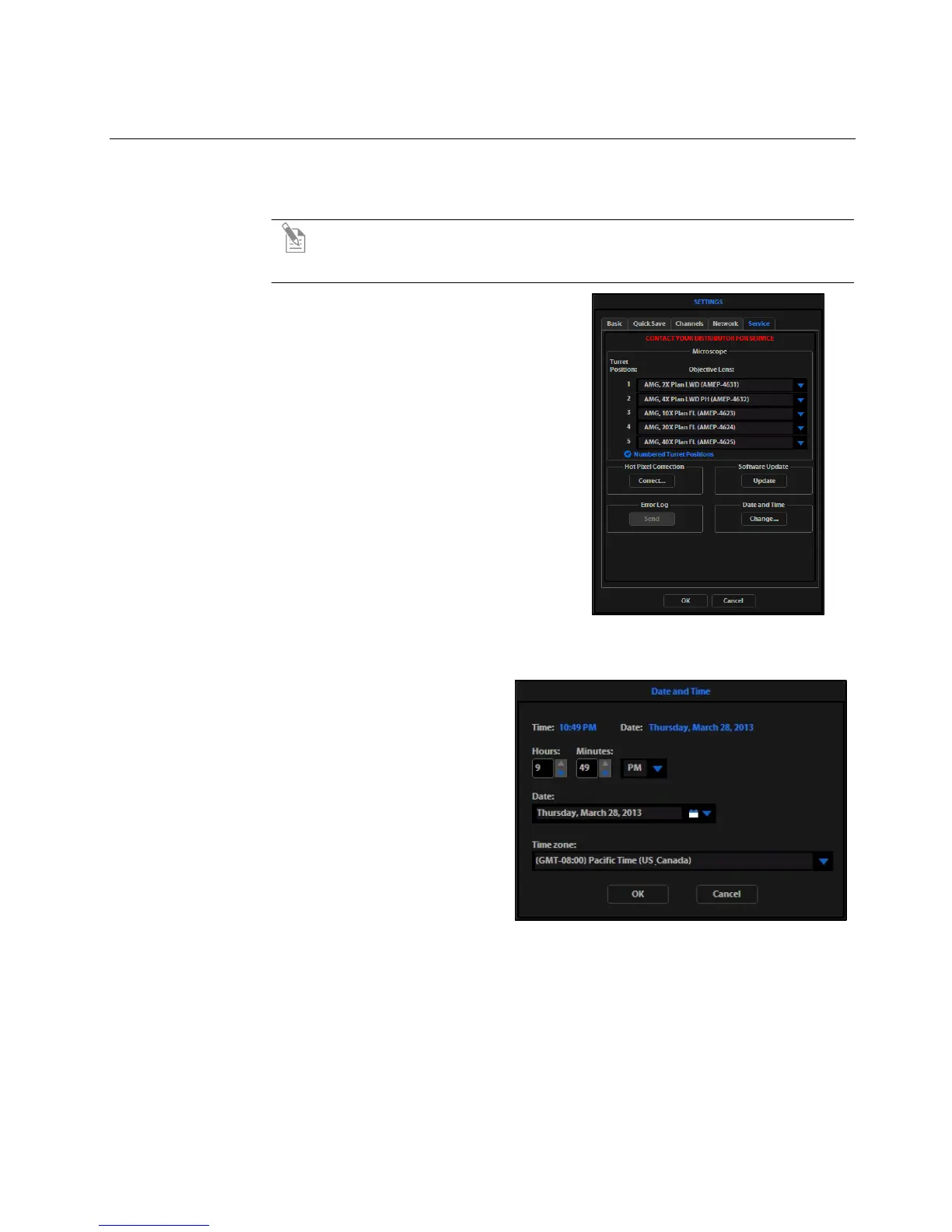
1. Click the Settings button to open
the Settings dialog box, and then
select the Service tab (Figure 22).
2. Click the Change button under
Date and Time.
3. In the Date and Time popup, use the
arrows and the drop-down menus to
set the time, date, and time zone, then
click OK (Figure 23).
4. Click OK in the Settings dialog box.
The new settings will take effect
immediately.
Figure 22 Settings: Service Tab
Figure 23 Date and Time Popup


 To Next Page