With exposure information turned on, you can see your ISO value in the Info bar on the left
of the screen. For more information, read Exposure Information.
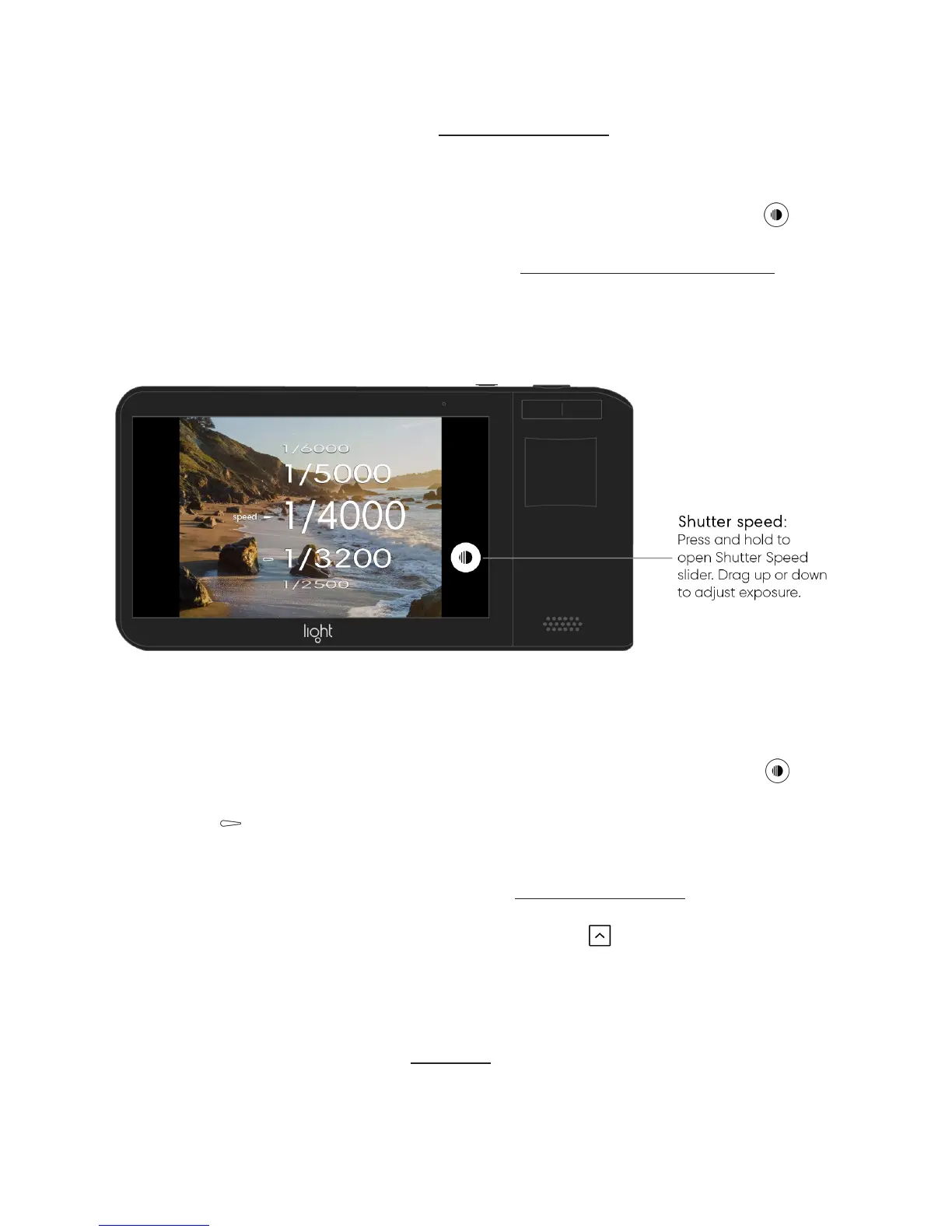
Adjust Shutter Speed in manual mode. Press and hold the shutter speed button on
the right side of the screen to open the shutter speed slider. While holding, move your finger
up or down to set your desired shutter speed value. Learn more about shutter speed.
View your current shutter speed value. Press and hold the shutter speed button to
open the shutter speed slider. Your previously used shutter speed value is indicated by a
hollow arrow .
With exposure information turned on, you can see your shutter speed value in the Info bar
on the left of the screen. For more information, see Exposure Information.
Tip: If you don’t want to use manual mode, tap the up arrow to open the Toolbar. Above
it, you see two capture mode options: auto or manual. Swipe up or down to highlight your
preferred mode.
Note: The Light L16 does not have native aperture control. You can adjust aperture after
transferring images to your computer. Click here to read more about why Light L16 doesn’t
have native aperture control.



 To Next Page