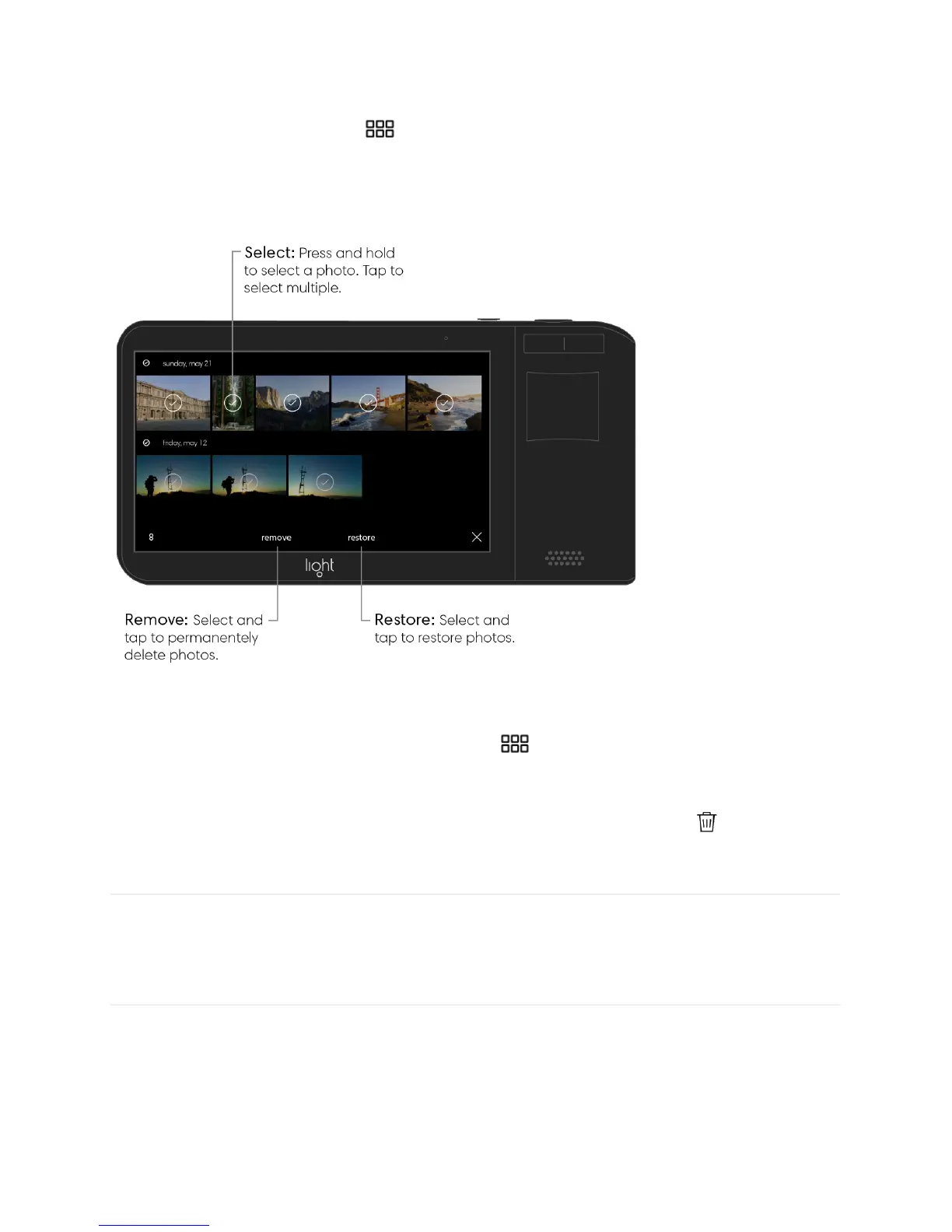
Recover deleted photos. Deleted photos are placed in your deleted folder. To access the
deleted folder, tap the grid icon to see all of your photos, then tap “all” in the top left
corner followed by “deleted.” From the deleted folder, press and hold on a photo to select it,
then tap “restore.” You can restore multiple photos at once by selecting more photos before
tapping “restore.”
Permanently deleted photos. Tap the grid icon to see all of your photos, then tap “all”
in the top left corner followed by “deleted.” To delete all photos, tap “remove all.” To delete
only selected photos, press and hold on a photo to select it, then tap “remove.” You can
remove multiple photos at once by selecting more photos before tapping “ remove all.”
Process photos on Light L16
When you take a photo with your Light L16, 10 or more images are captured at once. In
order to maximize battery power, only one camera is used to generate a thumbnail in the
preview screen and gallery. The process option on your L16 allows you to create a higher
resolution photo (13 megapixels – optimized for your device and social sharing) with just 5 of



 To Next Page