NOTE: Following directions exactly is necessary to ensure accurate results.
1) Turn Controller OFF.
2) Remove cover from Controller by removing the 6 phillips and 4 Allen screws. It may be
necessary to remove the bolts that hold the controller down. Then slide cover forward to
expose internal bit-driver.
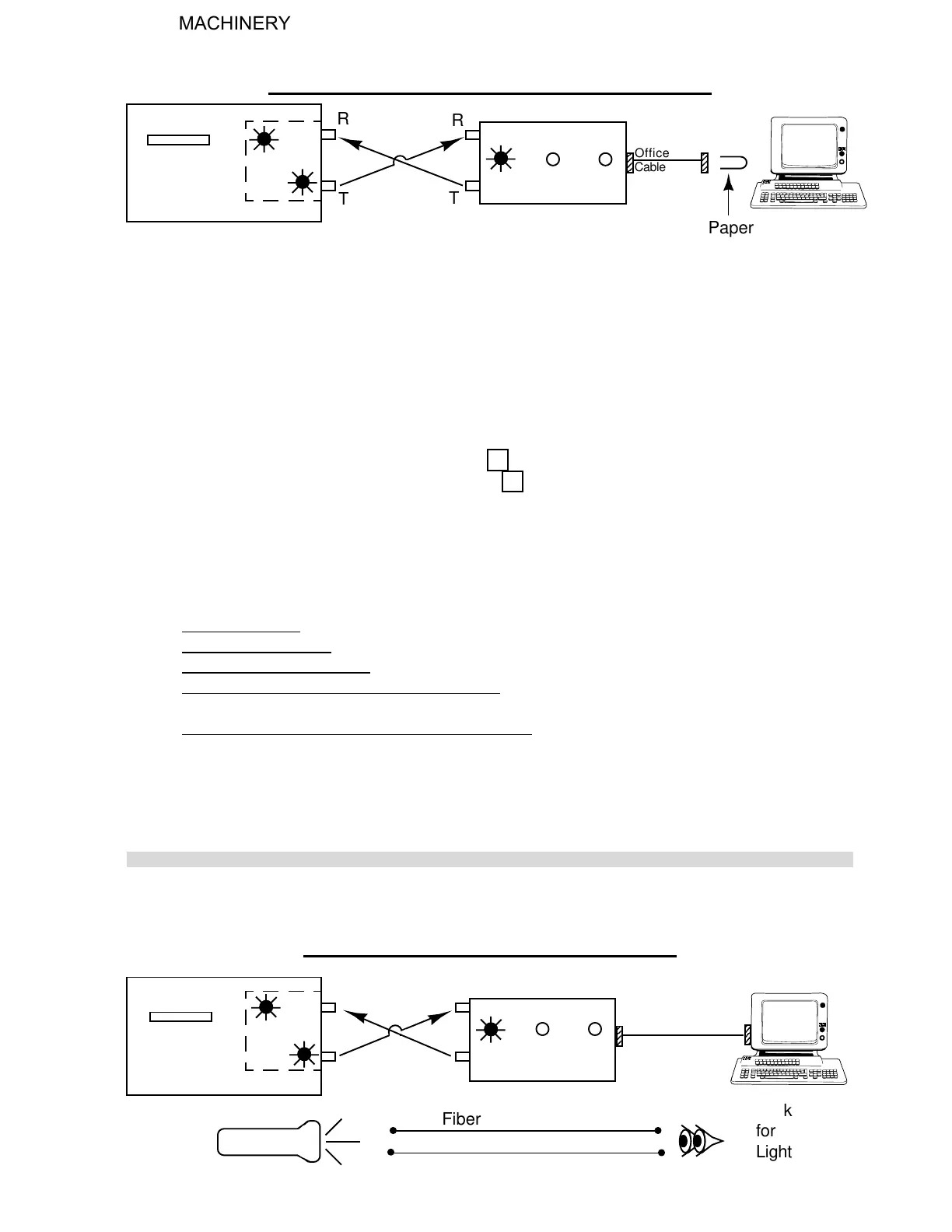
3) Unfold a small paper clip so that both ends are parallel, then place those ends into the office
cable or bit-driver across pins 2 and 3 for both 9 and 25 pin female plugs.
4) Turn Controller ON.
5) Arrow down to TEST and press the correct F key.
6) Arrow down to SERIAL and press the correct F key.
7) All of the bit-driver RD and TD lights should be flashing. The screen on the Controller will
display: "FIFO FITTED"
"SERIAL HOST PORT"
"FAILED"
This is normal.
* If NOT, check the following:
a) No Lights Flash - Could be a problem in testing. Recheck testing procedure.
b) Still No Lights Flash - Indicates a faulty internal bit-driver or Controller.
c) TD Internal Flashes Only - Check optic cable, external bit-driver, and office cable.
d) TD Internal and RD External Flashes Only - Check office cable or bit-driver. Paper clip
may not be in pins 2 and 3.
d) TD Internal, RD and TD External Flashes Only - Check fiber optic cable and internal bit-
driver.
8) To exit Serial Test press ESC
6. CHECKING THE FIBER OPTIC SYSTEM
RD
TD
DCD RD
TD
Office
Cable
R
R
T
T
Paper
Clip
2
3
7. TO CHECK FIBER OPTIC CABLE
DCD
2
2
2
R
R
T
T
RD
TD
RD TD
Light
Look
for
Light
Fiber Optic Cable
H. WEISS MACHINERY & SUPPLY
H. WEISS MACHINERY & SUPPLY
PHONE: (718) 605-0395 - www.hweiss.com


 To Next Page