4. Normal Fiber Optic Operation
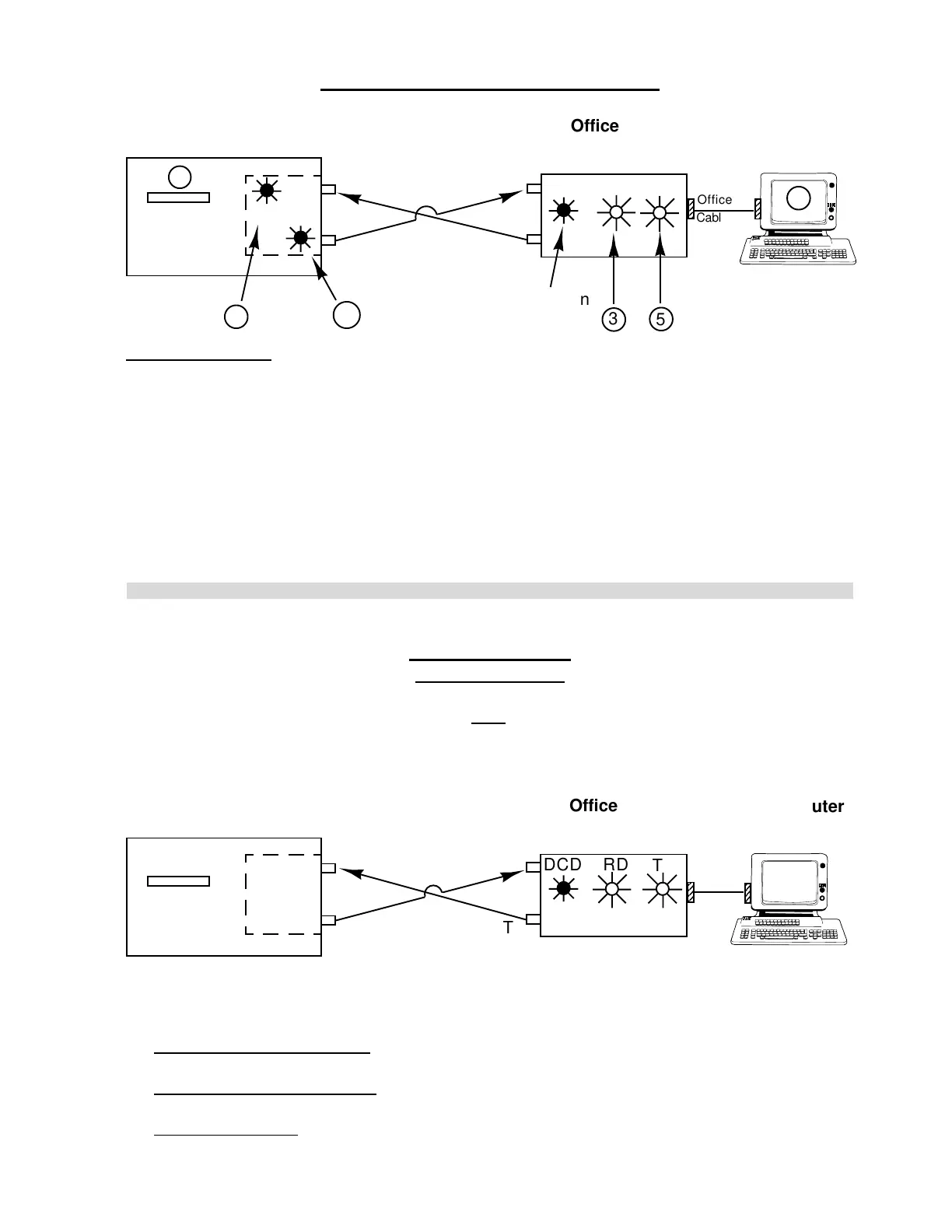
Normal Operation
1) Press DOWNLOAD on Controller.
2) TD light on internal bit-driver flashes (transmits data to office bit-driver).
3) RD light on Office bit-driver flashes (receives data from internal bit-driver).
4) Computer Communication Panel 2 screen will change to "WAITING FOR JOB TYPE".
5) TD light on office bit-driver (transmits data back to internal bit-driver).
6) RD light on internal bit-driver flashes.
7) Controller displays: 0=Job, 1=Part, 2=Ins.
1
RD
TD
6
Office
Cable
T
R
2
NEE Controller
Computer
Fiber
Optic
Cable
DCD RD TD
T
R
Always On
5
3
Office Bit
Driver
4
* If DOWNLOAD does not work, check the following on office bit driver:
a) DCD and RD light always on - Remove optic cable. Point back of bit-driver toward a
room light. Does RD light go out. Check optic cable and/or adjust the bit-driver.
b) RD flashes, TD light does not - Check office cable for continuity. Check connection to
computer. Check Communication Panel 2 Program in the computer.
c) RD and TD flashes - Check fiber optic cable. Check internal bit-driver.
5. QUICK TEST
Will Not Download
1) Turn Controller and Computer completely OFF following shut down procedure.
2) Turn Controller and Computer ON.
3) Try DOWNLOAD again.
4) Does it work?
T
R
NEE Controller
Computer
DCD RD
TD
Do the RD and
TD lights flash?
R
T
Office Bit
Driver
H. WEISS MACHINERY & SUPPLY
H. WEISS MACHINERY & SUPPLY
PHONE: (718) 605-0395 - www.hweiss.com


 To Next Page