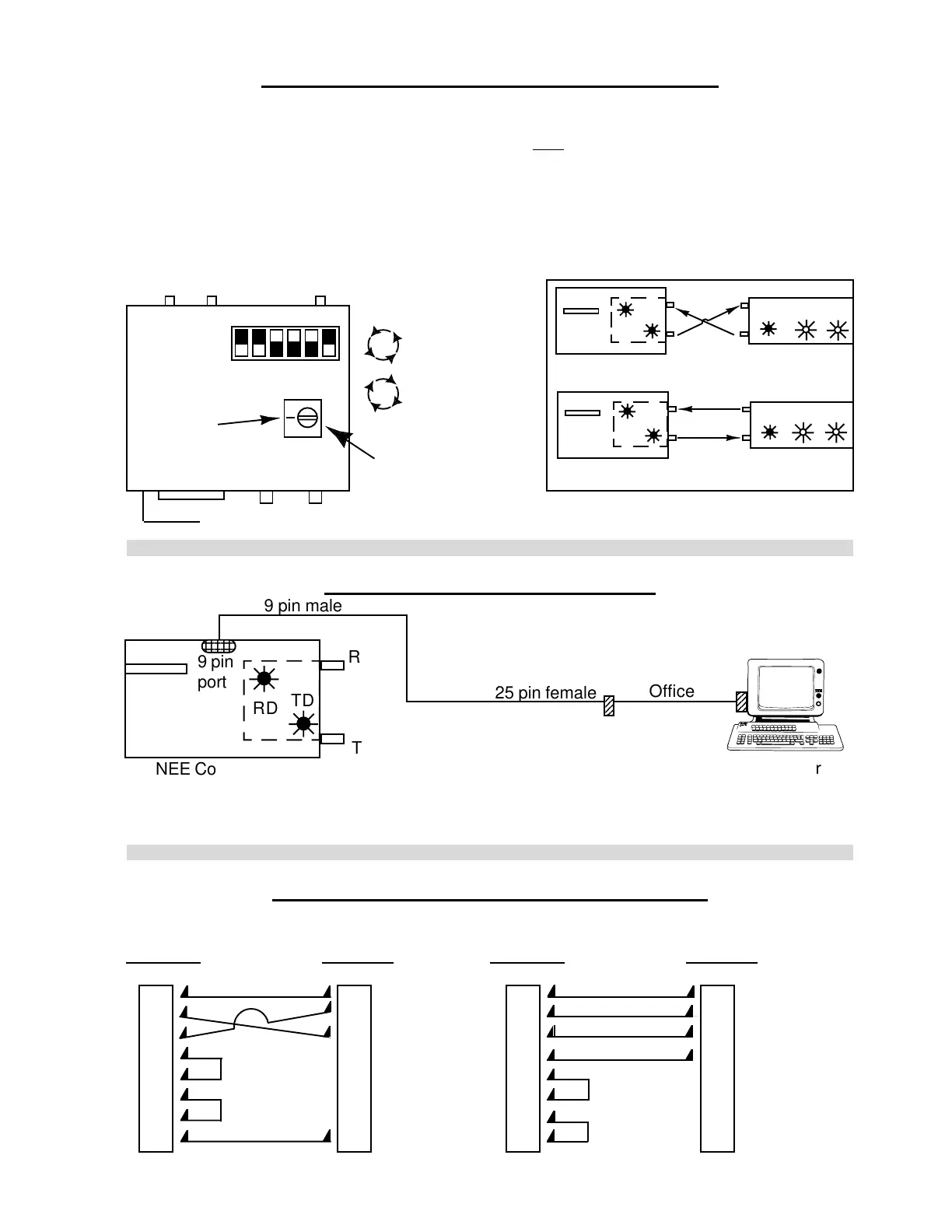
9. TO BYPASS OPTIC SYSTEM
NOTE: Adding a 9 to 25 pin cable to connect computer to controller eliminates the bit-driver
system entirely. Furthermore, this will verify that the computer and Controller function properly.
RD
TD
R
T
9 pin
port
2
2
2
2
2
2
NEE Controller
Computer
9 pin male
25 pin female
Office
Cable
8. BIT-DRIVER SENSITIVITY ADJUSTMENT
In order to adjust the bit-driver, you must remove the black metal cover, then connect the fiber
optic cable in reverse of normal operations at one end only. ("Cable Setting" Illustration below)
1) Turn the blue sensitivity potentiometer counterclockwise until the RD diode on the front
panel lights up. (see diagram below) If RD is already on, go to step 2.
2) Turn the same potentiometer clockwise until the RD diode turns off.
TOP VIEW
Mark position
of screw
before turning
ON
OFF
Dip-Switch
Front
Counter-
Clockwise
Clockwise
Blue Potentiometer
(for sensitivity adjust)
RD
TD
DCD
Adjustment Cable Setting
Normal Cable Setting
CABLE SETTING
RD
TD
DCD
RD TD
T
R
T
R
Rear
TR
110 VAC
RD
TD
DCD RD TD
T
R
T
R
10. OFFICE CABLE PIN CONFIGURATION
#7096 #7091
9 pin to 25 pin cable 25 pin to 25 pin cable
Computer (9 pin) Bit-Driver (25 pin) Computer (25 pin) Bit-Driver (25 pin)
1111
2222
3333
477
64
75
86
5720
H. WEISS MACHINERY & SUPPLY
H. WEISS MACHINERY & SUPPLY
PHONE: (718) 605-0395 - www.hweiss.com


 To Next Page