16 Bioscience Solutions – 4D-Nucleofector™ Manual
2.9.2 Loading Samples
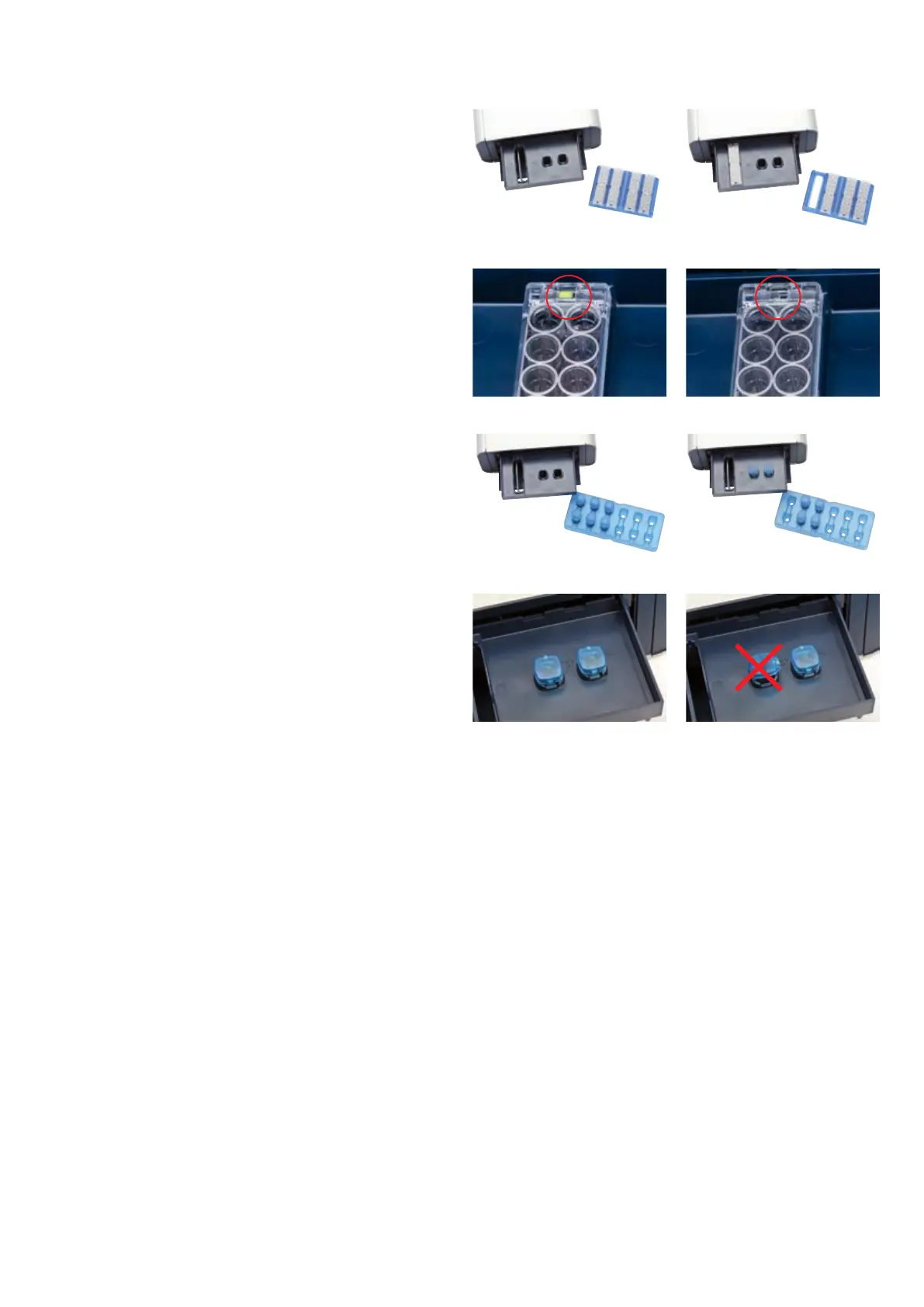
8. Load the 16-well Nucleocuvette™ Strip (gure 2.14, A, B) or one or
two 100 µL Nucleocuvette™ Vessels into the sample tray (gure 2.14,
E, F)
9. Make sure that the strip is oriented properly:
–
For the 16-well Nucleocuvette™ Strip, the yellow pin at the rear end
of the strip must be visible (gure 2.14, C). If the strip is mounted
in the wrong orientation its rear end will stay above the strip holder
and the yellow pin is hardly visible (gure 2.14, D).
–
For the 100 µL Nucleocuvette™ Vessel, the cuvettes should be
mounted such that the label LONZA on the lid is readable and the
opening clip is at the front (gure 2.14, G, H).
Figure 2.14: Loading of samples
C Right orientation D Wrong orientation
E F
G H
A B



 To Next Page