4D-Nucleofector™ Manual – Bioscience Solutions 27
2.11.2.3 Running the Experiment
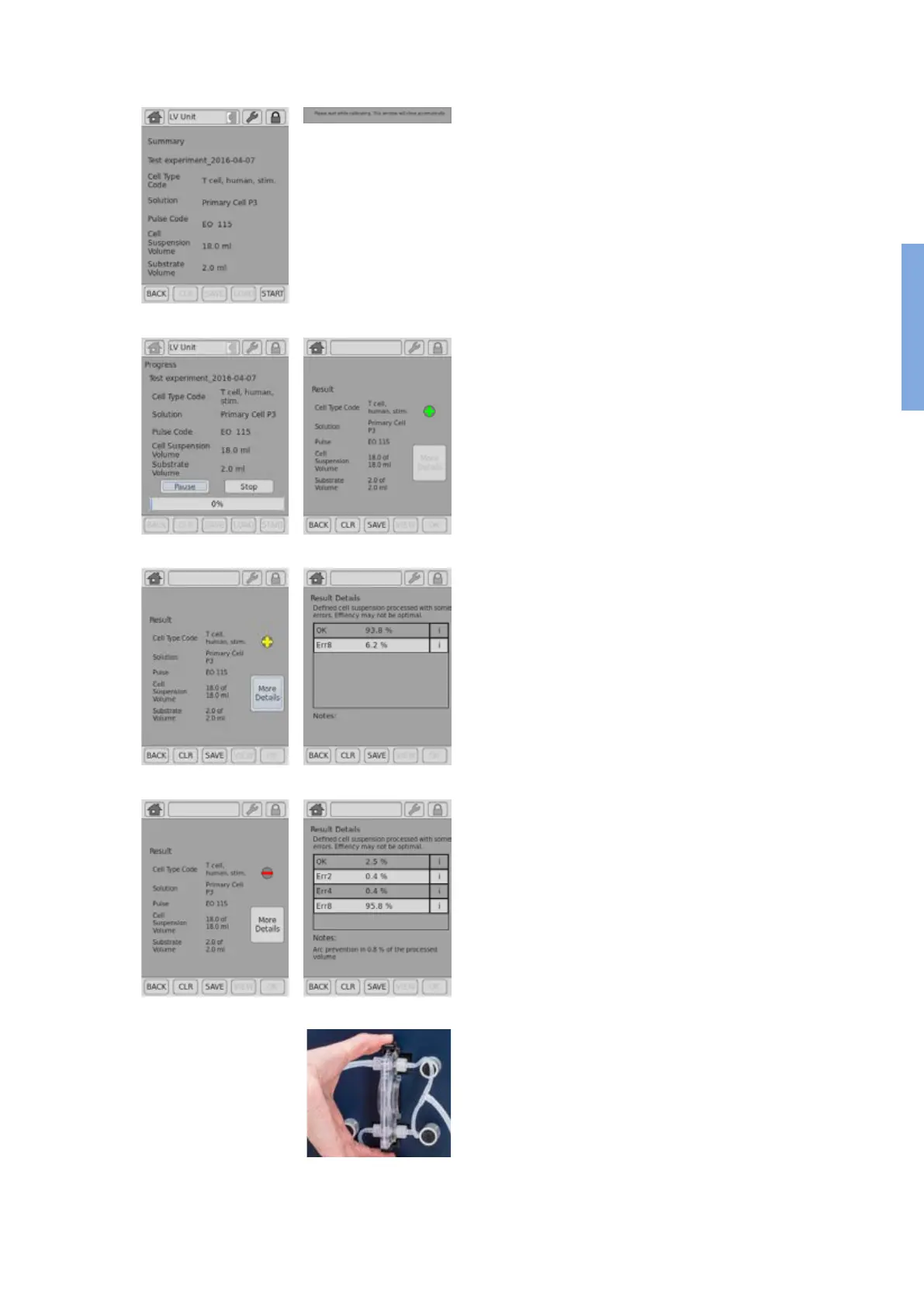
28. Check dened experiment including volumes again and press “START”
to initiate the Nucleofection process (gure 2.26, A).
29. Before starting the system performs a calibration step (gure 2.26,
B).
30. The progress of the experiment is indicated by a progress bar (gure
2.26, C).
31. The overall result is indicated by a color code: green for “OK” (gure
2.26, D), yellow in case of few errors (gure 2.26, E) and red in case
of multiple errors (gure 2.26, G). If errors occurred you can check
for more details by pressing “More details”. The result details (gure
2.26, F, H) will display the type of error and its percent occurrence in
the processed volume. For additional information on the error press
“i”.
32. Once the process is completed disconnect the outlet reservoir and
transfer transfected cell suspension into cell culture vessels.
33. Disassemble the tubing and take out the LV Nucleocuvette™ Cartridge
by pressing the black levers (gure 2.26, I) and discard it.
Figure 2.26: Experiment definition (LV Unit, LV Nucleocuvette™
Cartridge)
A B
C D
E F
G H
I
2



 To Next Page