4D-Nucleofector™ Manual – Bioscience Solutions 21
2.11.1 Using the 1 mL Nucleocuvette™ Cartridge
(Fixed Volume)
2.11.1.1 Dening a New Experiment
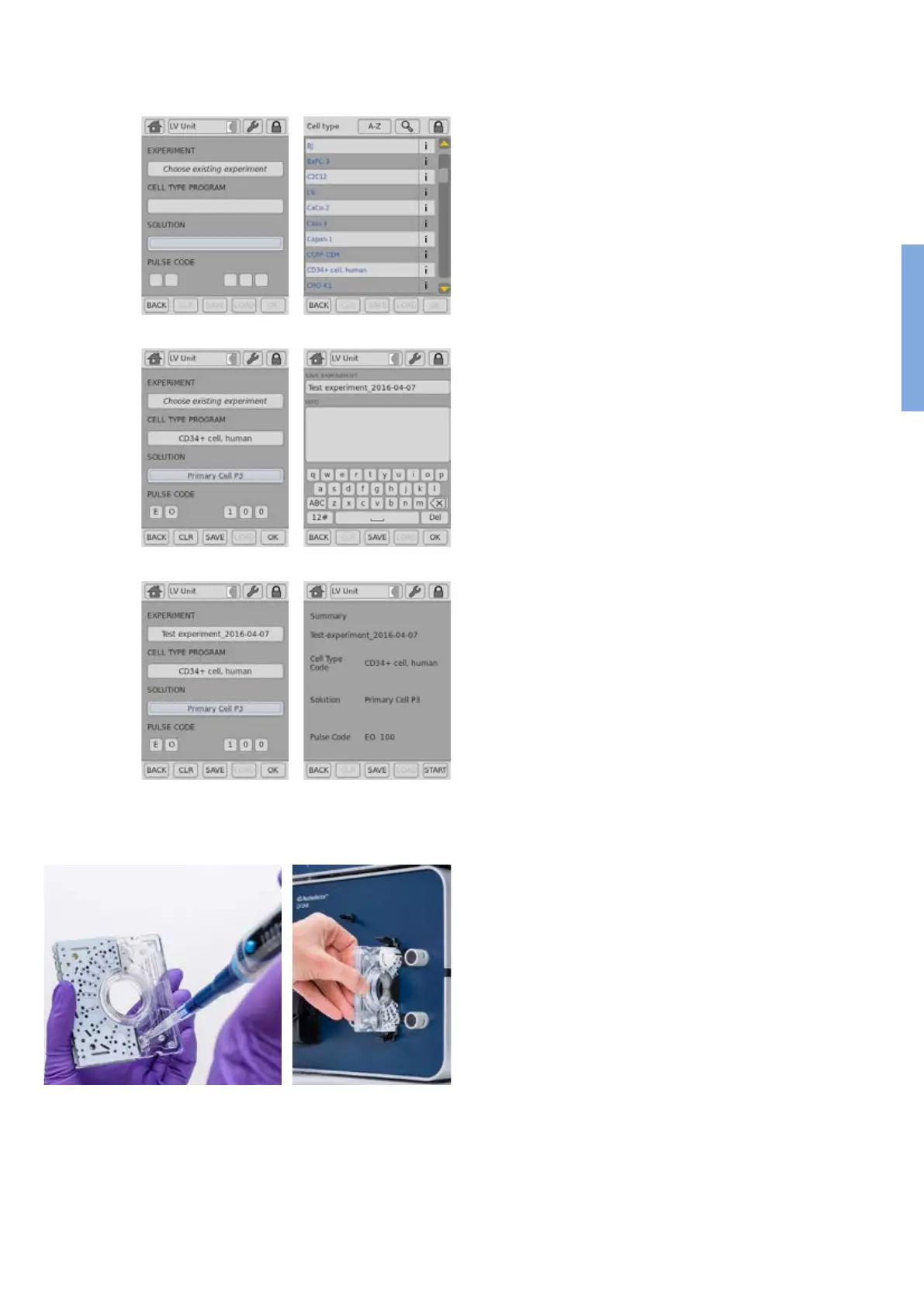
1. After unit and vessel type selection (see chapter 2.8.2) a screen
appears which allows you to dene experiment parameters select a
previously saved experiment by pressing “Choose existing experiment”
(gure 2.20, A).
2. Press the field “CELL TYPE PROGRAM” to choose predefined
Nucleofection conditions from a cell type list (gure 2.20, B). Use
the search (magnifying glass symbol) or the sort list functions (A-Z)
to nd conditions more quickly.
a. Select the desired cell type code by tapping on the appropriate
line of the cell list. The cell type selected will be highlighted. For
additional information about the cell type selected press “i”.
b. To conrm your selection press “OK”.
c. If required, modify pulse code by pressing the letter or number
code elds. A keyboard will appear, enabling you to change
settings. The solution code can be modied via a selection list.
3. Instead of dening solution and program code via the CELL TYPE
PROGRAM, both parameters can also be selected manually, e.g. in
case no predened cell type program is available. For adding new cell
type programs, please refer to chapter 2.12.3.
4. Optional: At this stage (or at step 8) you can save your dened
experiment for future use by pressing the “SAVE” button
(gure 2.20, C). A keyboard will appear allowing you to dene a name
(max. length: 26 characters).
5. You may enter further information about your experiment by touching
the “Info” eld and typing in your text (gure 2.20, D).
6. Conrm and save the experiment parameters by pressing “OK” or
“SAVE”.
7. Press OK to continue (gure 2.20, E)
8. A summary of the defined settings will be displayed (figure
2.20, F). Please check for correctness before continuing.
2.11.1.2 Loading Samples
9. Fill the 1 mL Nucleocuvette™ Cartridge with the cell-substrate solution
(gure 2.21, A ). A volume of 1 mL is required to completely ll the
cuvette. Using a higher or lower volume may lead to errors.
10. Insert the lled cartridge into the slot until it snaps in (gure 2.21, B).
C D
E F
A B
Figure 2.20: Experiment denition (LV Unit, 1 mL Nucleocu-
vette™ Cartridge)
Figure 2.21: Loading of sample (LV Unit, 1 mL Nucleocuvette™
Cartridge)
2



 To Next Page