p/n 18603-001, Rev. C LTV
®
1200/1150 Ventilator Service Manual Page 6-19
Motor Drive Calibration
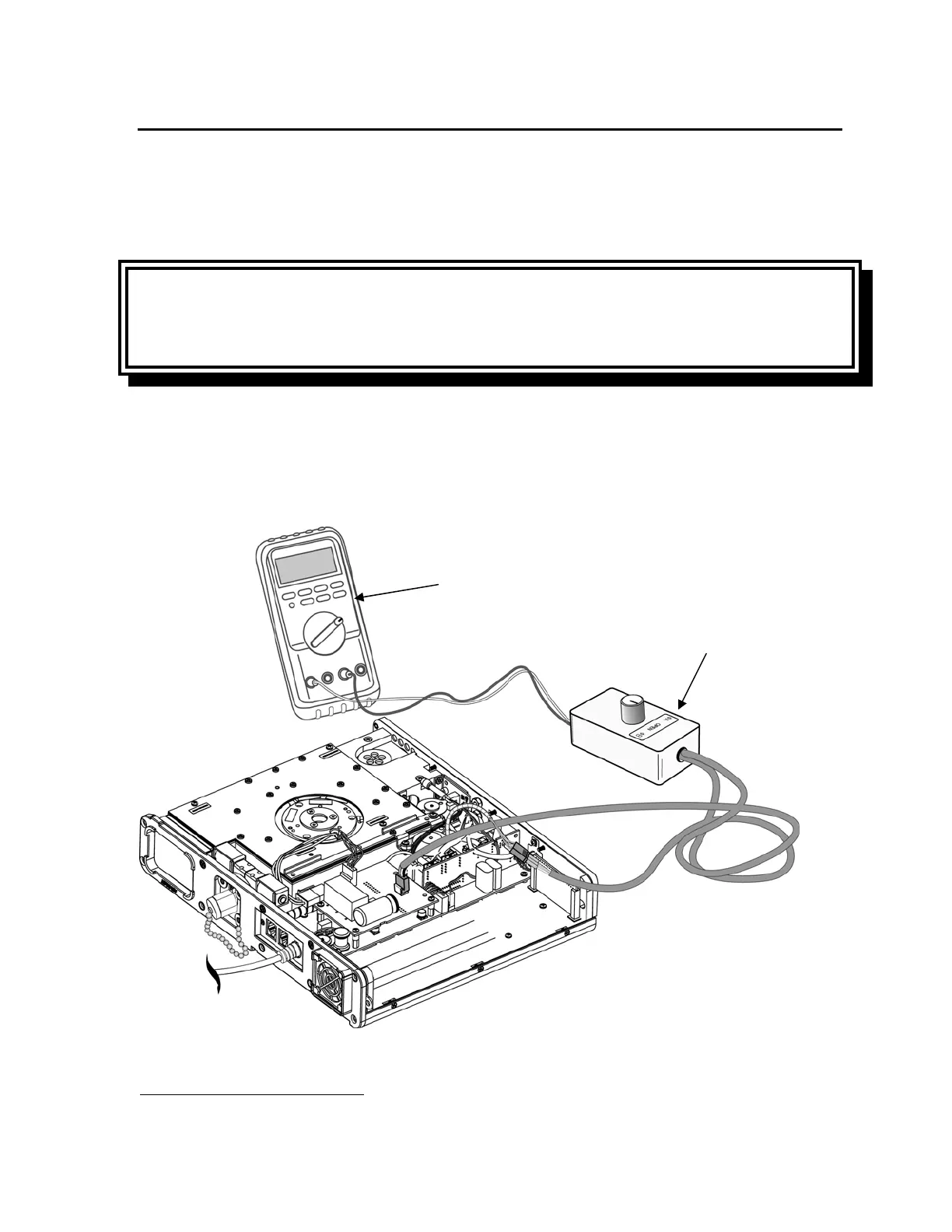
To perform the motor drive calibration, you will need the following equipment:
• Motor Drive calibration tool
16
, P/N 10871
• 10 amp 60 Hz amp meter set to measure between 400 and 700 ma.
To calibrate the motor drive:
CAUTION
Possible ventilator damage - To avoid damaging the ventilator, turn the ventilator off and
disconnect the AC adapter before attaching the calibration tool.
1) Turn the ventilator OFF and disconnect the AC adapter from the unit.
2) Disconnect the 4-wire flow valve cable from J4 on the motor board and connect it to the
male 4-wire connector on the calibration tool. Connect the female 4-wire connector from
the calibration tool to J4 on the motor board. Connect the calibration tool to the
ammeter. Turn the calibration tool to Open.
16
The Motor Drive Calibration tool or Stepper Motor Calibrator is available separately, or as part of the
Maintenance Calibration Kit, P/N 11566.
Ammeter
Motor Drive
Calibration Tool



 To Next Page