Page 8-28 LTV
®
1200/1150 Ventilator Service Manual p/n 18603-001, Rev. C
Back Panel
Back Panel, Removal
1) If installed, remove the LTV
®
protective boots (see instructions on page 8-5) and the
LTM/ LTV
®
mounting bracket (see instructions on page 8-23).
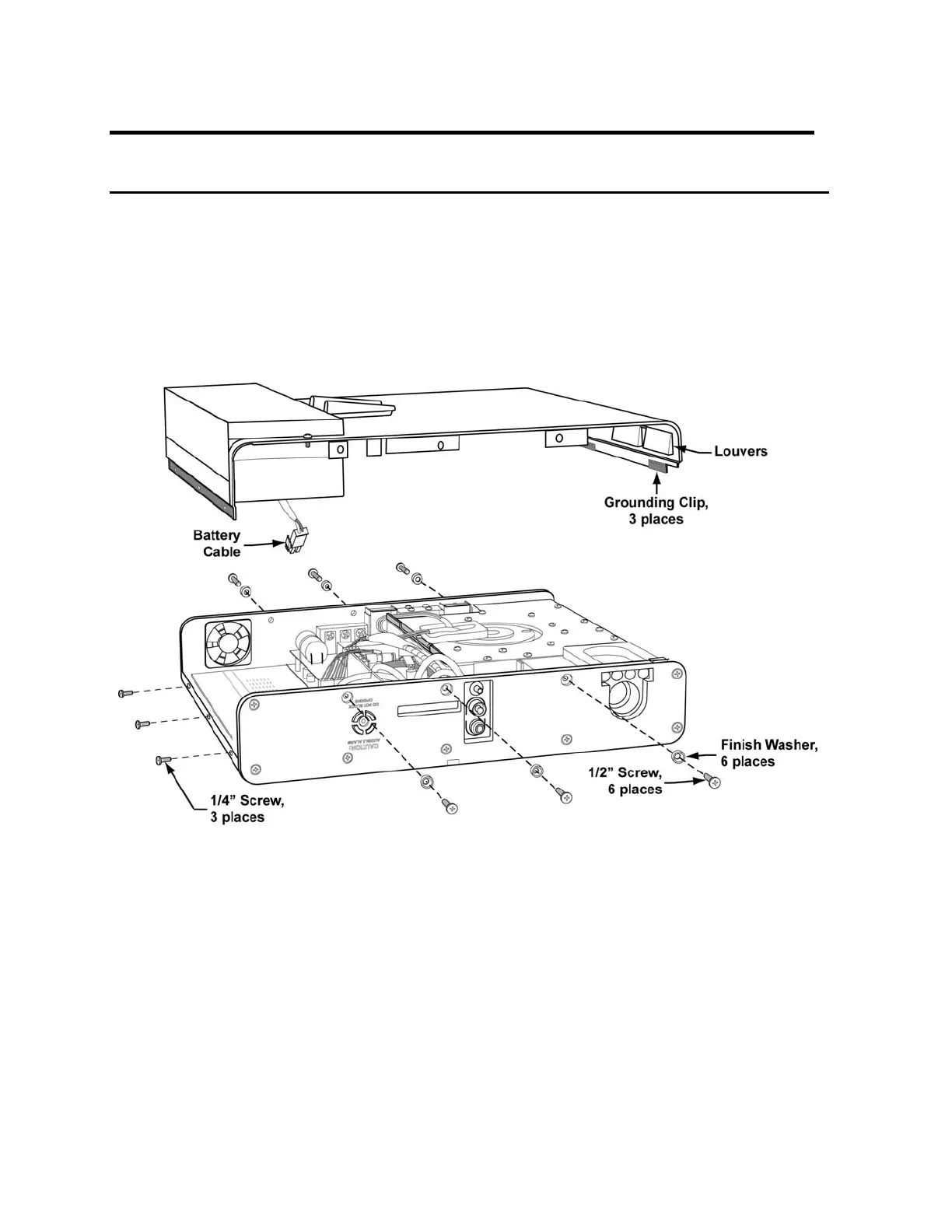
2) Turn the ventilator face down. Remove the 6 flat-head screws and gray finish washers
from the right and left sides of the ventilator as shown (3 from each side).
3) Remove the 3 flat-head screws from the top of the ventilator as shown.
4) Lift the back panel off by separating the back panel at the top edge, pulling up gently and
sliding the bottom edge out from under the connecting upper-Weldment edge at the
bottom of the case. Remove the back panel carefully so the long tab extending to the
oxygen blender is not bent or damaged.
5) Turn the back panel on edge and set it beside the ventilator (the battery cable
connecting the back to the power board is still attached.)
6) To completely free the back panel, disconnect the internal battery cable from the power
board.



 To Next Page