Top climate system
with LUBING Touch Controller
Copyright © Lubing System - All rights reserved
31
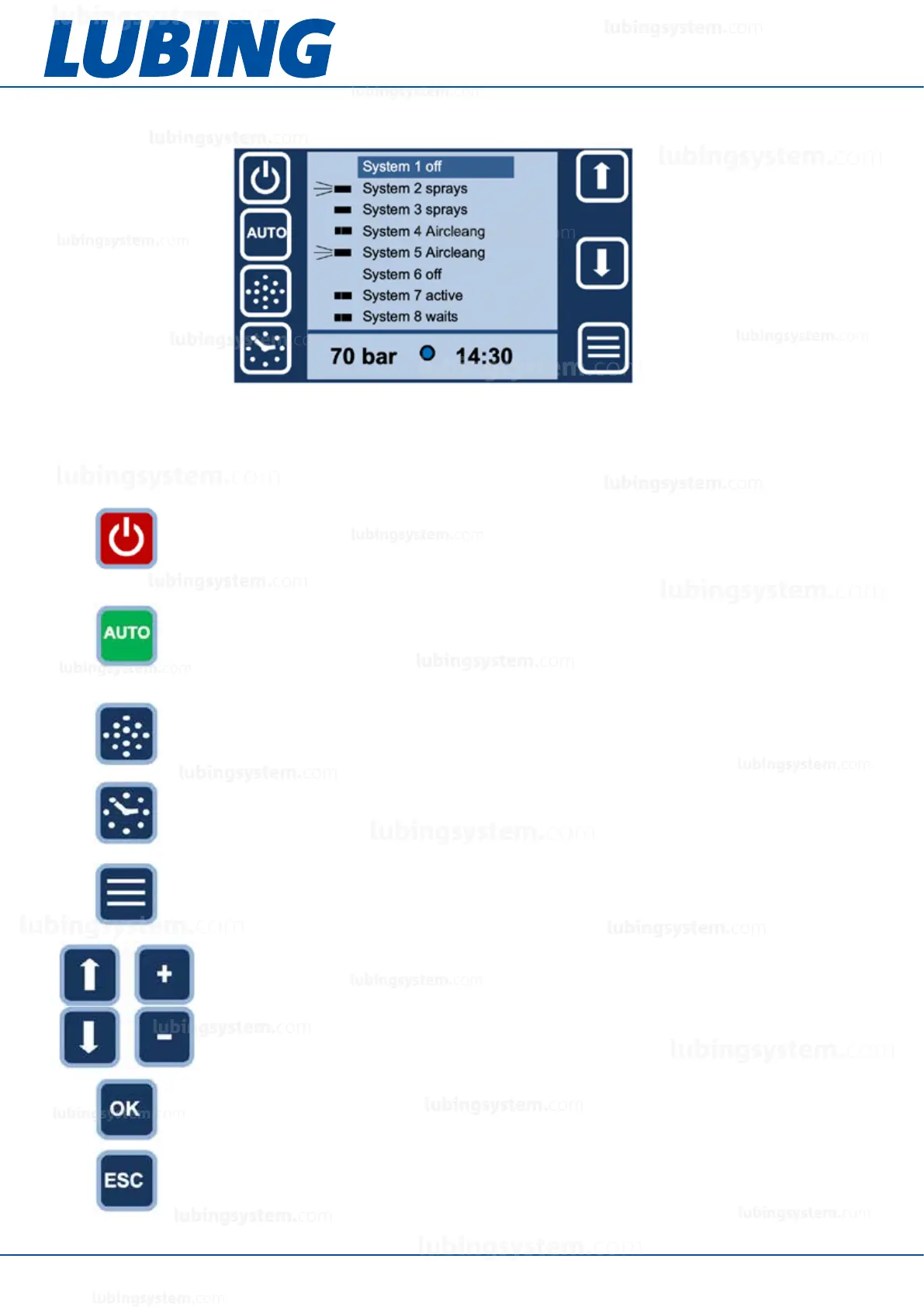
5.7.1.2 Examples standard screen: LCM vario
The various functions of the system can be switched on or off using the function keys. They apply to the area/
section shown active on the display.
Note: if a function key is pressed for approx. 5 seconds, the set values of this function appear in the display. They
can then be set with the +/- buttons and conrmed with the OK button.
On/off key
Hand/auto key
Daily timer
Selection-key up
Selection-key down
Air-cleaning key
Options key
Press the ON/OFF button to switch the system on or off. (red = ON)
Note: This button has no emergency stop function! The emergency stop switch is
mounted directly on the pump unit.
The AIR-CLEANING key turns the dust binding mode on or off. When the function is
switched on (green), the system runs at the previously set dust binding interval, but only if
it is otherwise not activated in auto mode.
The daily timer can be switched on or off with the DAILY TIMER key. When the function
is switched on (green), the system is only active during the set operating time. It can be
switched off automatically with this function, e.g. at night.
Press the OK key to conrm a selection or a value change. Only after this conrmation the
change is made.
The ESC key is used to jump back in the menu or to cancel an operation.
Press the OPTION key to enter the menu.
The AUTO key is used to switch between manual and automatic mode (green = auto
mode). In manual mode, the system runs continuously in the set intervall, in automatic
mode it runs parameter-controlled, either via the connected sensors or via the external
climate computer. The potential-free contact of the air-conditioning computer must be
closed for the system to cool. If the potential-free contact is open, “System ready” appears
in the status display.
Use the arrow keys to select individual menu items or areas. After selecting a change
function (EDIT), the +/- keys are displayed. These can be used to change values.
lubingsystem.com
lubingsystem.com
lubingsystem.com
lubingsystem.com
lubingsystem.com
lubingsystem.com
lubingsystem.com
lubingsystem.com
lubingsystem.com
lubingsystem.com
lubingsystem.com
lubingsystem.com
lubingsystem.com
lubingsystem.com
lubingsystem.com
lubingsystem.com
lubingsystem.com
lubingsystem.com
lubingsystem.com
lubingsystem.com
c
lubingsystem.com
lubingsystem.com


 To Next Page