31
PoE
PoE (Power over Ethernet) is a convenient way to transport both data and power over the same network cable, and thus
powering a device with its data cable. Your GigaCore switch can then be a data connection box and power source for
your end devices.
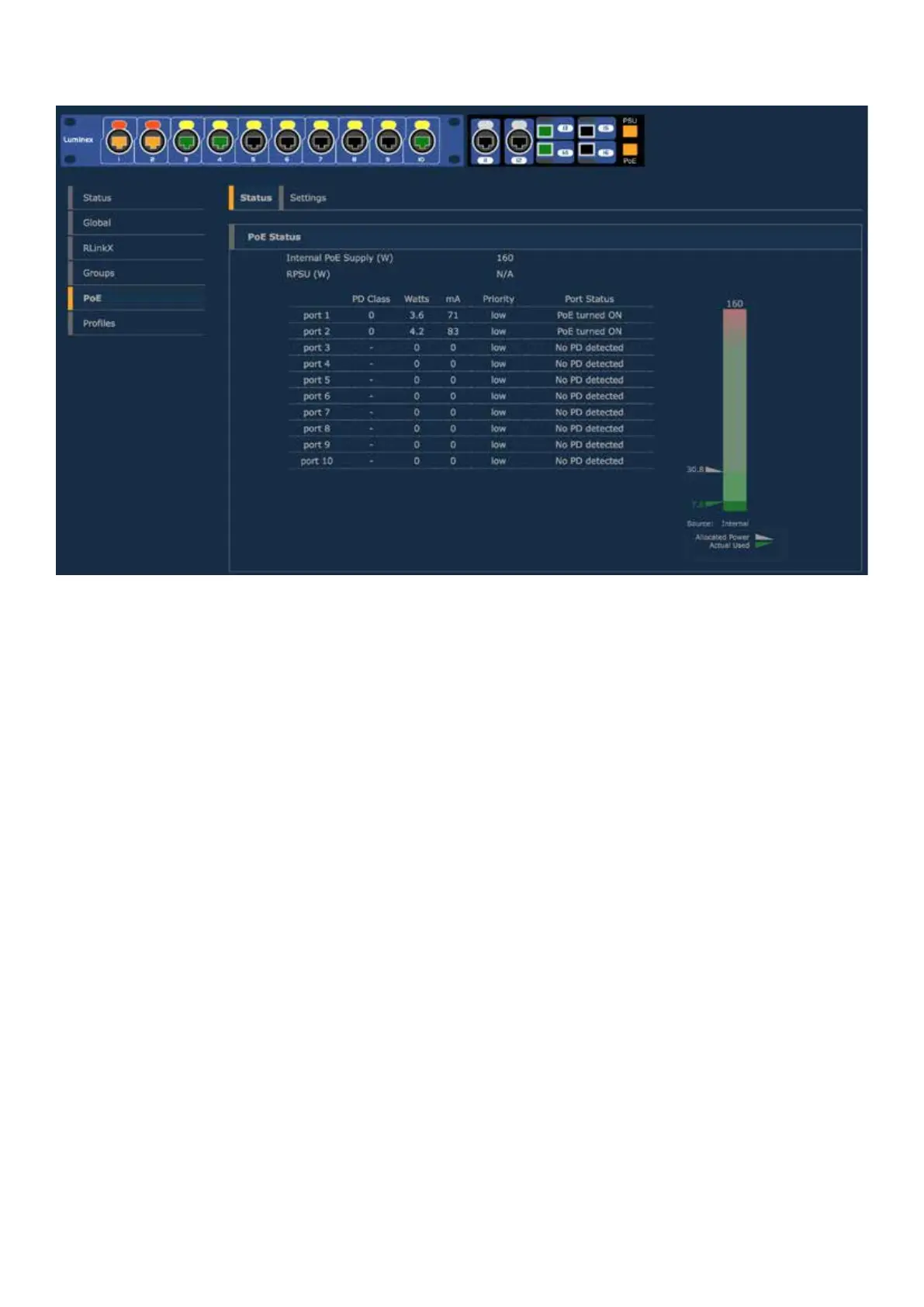
PoE supply will provide PoE enabled port as a default conguration (see illustration above).
A PoE enable port is displayed with a yellow latch above. When the switch is currently sourcing a PoE device through a
port, the latch will turn orange, as the port’s PoE LED on the front.
The PoE status page will oer the following info per port :
■ The Powered Device Class (0,1,2...)
■ The power consumption (Watts)
■ The current consumption (mA)
■ The priority (low, high, critical)
■ The port status
On the right hand side of the page, a bargraph is here to display the current power consumption of the switch. The
switch can deliver a total of 160W to share on the ten front ports, with a maximum of 30W per port (PoE+ compliant).
Two arrows will indicate the following values :
- Allocated power: based on the classes of the connected PoE devices, the switch will allocate the necessary power to
the PoE supply. This value is represented with a gray index.
- Actual usage: A green index will show the current power delivered by the PoE supply.


 To Next Page
 Loading...