262
XMS-1024P
a: 14203 Minuteman Drive, Suite 201, Draper, UT 84020-1685 | luxul.com | 801-822-5450
LUX-UG-XMS-1024P Vers: 081314
15.1.3 NDP Confi g
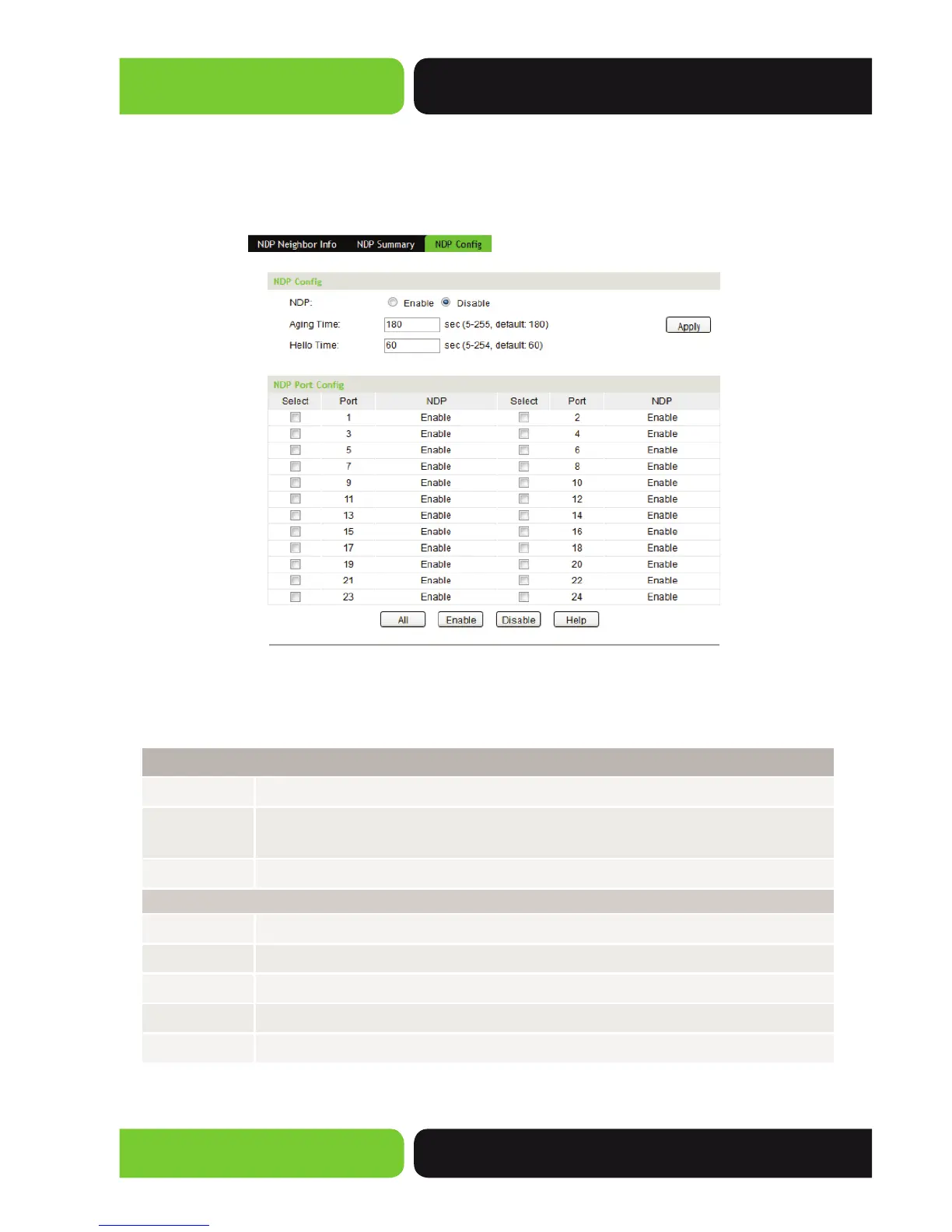
On this page you can confi gure the NDP functions of the Switch.
Choose the menu Cluster>>NDP>>NDP Confi g to load the following page:
Figure 15-4 NDP Confi g
The following entries are displayed on this screen:
NDP Confi g
NDP:
Select to Enable/Disable NDP function Globally.
Aging Time:
Enter the period of time the Neighbor Switch should keep the NDP packets
from this Switch.
Hello Time:
Enter the Interval used when sending NDP packets.
Port Confi g
Select:
Select the desired Port(s) to confi gure its NDP status.
Port:
Displays the Port Number of the Switch.
NDP:
Displays NDP Status of the current Port.
Enable:
Click the Enable button to enable NDP for the Port you select.
Disable:
Click the Disable button to disable NDP for the Port you select.


 To Next Page