LX 10k
Basic operation
Document name: LX 10KUM
Document revision: R1
3.2 Device interface
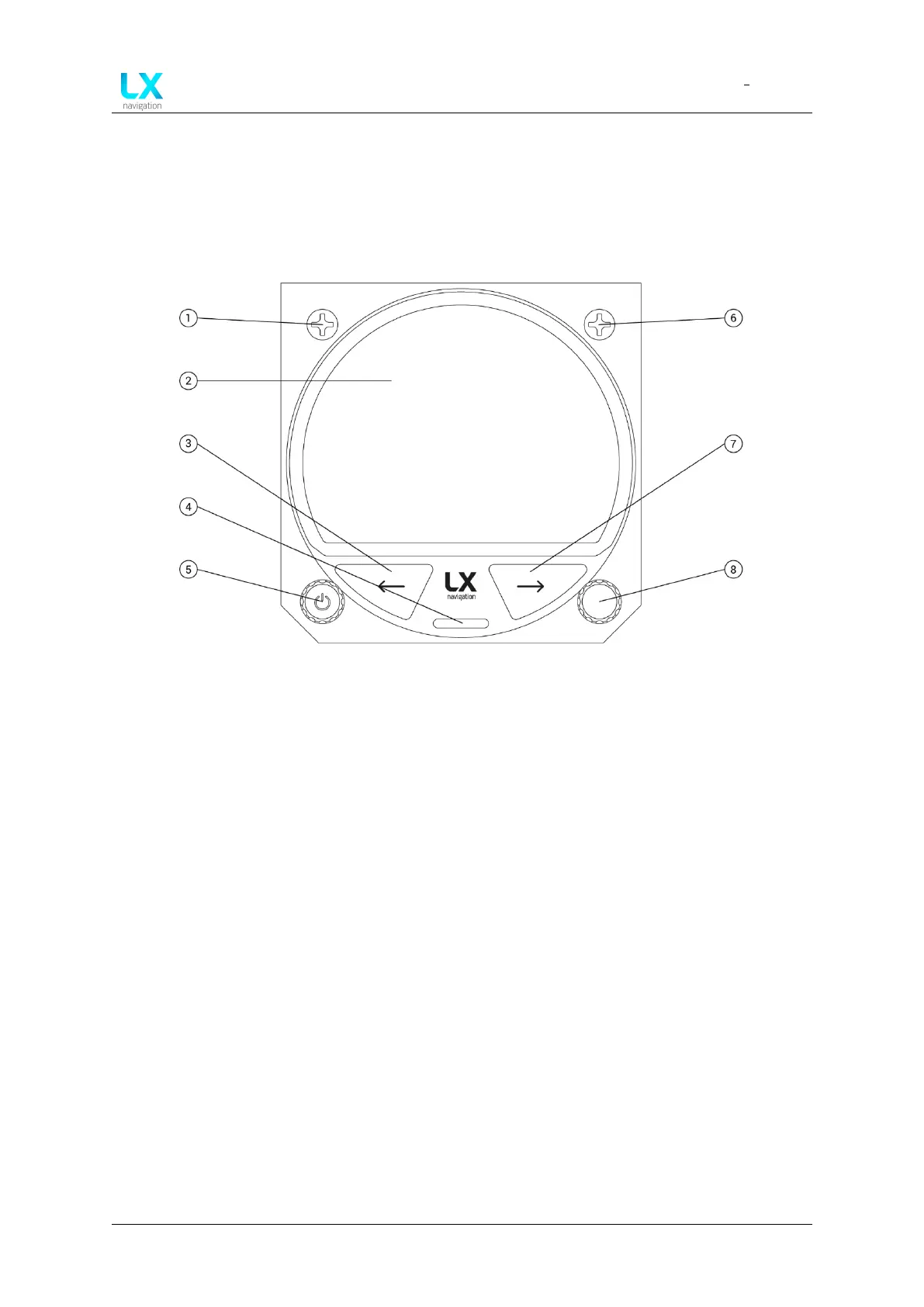
The LX 10k features two push buttons and two push-rotary knobs for pilot-device communi-
cation. The front side of the device, represented by figure 1, shows the LX 10k’s user input
interface.
Figure 1. LX 10k front plate interface
On the front plate, we can see the following items:
1. M4x6 Phillips head screw
2. LX 10k display
3. Left push button (BOX)
4. microSD card reader
5. Left push-rotary knob (ZOOM)
6. M4x6 Phillips head screw
7. Right push button (MC)
8. Right push-rotary knob (PAGES)
We will name the two main push buttons and two main push-rotary buttons by their function
(ZOOM, MC, BOX, PAGES). The push-rotary knob on the LX 10k indicator will be named by it’s
function - (VOL).
Device manual Public 14


 To Next Page