www.lynxspring.com
®
USER GUIDE
Lee’s Summit, MO 64086
sales@lynxspring.com
All Rights Reserved
Revised 2/1/2019
JENE-EG534-V2
Page 13 of 31
2.
Config properties
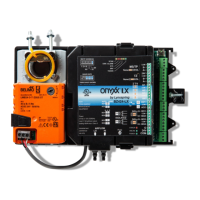
In addition to common device-level status properties, an Onyxx Device has the following additional properties.
• Device Path – Set automatically if the device was discovered and added; a sub-portion of the full directory path
• Led Firmware Version – Displays the current firmware version of the chip that controls the LED board
• Analog Ouput Firmware Version – Displays the current firmware version of the chip that controls the AO Ports
• Digital Output Firmware Version – Displays the current firmware version of the chip that controls the DO ports
• Univesal Input Firmware Version_Lower Ports – Displays the current firmware version of the chip that controls
the UI 1-8 ports
• Universal Input Firmware Version_Upper Ports – Displays the current firmware version of the chip that controls
the UI 9-16 ports
Onyxx Point Manager
As the default view for the Points extension under an Onyxx Device, the onyxxDriver Point Manager allows available I/O
terminal “points” to be discovered and add corresponding Onyxx Proxy points added to the station database.
Figure 3-7 Adding Onyxx Proxy points discovered using Onyxx Driver Point Manager
A Proxy point is added for each discovered I/O terminal. For more details, see “Onyxx Board Manager Usage notes” on
page 11. For procedures, see “Add Onyxx Proxy points” on page 6.


 To Next Page
 Loading...