IMPULSE•T Instruction Manual – October 2015
4-5
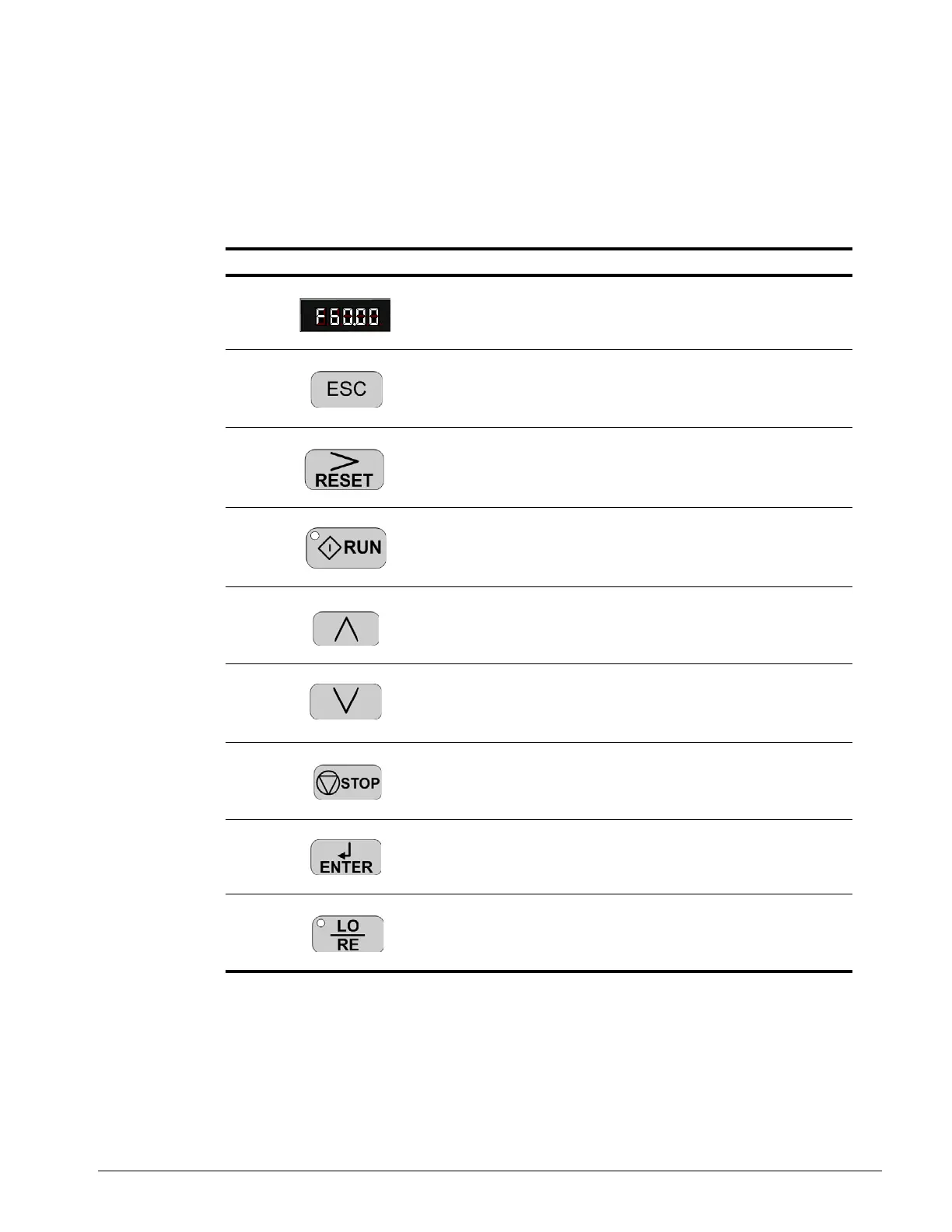
Keypad LED and Button Functions
Some of the keypad buttons, whose functions are described below, are dual-purpose. The dual-
purpose keys have one function when used in a view-only mode, and another function when used in
a programming mode.
Table 4-1: Keys and Displays on the LED Operator
No. Display Name Function
1 Data Display Area Displays the frequency reference, parameter
number, etc.
2 ESC Key Returns to the previous menu (before ENTER
Key is pressed), or cursor position
3 RESET Key Moves the cursor to the right.
Resets the drive to clear a fault situation.
4 RUN Key Pressing the key initiates the RUN command
when LOCAL mode operation is selected.
Starts the auto-tuning process.
5 Up Arrow Key Scrolls up to select next parameter group or
parameter settings. It also increases the value
of the blinking digit of a parameter setting.
6 Down Arrow Key Scrolls down to select next parameter group or
parameter settings. It also decreases the value
of the blinking digit of a parameter setting.
7 STOP Key Stops the drive by initiating a base block STOP
command.
NOTE: Stop priority circuit.
8 ENTER Key Selects modes or parameters. Displays each
parameter’s set value. By pressing this key
again, the set value is stored.
9 LO/RE Selection
Key
Selects local or remote operation.


 To Next Page
 Loading...