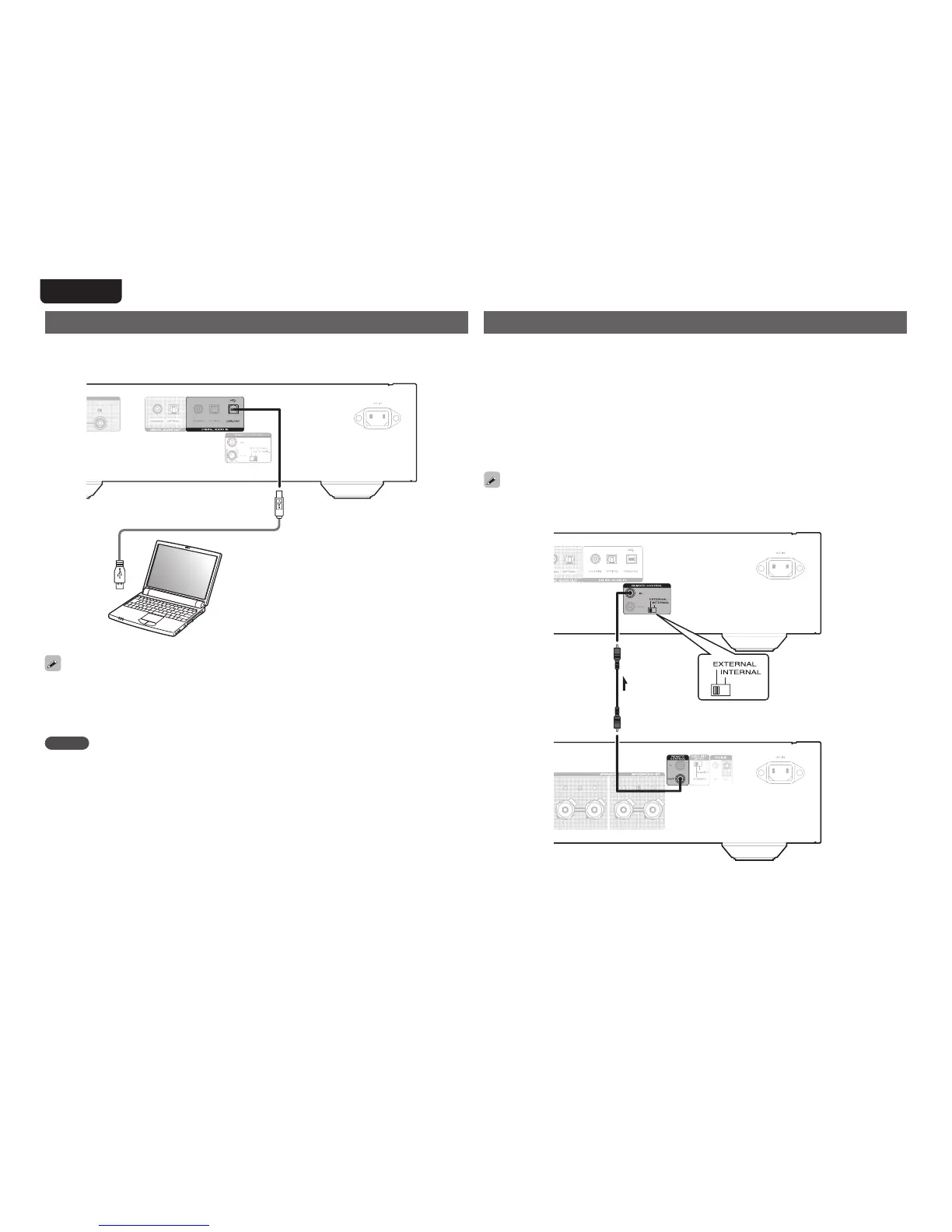
Remote control connection
WhenyouusethisunitconnectedtoaMarantzamplier,thisunitreceivesoperationsignals
sentfromtheamplierandoperatesaccordingly.
n Connection
UsethesuppliedremoteconnectioncabletoconnecttheREMOTECONTROLINconnector
ofthisunittoREMOTECONTROLOUTconnectoroftheamplier.
n Setting
Settheremotecontrolswitchontherear panelofthisunitto“EXTERNAL”tousethis
feature.
•Thissettingwilldisableremotesensorreceptionofthisunit.
•Tooperatetheunit,pointtheremotecontrolattheremotesensoroftheamplier.
To use this unit without connecting it to the amplier, set the remote control switch to
“INTERNAL”.
Signalow
Amplifier
Remoteconnectorcable
(supplied)
Setto“EXTERNAL”.
This unit
Connecting a PC or Mac
ByconnectingacomputertotheUSBportontherearpanelofthisunitusingacommercially
availableUSB connecting cable, this unit can beusedasaD/Aconverter “Using as a D/A
converter”(vpage20).
TypeB
Computeronwhichthe
driversoftwareandaudio
playersoftwareareinstalled
TypeA
•Install the dedicated driver softwareon the computer toenable communication between
thecomputerandthisunitinordertoplaybackhigh-resolutionsoundsource(DSDsignalor
192kHz/24bitPCMsignal)audio availableontheinternet“Installingthededicated driver
(WindowsOSonly)”(vpage20).
•DownloadthedriversoftwarefromtheSA-14S1pageoftheMarantzwebsite.
NOTE
•Useacablethatis3morlesstoconnecttothecomputer.



 To Next Page