•Only music les that are not copyright-protected can be
playedonthisset.
•Contents downloaded from pay sites on the Internet are
copyright protected. Also, les encoded in WMA format
whenrippedfromaCD,etc.,onacomputermaybecopyright
protected,dependingonthecomputer’ssettings.
•WhenaudiofromlesintheUSBmemorydeviceisoutput
from the digital audio output connector, the sampling
frequencyisconvertedto44.1kHzforoutput.
NOTE
•It is not compatible with an MP3 player, digital camera, a
USBmemorydeviceforamobilephone,etc.
•TheunitcannotchargeaUSBmemorydevice.
Playback order of files
(DATA CD / USB memory device)
When there are multiple folders containing music les, the
playbackorderoffolders isautomaticallyset whenthisunit
readsthemedia.Thelesineachfolderareplayedbackinthe
orderinwhichtheleswererecordedonthemedia,fromthe
oldestdateandtime.
CD-R/CD-RW
ForplaybackoflesonCD-RorCD-RW,lesinallfolderson
therstlayerareplayedrst,nextonthesecondlayer,then
nextonthethirdlayer,andsooninthisorder.
USB memory device
ForplaybackoflesrecordedonUSBmemorydevice,lesin
therstfolderontherstlayerareplayedrst,nextfolders
onthesecondlayerinthefolder,thennextonthethirdlayer,
andsooninthisorder.Thenaccordinglylesonanotherrst
layerareplayed.
Playable media
•Theplaybackorder displayed on a PC may dier from the
actualplaybackorder.
•TheplaybackorderwithaCD-R/CD-RWmaydier,depending
onthewritingsoftware.
NOTE
The playback order may dier from the order in which the
folders or les were recorded if you delete or add a folder
orleonUSBmemorydevice.Thisoccursbecause ofdata
recordingspecicationsandisnotamalfunction.
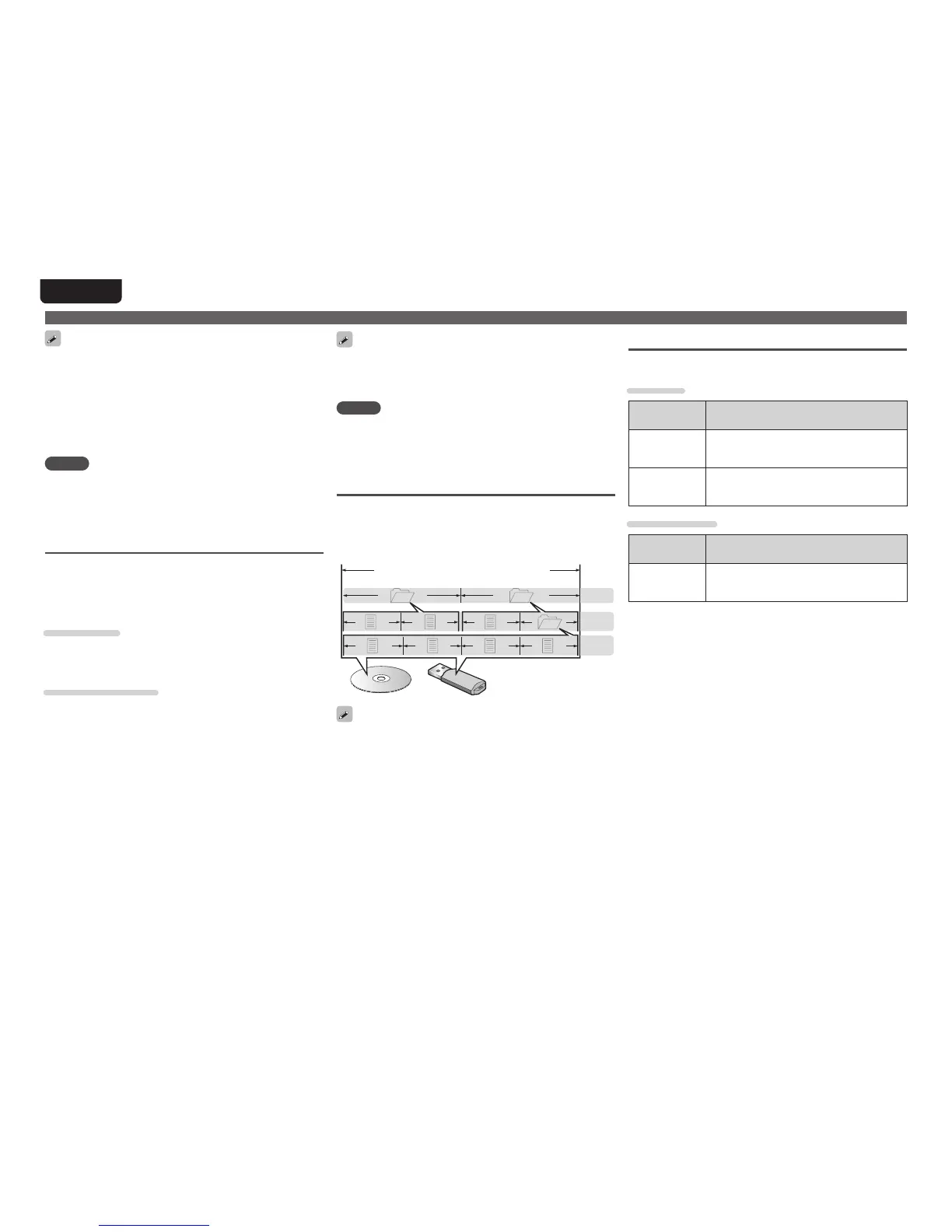
About Folders and Files
Files, such as MP3/WMA etc., recorded on CD-R/-RW and
USBmemorydevicearedividedintolargesegments(folders)
and small segments (les). Files are stored in folders, and
folderscanbeplacedforstorageinahierarchy.Theunitcan
recognizeupto8levelsoffolders.
Folder 2Folder 1
File1
File4 File5 File6 File7
1stlevel
2ndlevel
3rdlevel
File2 File3 Folder 3
CD-R/-RW or USB memory device
Whenwriting MP3/WMAetc.lesonaCD-R/-RWdisc,set
thewritingsoftware’sformatto“ISO9660”.Thelesmaynot
playproperlyiftheyarerecordedinotherformats.Fordetails,
refertotheinstructionsofyourwritingsoftware.
D/A converter
n Supported audio formats
USB-DAC
Signal format Specification
DSD
(2-channel)
•Samplingfrequency:
2.8224MHz
•Bitlength:1bit
LinearPCM
(2-channel)
•Samplingfrequency:
32/44.1/48/88.2/96/176.4/192kHz
•Bitlength:16/24bit
Coaxial/Optical
Signal format Specification
LinearPCM
(2-channel)
•Samplingfrequency:
32/44.1/48/64/88.2/96/176.4/192kHz
•Bitlength:16/24bit



 To Next Page