Using as a D/A converter
Digitalaudiosignalsinputfromanexternaldeviceorcomputer
intothisunitcanbe convertedandoutputasanalogsignals
usingthisunit(D/Aconverter).
•DSDisaregisteredtrademark.
•Microsoft,WindowsXP,WindowsVista,Windows7and
Windows8areeitherregisteredtrademarksortrademarks
ofMicrosoftCorporationintheUnitedStatesand/orother
countries.
•Apple,Macintosh and Mac OS are trademarks of Apple
Inc.,registeredintheU.S.andothercountries.
Connecting and playing back from a
computer (USB-DAC)
•You can enjoy high-quality audio playback from this unit's
D/AconverterbyinputtingPCMsignalorDSDsignalmusic
lesintothisunitfromacomputerviaUSBconnection.
•In order to use USB-DAC playback, install the dedicated
driverontoyourcomputertoenableyourcomputerandthis
unittocommunicate.
•DriversdonotneedtobeinstalledforMacOS.
•Also, you can use whichever commercially available or
downloadableplayer software youliketo playback leson
yourcomputer.
n Installing the dedicated driver
(Windows OS only)
Installing the driver software
1
Disconnect the USB cable between your
computer and the unit.
•Thedriversoftwarecannotbeinstalledcorrectlyifyour
computerisconnectedtotheunitbyaUSBcable.
•If the unit and your computer are connected by a
USB cable and the computer is switched on before
installation, disconnect the USB and restart the
computer.
2
Download the dedicated driver from the
“Download” section of the SA-14S1 page of the
Marantz website onto your computer.
3
Unzip the downloaded file, select the 32-bit
or 64-bit exe file that matches your Windows
operating system, and double-click the file.
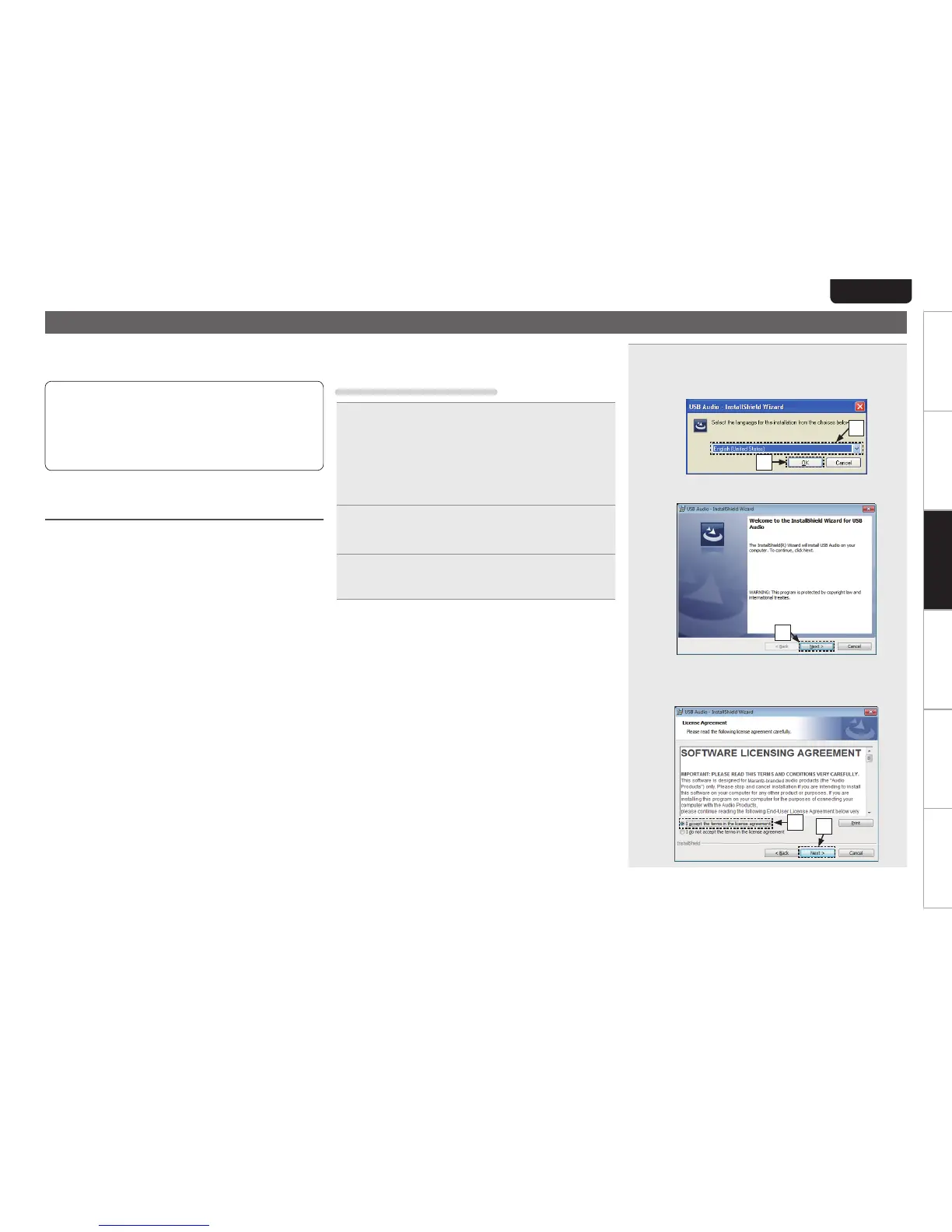
4
Install the driver.
q Select the language to use for the installation.
w Click “OK”.
q
w
e The wizard menu is displayed. Click “Next”.
e
r Read the Software Licensing Agreement, and click
“I accept the terms in the license agreement”.
t Click “Next”.
t
r



 To Next Page