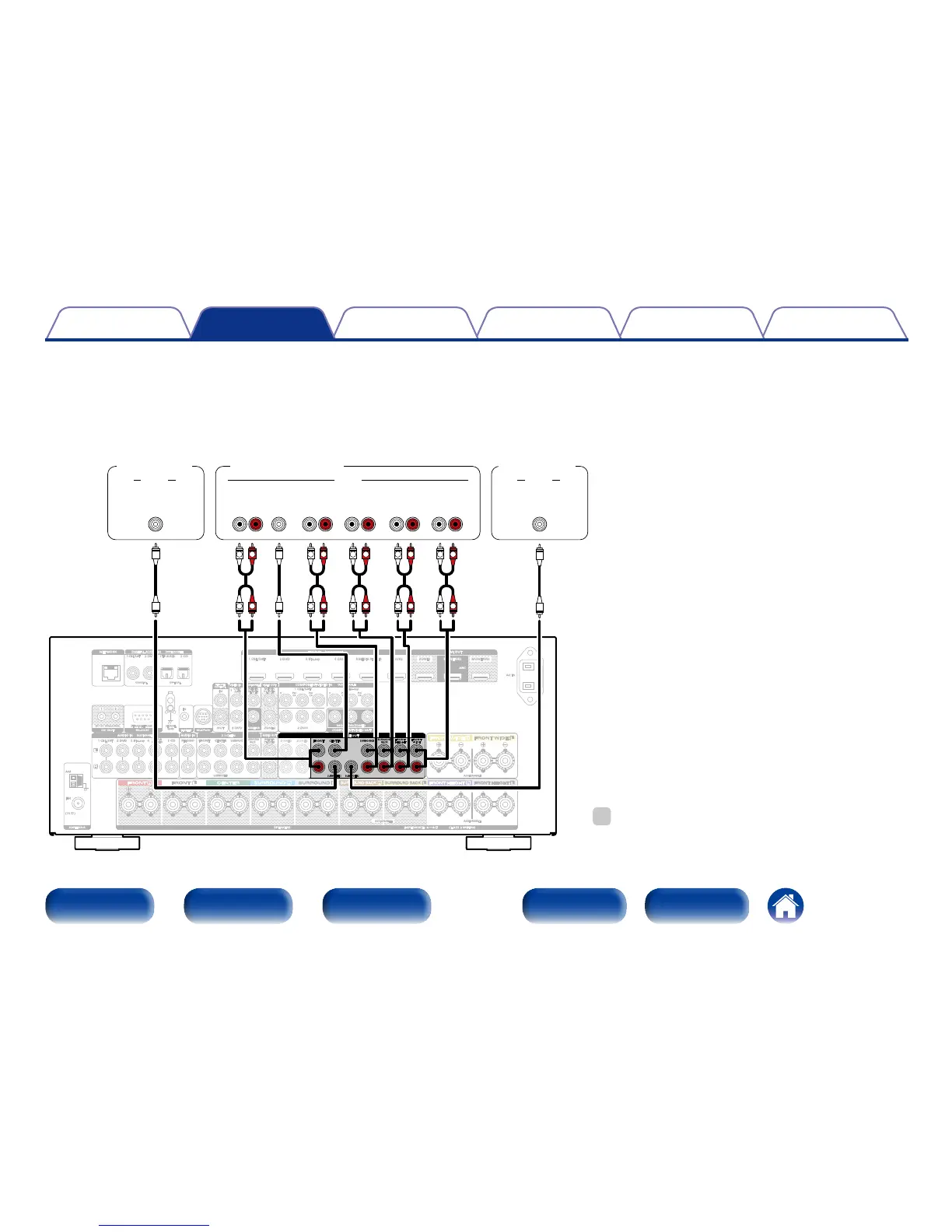
2 Connecting an external power amplifier
•You can use this unit as a pre-amp by connecting an external power amplifier to the PRE OUT connectors. Adding an external power amplifier with
a higher power output rating than this unit may be beneficial with loudspeakers that have lower eciency and/or lower impedances, or to reach
higher volume levels.
•Select the terminal to use and connect the device.
FRONT
SUBWOOFER
SURROUND
SURROUND
BACK
CENTER
1 CBL/SAT
2 DVD 3 Blu-ray
MEDIA
PLAYER
MEDIA
PLAYER
5 CD
4
PHONO
AM
(75Ω)
FM
1
CBL/SAT
2
DVD
1
TV AUDIO
2 CD
1 CBL/SAT 2 DVD 3 Blu-ray 4 GAME 5 MEDIA PLAYER 6 AUX2
SIGNAL
GND
STRAIGHT CABLE
DC12V 150mA MAX.
IN
P
R
/
C
R
P
B
/
C
B
Y
P
R
/
C
R
P
B
/
C
B
Y
CBL/
SAT
MEDIA
PLAYER
MEDIA
PLAYER
ZONE2
1 CBL/SAT
3 Blu-ray
2 DVD
1 3
IN
OUT
HDMI OUTNETWORK
RS-232CDC OUT
FLASHER
REMOTE
CONTROL
VIDEO OUT
COMPONENT VIDEO OUT
7.1CH IN
AUDIO OUT
M-XPort
ANTENNA
AC IN
DIGITAL AUDIO IN
(
ASSIGNABLE
)
COAXIAL OPTICAL
AUDIO IN
(
ASSIGNABLE
)
AUDIO IN
2 DVD
VIDEO IN
(
ASSIGNABLE
)
MONITOR
COMPONENT VIDEO IN
(
ASSIGNABLE
)
MONITOR/ZONE2
HDMI IN
(
ASSIGNABLE
)
CLASS 2 WIRINGSPEAKERS IMPEDANCE : 6~8Ω
ZONE2 MONITOR2
1
2
ASSIGNABLE ASSIGNABLE
ASSIGNABLE
ARC
MONITOR1
FRONT
SURROUND
FRONT
HEIGHT
FRONT
WIDE
SURROUND
BACK
CENTER
ZONE2 ZONE3
PRE OUT
SUBWOOFER1
SUBWOOFER2
L
L
L
L
L
L
R R R
RR R
L
L
L
L
R R
R R
CENTER SURROUND
BACK
RL
SURROUND
RL
FRONT
RL
AUDIO
SUB-
WOOFER
2
AUDIO
SUB-
WOOFER
1
AUDIO
FRONT
WIDE
RL
FRONT
HEIGHT
RL
Subwoofer
(Primary)
Power amplifier
Subwoofer
(Secondary)
%
•When using just one surround back speaker, connect it to the
left channel (L) terminal.



 To Next Page