EasyManua.ls Logo

Martin P3-100 System Controller - Page 10

Martin P3-100 System Controller
60 pages
Print Icon
To Next Page IconTo Next Page
To Previous Page IconTo Previous Page
Loading...
10 P3-100 user manual
System layout
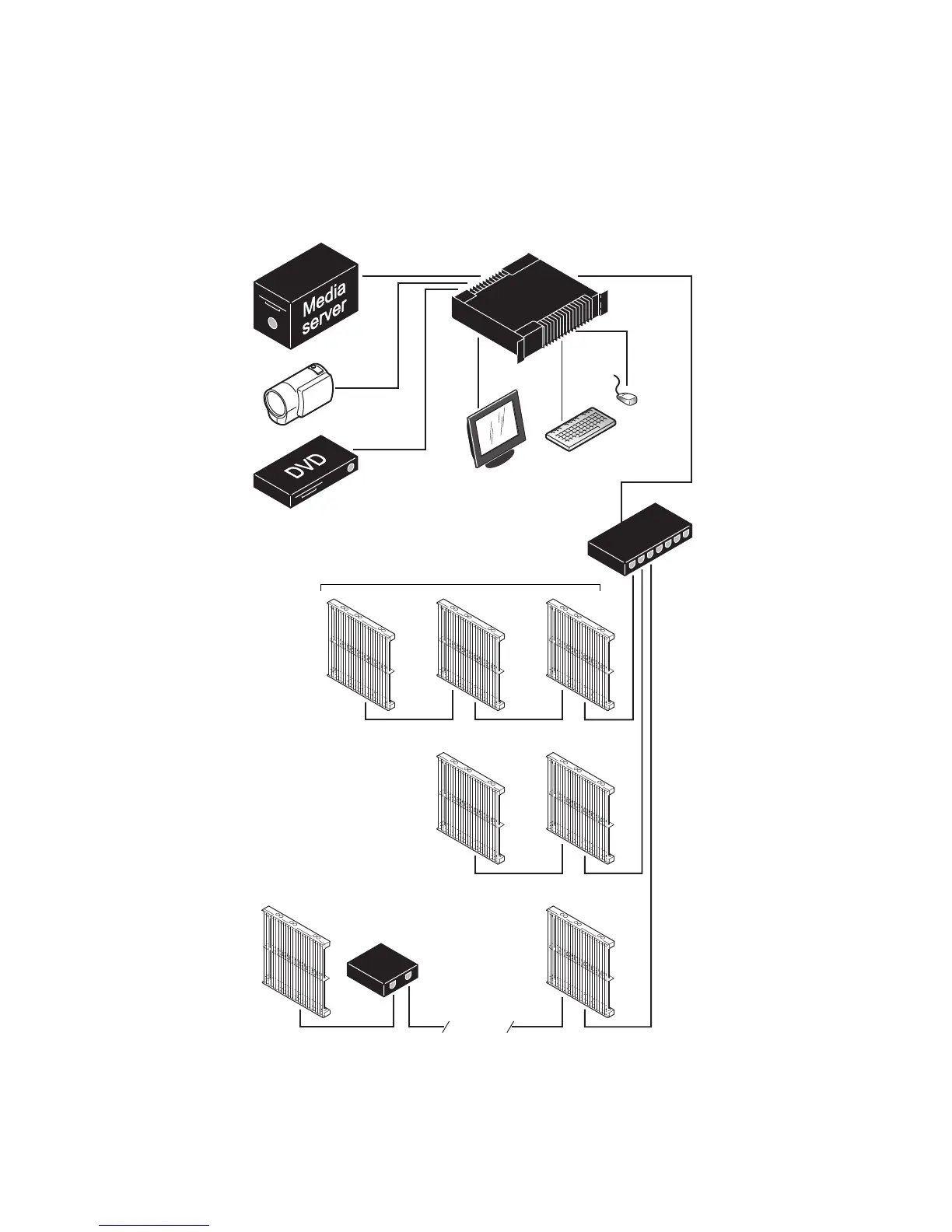
Figure 3 is given for reference only and shows how an entire system consisting of a P3-100 System
Controller and LC Plus panels should be laid out and connected. For full details of panel installation –
including important safety information – refer to the user documentation supplied with panels and available for
download free of charge from www.martin.com
Figure 3: System layout
DVI
DVI-D
Analog
video
Monitor
Mouse
Keyboard
P3-100 Controller
P3 signal
1GB Ethernet
switch required
1GB Ethernet
switch required
100 m
Max. 50 panels per daisy-chain
if installation
exceeds 50 panels
if cable length
exceeds 100 m
cable

Related product manuals