Operation 41
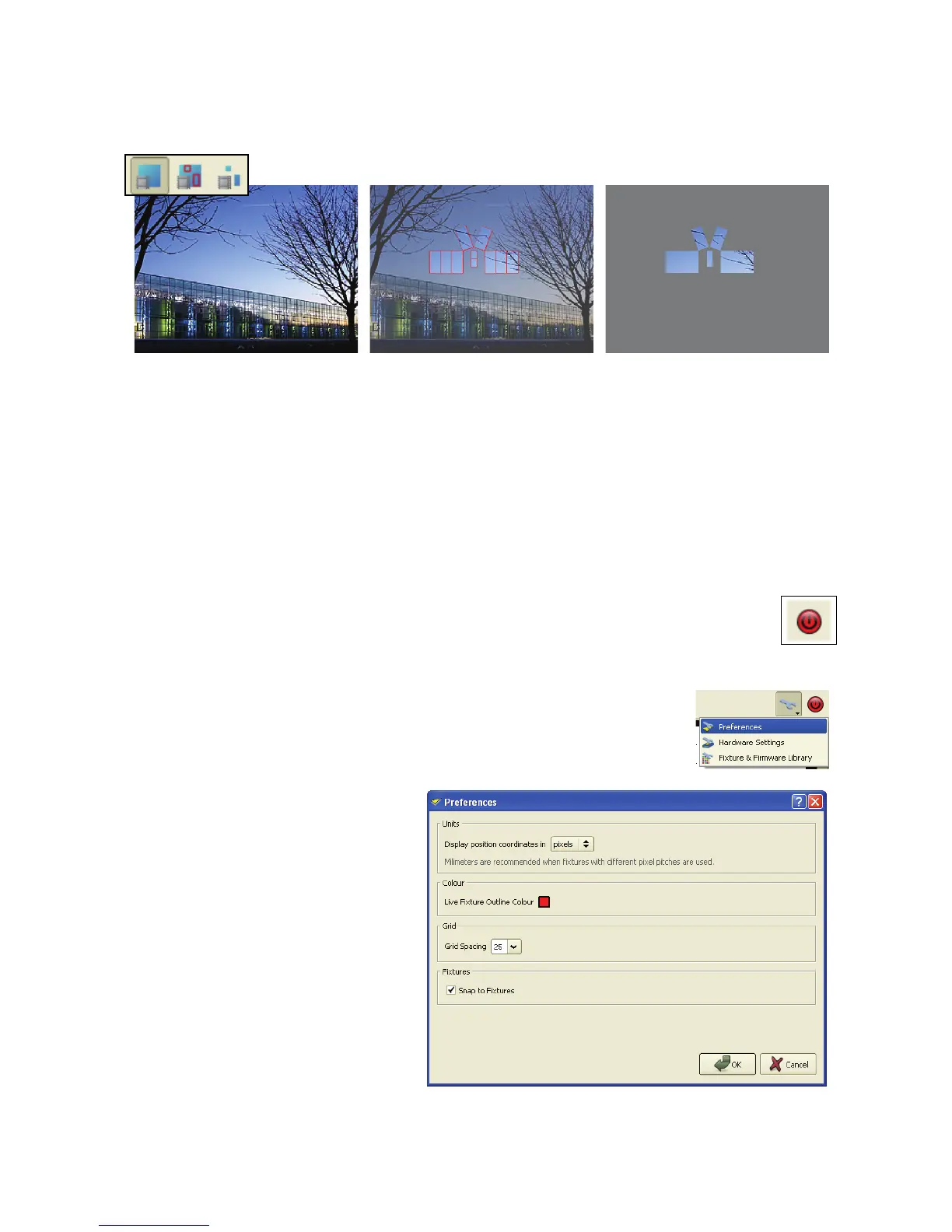
- Whole video frame view
- Video frame with panels overlaid
- Only the part of the frame displayed on your panels.
4. The preset pane in the Live view only allows you to recall video presets. Presets cannot be altered, which
makes this view the ideal ‘show-safe’ environment.
Shutting down the system
To shut down the P3-100 System Controller safely:
1. Use Save Copy in the File window to create any backups you might want to store on the USB memory
device.
2. Click on the Shutdown button at the top right of the screen. When the P3-100 displays a
message telling you that it is safe to shut down the system, cut power to the P3-100.
Preferences
The Preferences options are accessed by clicking on the Tools button (the
wrench or spanner next to the Shutdown button) and selecting Preferences from
the drop-down menu.
The Preferences options consist
of:
Units: where you choose the
units used to display panel
co-ordinates.
Color: where you choose the
color applied to live panels in the
Setup view.
Grid: the spacing of the grid on
the canvas (you can only choose
a grid spacing that is relevant for
your panels).
Fixtures: ‘Snap to Fixture’
enables/disables panels snapping
towards each other if they are
placed close to each other on the
canvas.
Figure 40: Video view mode options













 To Next Page