Status indicators and front panel 7
Status indicators and front panel
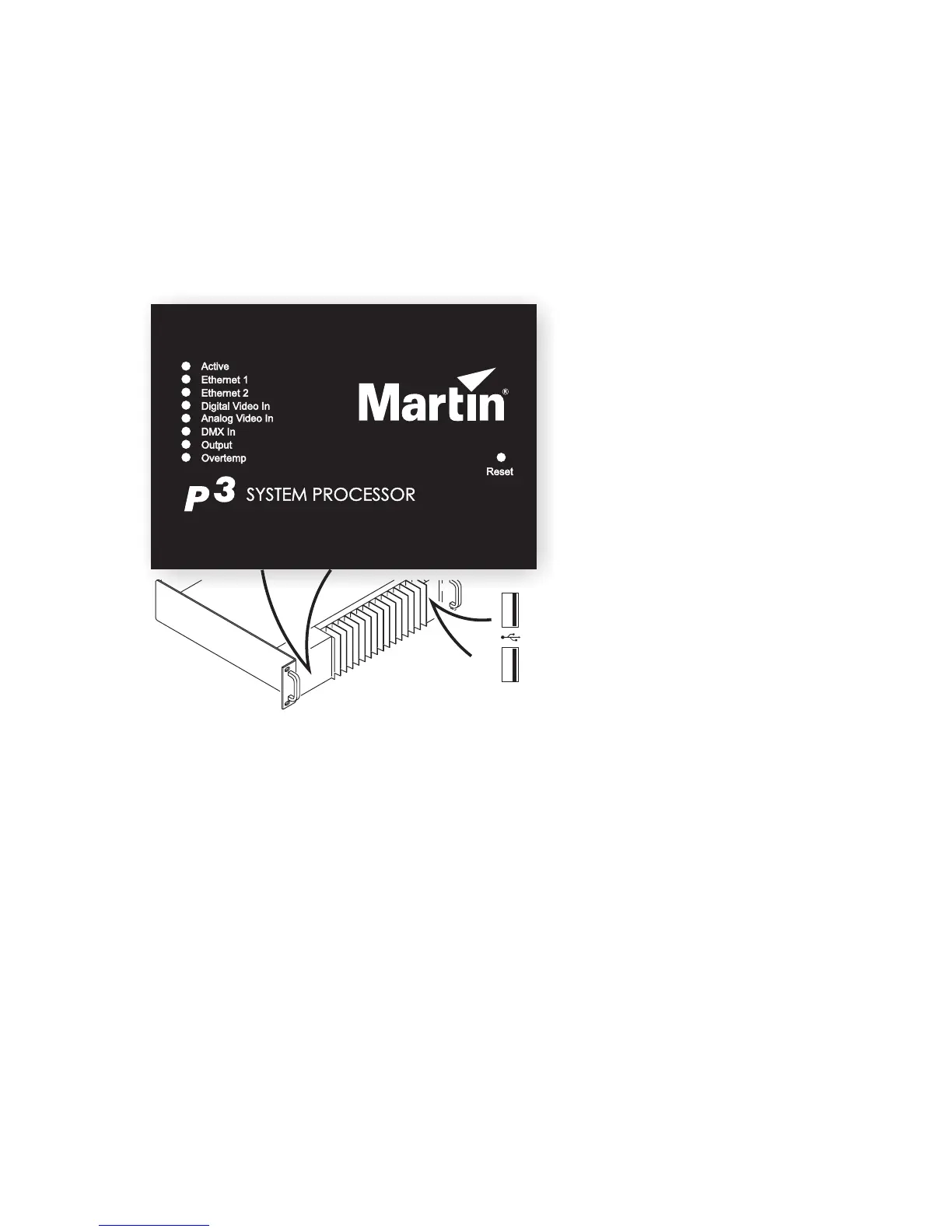
See Figure 1. The LED status indicators and Reset button on the P3-100 front panel have the following
functions:
Active flashes during startup and
lights continuously during operation.
Ethernet 1 and Ethernet 2 light when
there is activity on these connectors on
the rear panel.
Digital Video In and Analog Video In
indicate the currently selected video
signal.
DMX In lights when a valid DMX signal
is present at the DMX Input connector
on the rear panel.
Output lights when the P3-100 is
sending a P3 data signal.
Overtemp lights if the P3-100 has
exceeded its maximum safe operating
temperature. A thermal protection
circuit throttles down the processor if
this happens.
Reset lets you carry out a forced reset
(if the P3-100 application freezes and
you cannot reboot the processor
normally, for example). Use the tip of a
ballpoint pen to push the reset button.
The P3-100 constantly stores data in
its onboard flash memory, so you are
unlikely to lose data if the application
fails.
The two USB ports on the front panel can be used for any USB peripheral including the keyboard and mouse,
but are most conveniently placed for portable memory devices. The keyboard and mouse can be connected
to the two USB ports on the rear connections panel.
Figure 1: Status indicator panel and USB ports













 To Next Page