28 P3-100 user manual
3. Setting up video display
The P3-100 accepts digital (DVD-D) video at up to 1280 x 1024 resolution as well as analog composite,
S-video and component video using PAL, NTSC and SECAM systems.
To use the largest DVI-D resolutions, you may need to either crop the input using the Video Viewport
settings or scale the input using the Video Scaling feature. The maximum reduction factor for video scaling is
8, so you can shrink the video image to one eighth of the original resolution.
Video Input view
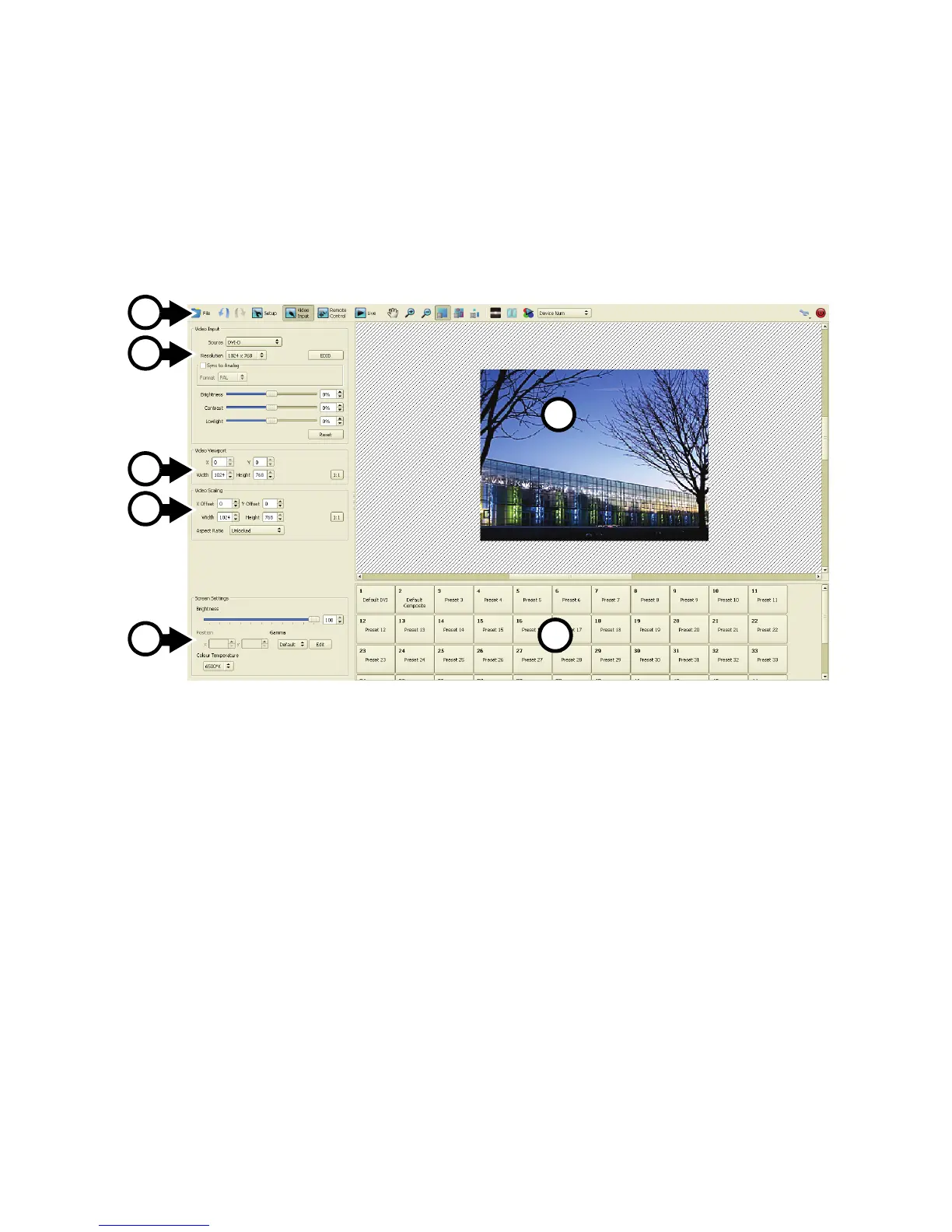
The Video Input view is divided into the following areas:
A - Toolbar: Contains some extra buttons that are specific to video input.
B - Video Input: Where you select the video source and settings like resolution, contrast, EDID, etc.
C - Video Viewport: Where you cut/crop captured video to your area of interest.
D - Video Scaling: Where you can scale captured video.
E - Screen Settings: Global screen settings that affect all fixtures (brightness, position, gamma & color
temperature).
F - Canvas: Where you can preview captured video.
G - Preset Pane: Where you can store / recall video presets that contain a full set of video configuration
parameters.
Figure 24: Areas in Video Input view
A
B
C
D
E
F
G













 To Next Page