34 P3-100 user manual
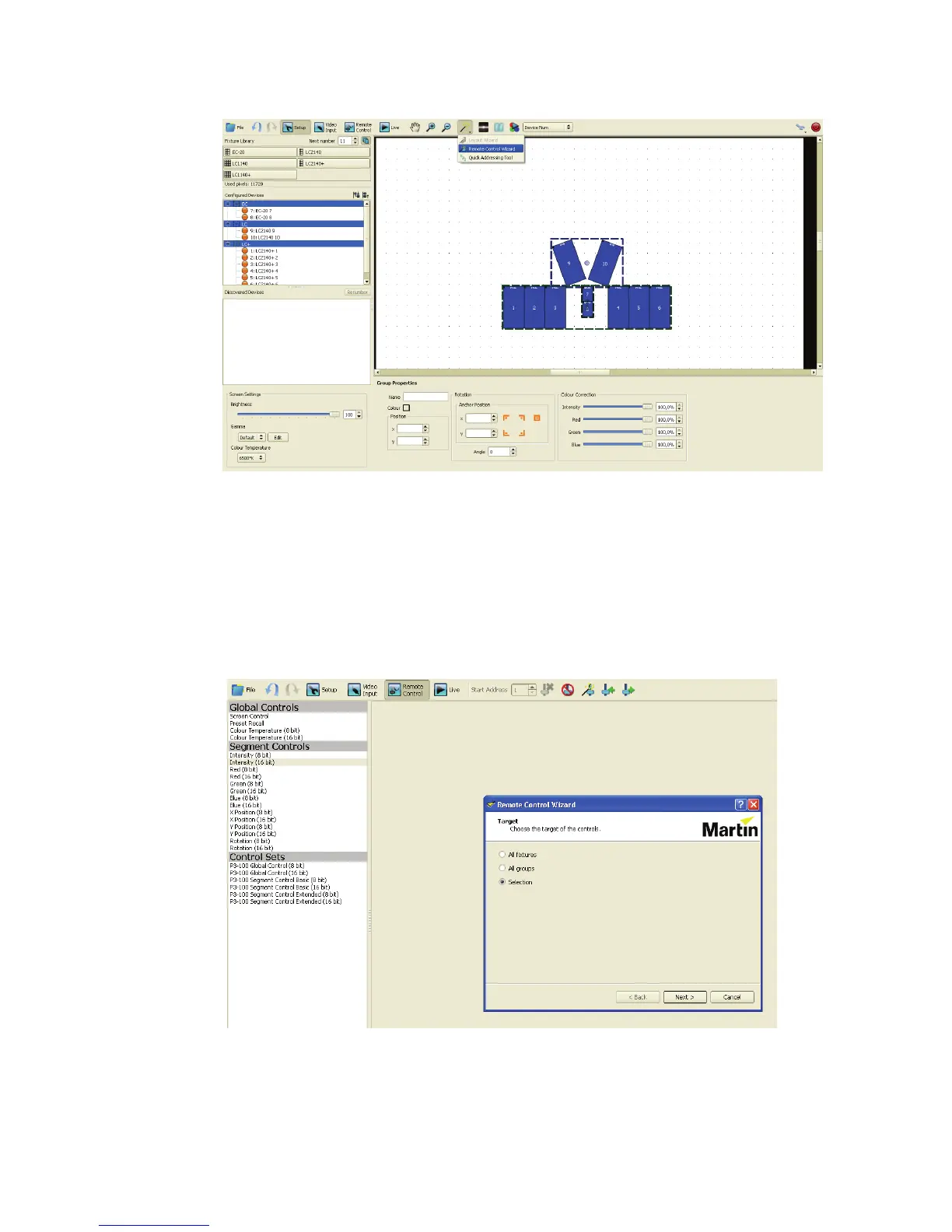
3. If you made a selection of fixtures or fixture groups, you can see your selection if you use the Remote
Control Wizard button in the Setup View:
4. The wizard will ask you which fixtures you want to assign DMX controls to. You can choose between:
- All Fixtures: DMX controls are applied to all panels individually, so that each individual panel can be for
example rotated.
- All Groups: DMX controls are applied to all groups, so that each group can be for example rotated as
one unit and panels that are not part of a group will ignore the DMX control commands.
- Selection: only available if you make a selection of panels or groups before activating the wizard,
panels that are not in the selection will ignore the DMX control commands.
5. The wizard will then ask you to select which controls you want to create for these fixtures. Select one of
the predefined Basic or Extended sets, or select your own custom set of controls.
Figure 34: Remote Control Wizard in Setup view
Figure 35: Assigning DMX controls in the Remote Control Wizard













 To Next Page