Martindale ET4000 / ET4500 Instrument operation
24
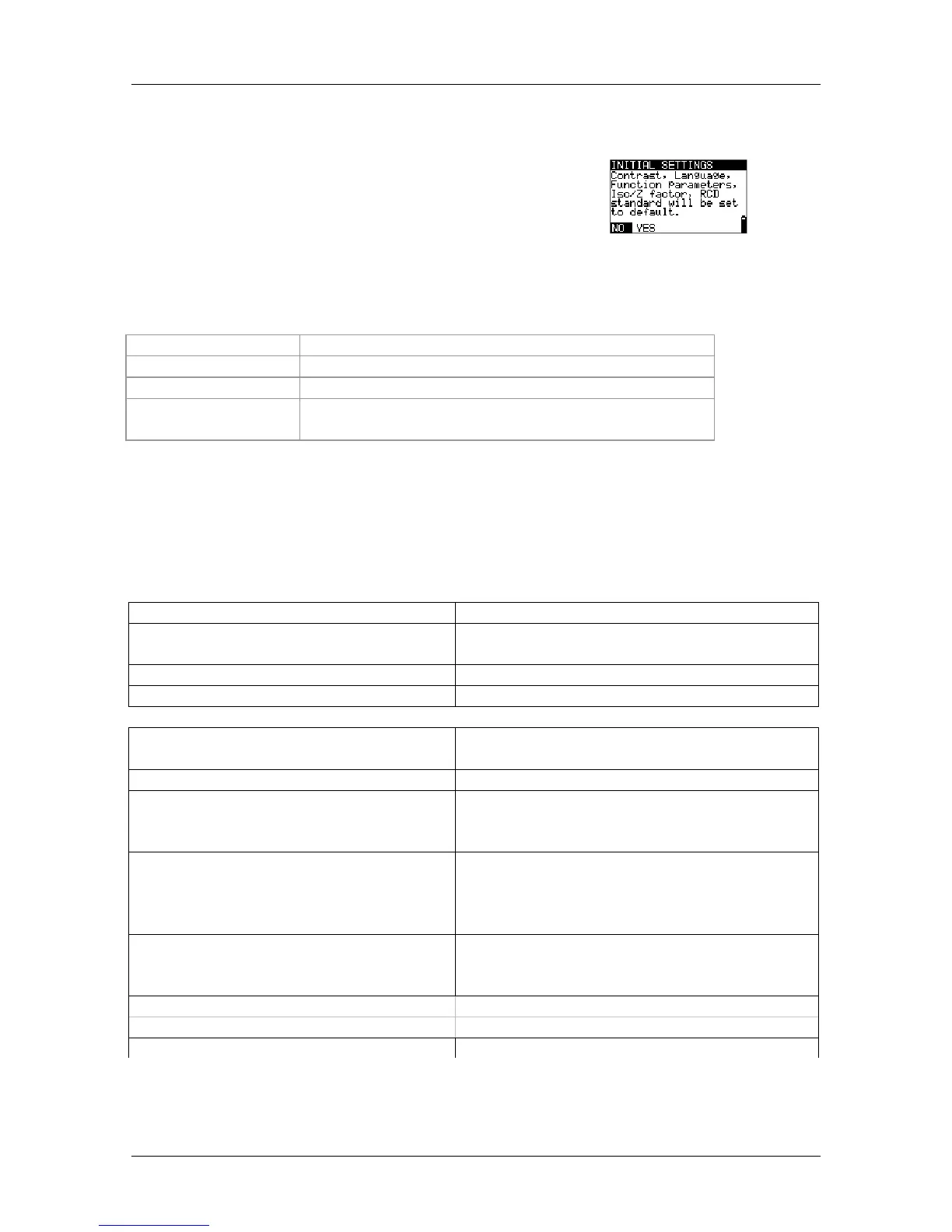
4.4.5 Initial settings
In this menu the instrument settings, measurement
parameters and limits can be set to initial (factory)
values.
Figure 4.11: Initial settings
dialogue
Keys:
UP / DOWN
Selects option [YES, NO].
TEST
Restores default settings (if YES is selected).
ESC
Exits back to settings menu.
Function selector
switch
Exits back to selected test / measurement function
without changes.
Warnings:
Customized settings will be lost when this option is used.
If the batteries are removed for more than 1 minute the custom made settings will
be lost.
The default setup is listed below:
Instrument setting Default value
Contrast
s defined and stored by adjustment
procedure
Z factor 0.80
RCD standards BS 7671
Function
Parameters / limit value
Sub-function
EARTH RE (ET4500 only) No limit
R ISO L / E
No limit
Utest = 500 V
Low Ohm Resistance
R LOW, r
1
, r
n
, r
2
, R1+R2, R2,
R1+RN,
No limit
CONTINUITY No limit, sound OFF
Z - LINE Fuse type: none selected
VOLTAGE DROP ΔU: 4.0 %
Z
REF
: _.__ Ω (not set)
Z - LOOP Fuse type: none selected
Zs rcd Fuse type: none selected
RCD RCD t



 To Next Page