Martindale ET4000 / ET4500 Data handling
65
6.6 Communication
Saved results can be transferred to a PC (ET4500 only). A special communication
program on the PC automatically identifies the instrument and enables data transfer
between the instrument and the PC.
There are two communication interfaces available on the instrument: USB and RS 232.
6.6.1 USB and RS232 communication
The instrument automatically selects the communication mode according to the
detected interface. The USB interface has priority.
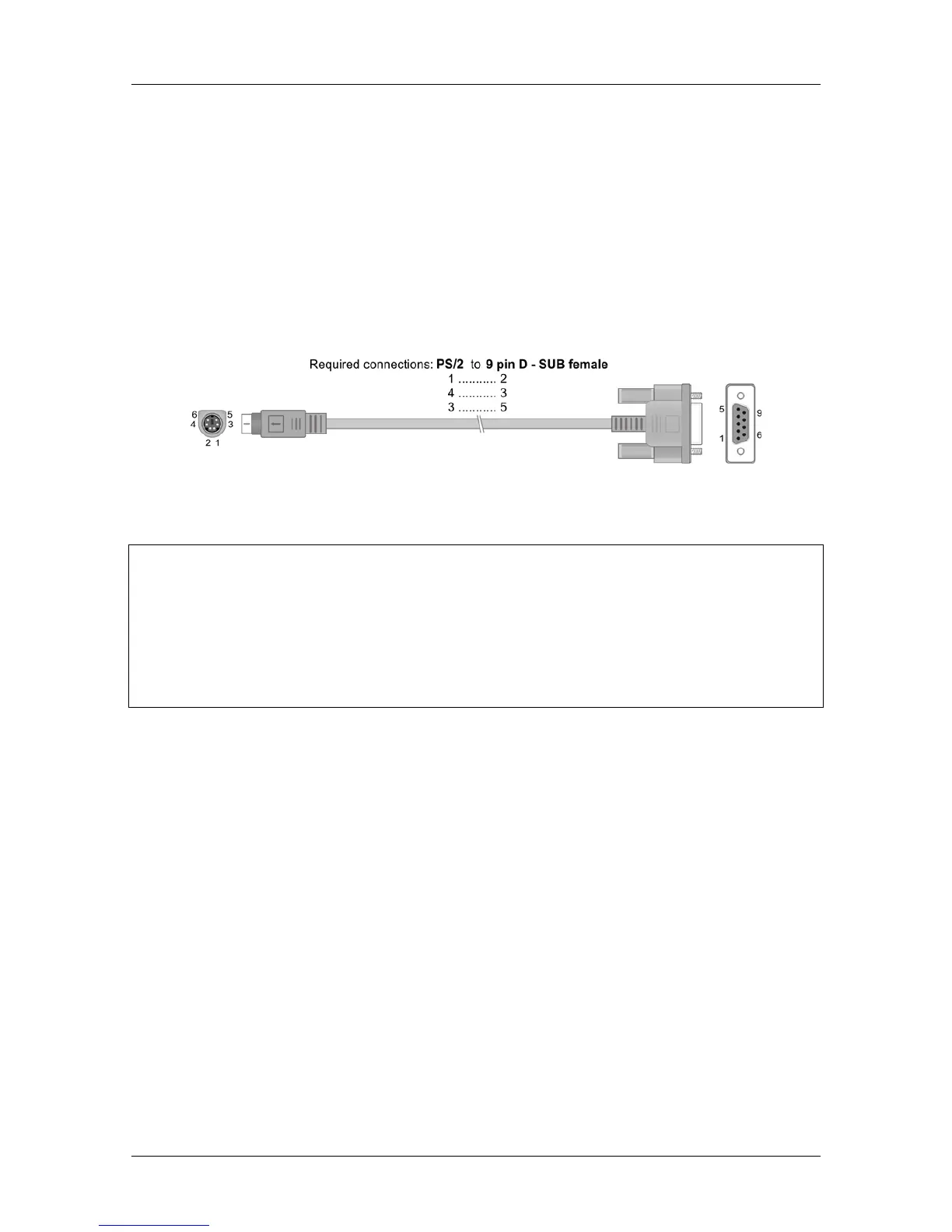
Figure 6.13: Interface connection for data transfer over PC COM port
How to establish a USB or RS-232 link:
RS-232 communication: connect a PC COM port to the instrument PS/2
connector using the PS/2 - RS232 serial communication cable;
USB communication: connect a PC USB port to the instrument USB connector
using the USB interface cable.
Switch on the PC and the instrument.
Run the ET-link program.
The PC and the instrument will automatically recognize each other.
The instrument is now ready to communicate with the PC.
The PC program ET-link is compatible with Windows XP, Windows Vista, Windows 7,
and Windows 8. Read the file README_ETlink.txt on the installation CD for instructions
on installing and running the program.
Note:
USB drivers should be installed on the PC before using the USB interface. Refer
to the USB installation instructions available on the installation CD.



 To Next Page