Martindale ET4000 / ET4500 Data handling
63
TEST
Deletes all results in selected location.
MEM / ESC
Exits back to delete results menu without changes.
Function selector
switch
Switches to test / measuring function without changes.
6.5.3 Clearing individual measurements
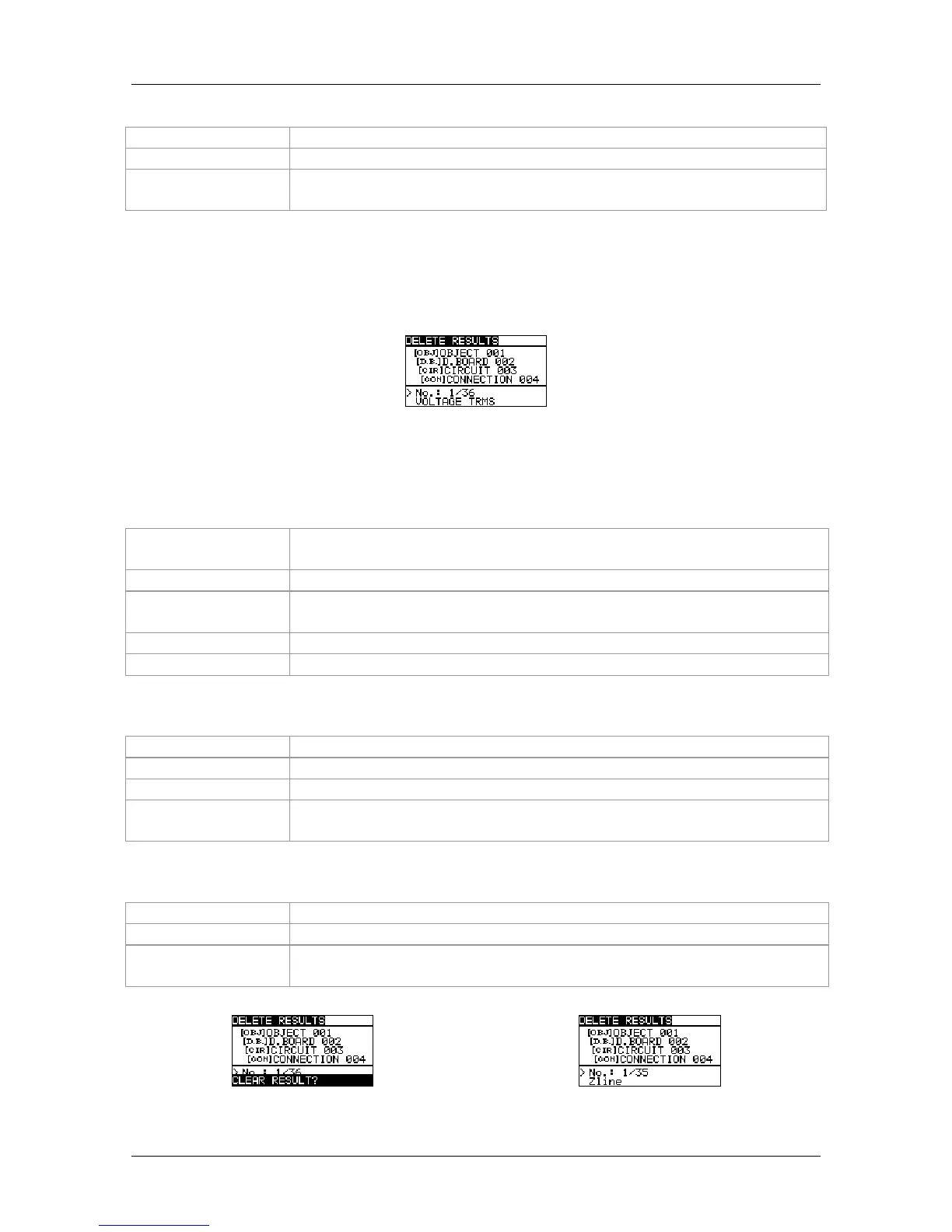
Select DELETE RESULTS in MEMORY menu.
Figure 6.9: Menu for clearing individual measurement (installation structure field
selected)
Function of Keys in delete results menu (installation structure field selected):
TAB
Selects the location element (Object / Distribution board / Circuit /
Connection).
UP / DOWN
Selects number of selected location element (1 to 199)
Function selector
switch
Switches to test / measuring function.
ESC
Exits back to memory menu.
MEM
Enters measurements field for deleting individual measurements.
Function of Keys in delete results menu (measurements field selected):
UP / DOWN
Selects measurement.
TEST
Opens dialog box for confirmation to clear selected measurement.
TAB / ESC
Returns to installation structure field.
Function selector
switch
Switches to test / measuring function.
Function of Keys in dialog for confirmation to clear selected result(s):
TEST
Deletes selected measurement result.
MEM / TAB / ESC
Exits back to measurements field without changes.
Function selector
switch
Switches to test / measuring function without changes.
Figure 6.10: Dialog for confirmation
Figure 6.11: Display after measurement



 To Next Page