6
Instrument Overview
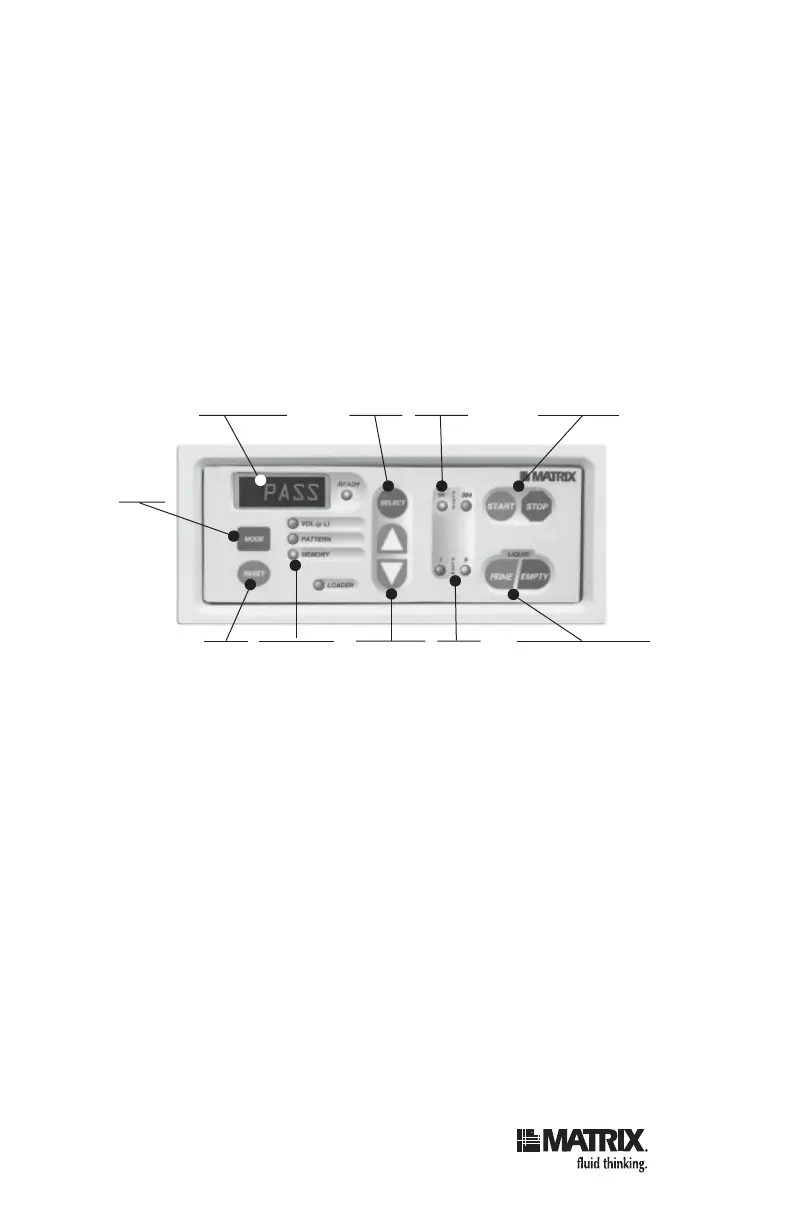
2. Keypad and LED Display
The keypad allows the operator to program and execute
dispense operations. You can also execute “manual
operations” (without using a preprogrammed dispense
volume) by pressing and releasing the PRIME and EMPTY
keys on the keypad.
Instructions for using the keypad are described under
Setting up and Running the Instrument beginning on
page 24.
Key and Display Description (clockwise from top left):
LED Display — Displays volume, selected channel,
program number, and error-message codes.
SELECT — When PATTERN mode is selected, allows
you to cycle through channels (individual tubes) to toggle
them on or off for dispense. When MEMORY mode is
selected, allows you to fi rst load and then save a program
in memory.
PLATE Type LEDs — Indicates which plate type (96 or
384-well) is currently selected.
LED Display Select Plate Start, Stop
Mode
Reset Vol (µl)
Pattern
Memory
Modes
Up, Down
(+,-)
Alarm
Prime, Empty
(for manually fi lling
receptacles)



 To Next Page