26
BepopPC EX Software Installation
Adjustingtheprinttempurature
It is possible to change the printing tempurature. In the event that the printed areas become speckled, wrinkled,
or small letters are having trouble printing, change the printing tempurature in the print properties.
1
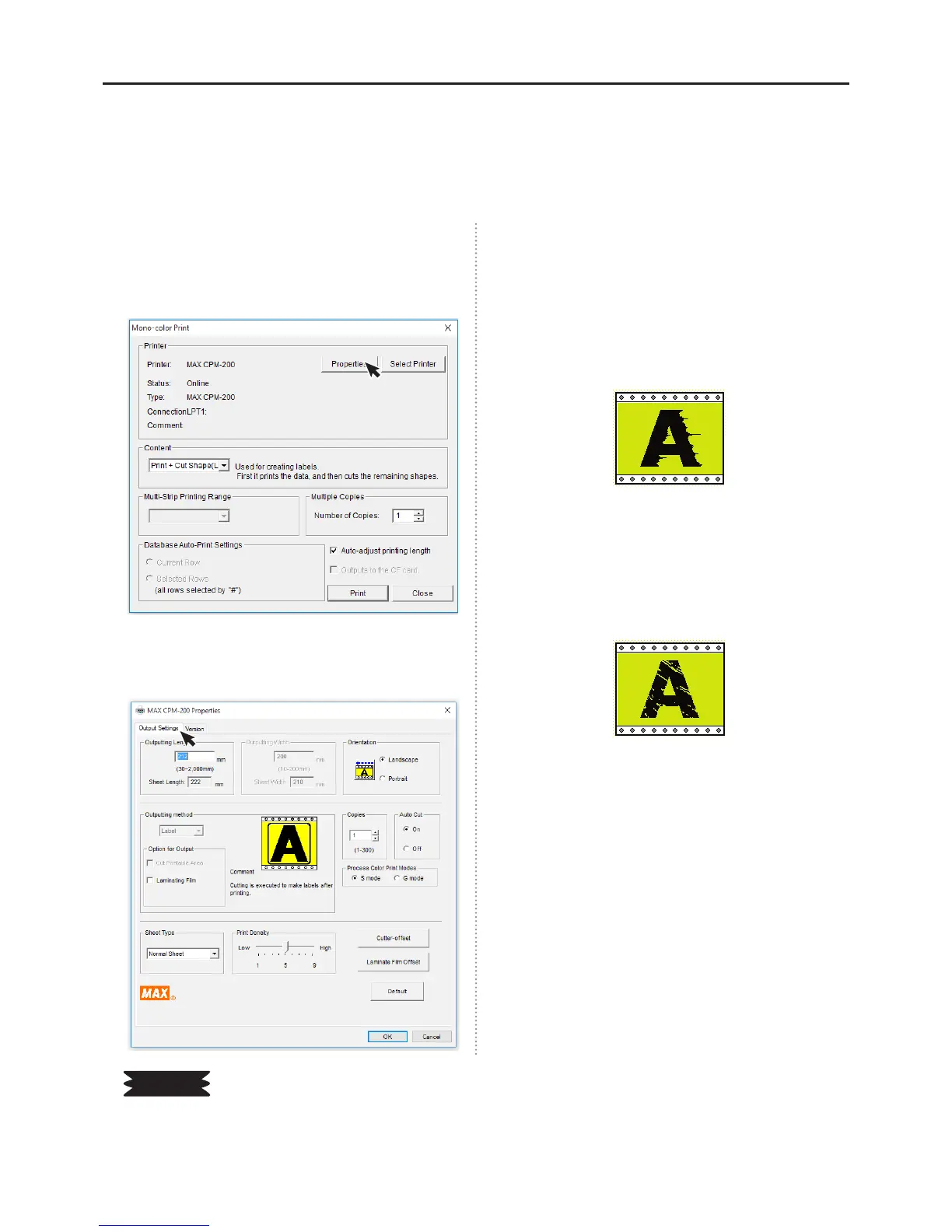
In the BepopPC EX menu bar, select File → Print.
2
Click on the “Properties” button.
3
Open the Properties menu will automatically open
to the “Output Settings” tab.
4
Adjust the Print Temperature bar 1 increment at a
time, and click the okay button.
When printing in a hot enviornment, it is necessary
to “lower” the printing temperature. When the
environment is too hot, the printed sign may have
wrinkles and look like:
When printing in a low temperature enviornment,
it is necessary to “raise” the printing temperature.
When the environment is too cold, the printed sign
may have speckles and look like:
5
While printing, adjust the machine to nd the best
tempurature settings.
Please
☆
Whenprintinginacoldenvironmentthetransfercapabilitiesoftheinkaroundtheletteredgesisreduced,andthe
printingqualitymaybereduced.Itisrecommendedthatthemachineisopperatedatroomtemperature,andmorethan
15°C(60°F).


 To Next Page