32
BepopPC EX Software Installation
PrinterUninstall
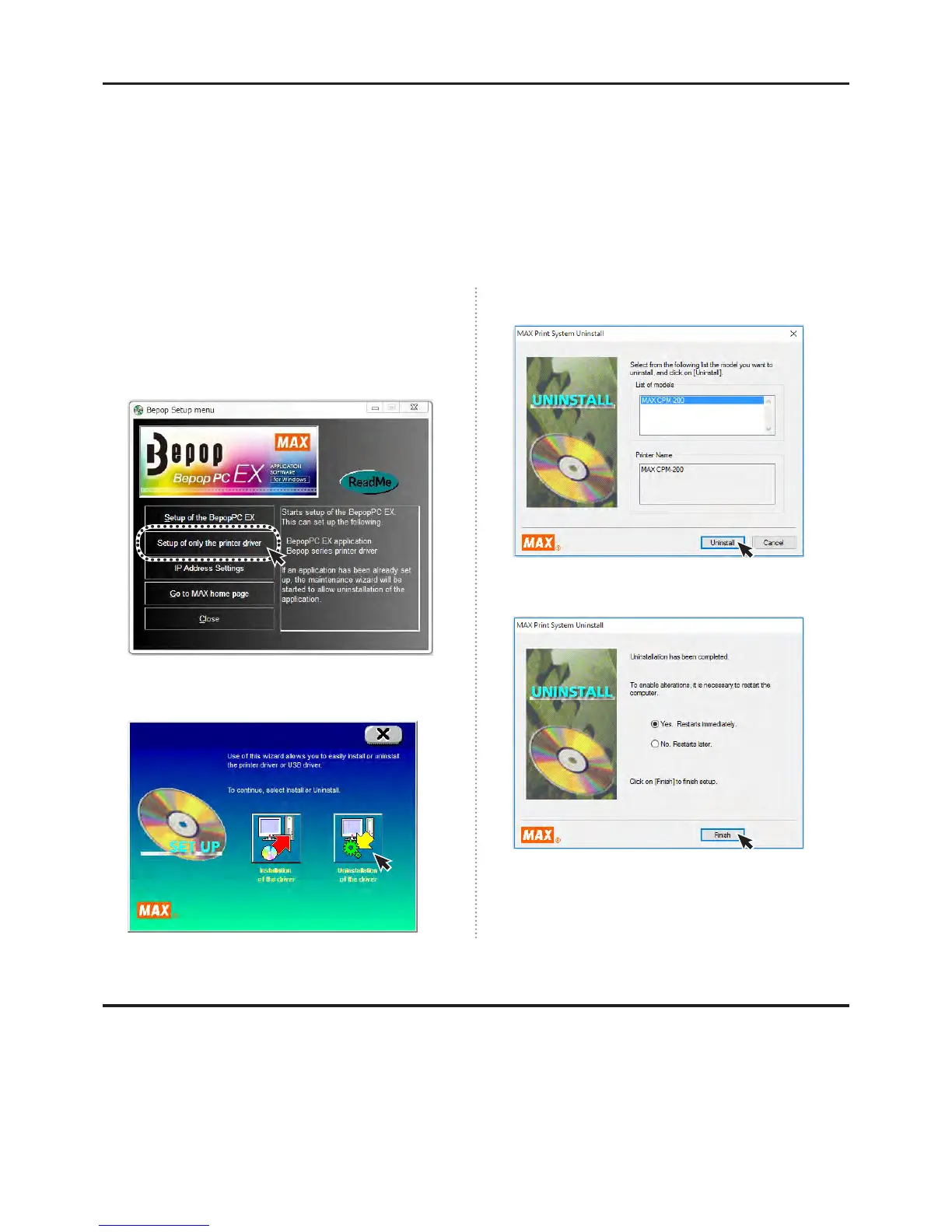
Please follow the procedure below when uninstalling the printer driver.
[Precautions]
● Printing even one time after opening the computer can cause the uninstall to fail. Please restart your computer
before ininstalling the printer driver.
● Uninstalling using a different procedure may leave some system information on your computer. This could
cause the next install attempt to fail.
1
Insert the attached CD-ROM into the computer.
2
The BepopPC EX Set-Up menu will apear. Click on
the “Setup of only the printer driver”.
3
Click on “Uninstallation of the Driver”.
4
Select CPM-200 and click “Uninstall”.
5
Select “Yes, restarts immediately”, and click “Finish”.
6
Restart the computer. The uninstall is complete.
* Be sure to restart the computer after the uninstall is
complete.
HowtouseBepopMembership
You can enjoy the following free services on the member site home page
http://www.max-ltd.co.jp/int/bepopregi/
● Software upgrades ● Symbol downloads
● Application introductions ● And much more!
* These services are free after you register your machine.
* Access the registration form by visiting the home page and clicking on user registration.
* The content of the membership site is subject to change without notice.



 To Next Page