15
BepopPC EX Software Installation
BepopPCEXPrinterDriverInstallation
1
Close all active applications and software before
beginning installation.
2
Place the attached CD-ROM into the driver. Click
“continue” in the “User account settings” window.
* USB Installation
To install the printer driver please observe the
following procedure, not observing the procedure
may result in driver installation failure.
1) Connect the printer to the computer USB port.
2) Turn on the printer (check that the LED light
above the power button is green).
3) Begin the driver installation program.
3
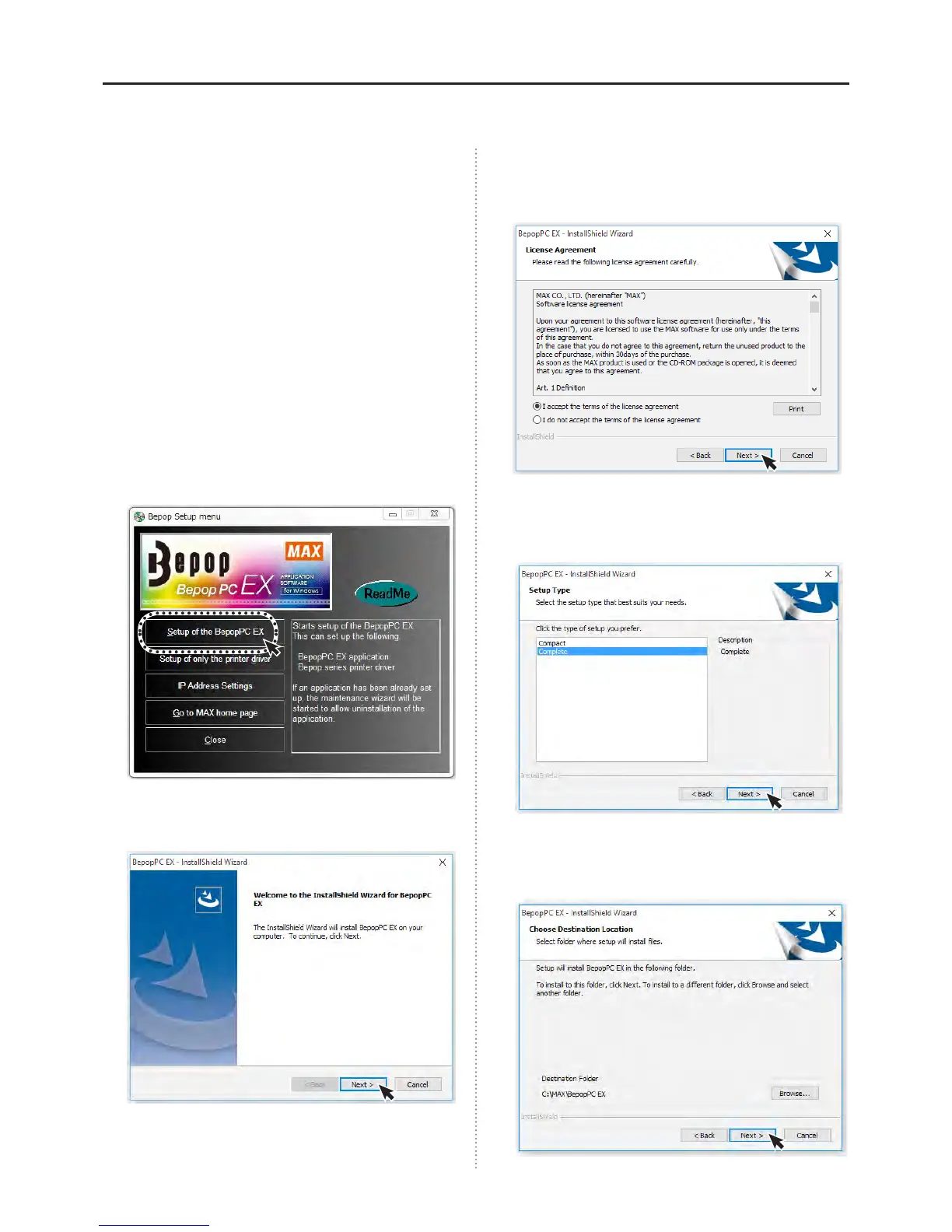
The BepopPC EX setup menu will appear. Click on
“Setup of the BebopPC EX”.
4
Click on “Next”.
5
Read the License Agreement. After understanding
and agreeing to the Terms and Conditions, please
click “Next”.
6
Select “Complete” and click next.
* “Complete” will install all les.
* “Compact” will install all les except original fonts.
7
Click the “Next” icon.
(Choose the appropriate destination folder if
necessary.)



 To Next Page