27
BepopPC EX Software Installation
Makingacuttinglayout,andcuttingasign
The CPM-200 can also freely cut signs.
This section will cover the operations and procudure using BepopPC EX software.
1
Plug in your CPM-200 and open the BepopPC EX
software.
Viewpage13“Connectingthe
Cable
andTurningOnthePower”
2
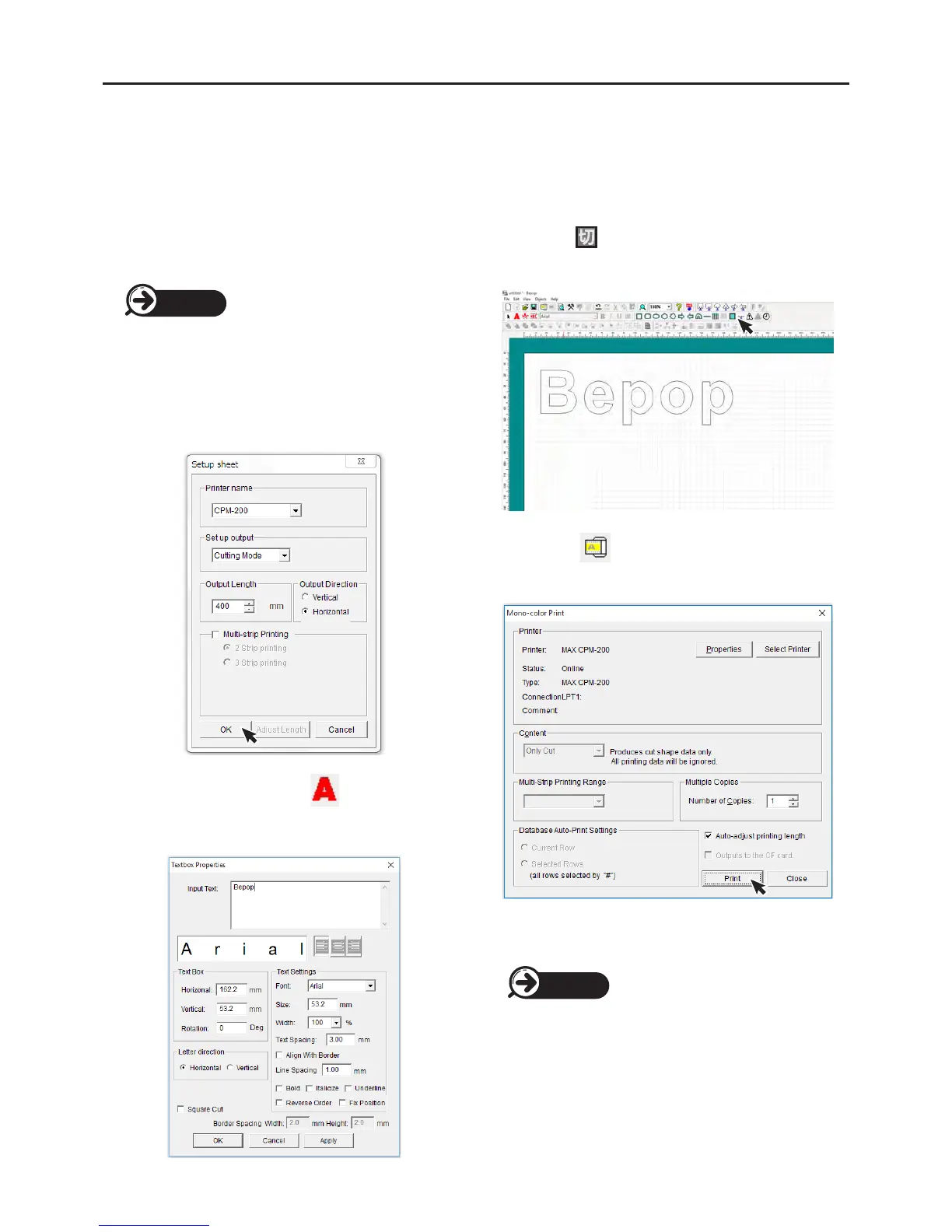
Input letters.
①
File → Tape Settings. Open the Tape Settings menu,
under “set up output” select “cutting mode” and click
“OK”.
②
Creat a text box by selecting , then clicking and
draging a frame. When the Text Box Properties menu
opens, imput text.
③
Select the icon to draw a cut-shape around the
letters, this will improve the weeding process.
④
Select the icon, click “Print”. The machine will
start cutting the letters.
3
Apply Cut Lettering.
Viewpage28“Howtoapplycut
lettering”
Page 13
Page 28



 To Next Page