33
BepopPC EX Software Installation
TroubleShooting
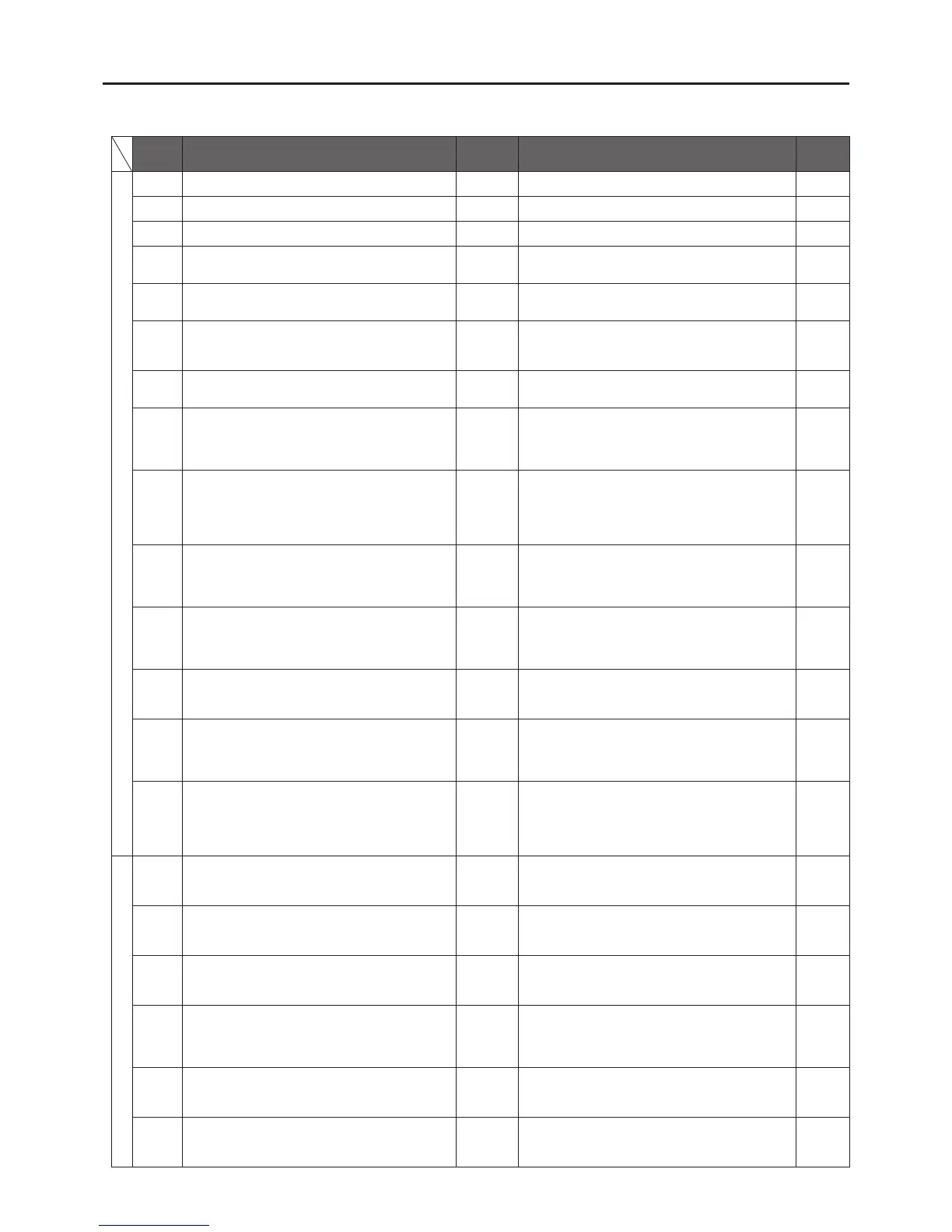
Errormessagelistforerrorsdisplayedonthestatusmonitorduringprinting.
Error
Code
Error Message
Printer LED
Status
Solution
Reference
Errors related to sensors
200
The door cover is open. Red Close the door cover of the main body.
Pg. 6
201
There is no tape. Red Set new tape roll in the main body.
Pg. 7
202
A tape feed error is going on. Red Please insert a Max Brand tape that is ends with a N.
Pg. 7
203
The remaining tape length is not enough to detect
the remaining length.
Red
Insert a tape role with enough length to print the
data.
Pg. 7
311
The color of the loaded ink ribbon does not tally
with the output color. Load[Rplc].
Green
Please set the color ribbon that is specied by the
Status Monitor.
Pg. 8
314
Unable to get the necessary ink ribbon information.
Check whether the ink ribbon is loaded properly or
the dedicated ink ribbon is loaded.
Red
Open the door cover, and check that the ink ribbon
is properly inserted.
Pg. 8
315
No remaining ribbon. Replace it with another ink
ribbon with the sufcient remaining length.
Red Insert an ink ribbon with enough remaining length.
Pg. 8
310
The ink ribbon is running out. (2 m or less)
The ribbon may run out while printing.
To continue, select a desired printing color from the
following list and click““Continue Print””.
Green Please prepare a ribbon with enough length to print.
Pg. 8
301
The ribbon has not been loaded or a non-special
ribbon has been loaded. Check the ribbon.
For the special ribbon, ““SL-RXXXT”” is indicated
on the ribbon cassette. If ““T”” is not indicated, click
on ““Continue Print"" to print.
Green Correctly insert the specialized ink ribbon.
Pg. 8
303
There is no print data corresponding to the set
ribbon color. Replace the ribbon. To continue as it
is, select a desired printing color from the following
list and click on ““Continue Print””.
Green Please use the ink ribbon that is used in your layout.
Pg. 8
304
There is no print data corresponding to the set
ribbon color. Replace the ribbon.
The remaining ribbon length is running out. (2 m or
shorter). The ribbon may run out while printing.
Green
Use a ribbon that is used in your layout, and has
enough remaining length to print.
Pg. 8
316
Unable to get the necessary ink ribbon information,
which may result in unsuccessful print.
To continue, click ““Continue print””.
Green
Insert the specialized ink ribbon correctly continue
with printing.
Pg. 8
317
The characteristics of the loaded ink ribbon is not
compatible with the output color, which may result
in unsuccessful output of the desired color.
To continue, click ““Continue Print””.
Green
Process color ribbons are being used in a pure
color layout, or regular ribbons are being used for
a process color layout. Please insert ribbons that
appropriate for the chosen layout.
Pg. 8
318
The characteristics of the loaded ink ribbon is not
compatible with the output color, which may result
in unsuccessful output of the desired color.
Besides, the ink ribbon is running out. (2 m or less)
The ribbon may run out while printing.
Green
Insert a ribbon that has enough length and is
appropriate for the layout settings.
Pg. 8
Errors that occur during printing
400
The door cover is open. Red
Close the door cover of the main body. \nIf the data
was being printed, click on the “Cancel Print" button
and redo printing.
Pg. 6
401
There is no tape. Red
Set new tape in the main body. \nIf the data was
being printed, click on the ““Cancel Print”” button
and redo printing.
Pg. 7
402
There is no ribbon. Red
Set new ribbon in the main body. \nIf the data was
being printed, click on the ““Cancel Print”” button
and redo printing.
Pg. 8
403
Cannot detect the leading end of the tape. Red
View help by pressing the [Remedy] button, take a
correct measurement of the tape. \nIf the data was
being printed, click on the ““Cancel Print"" button
and redo printing.
Pg. 7
404
A tape feed error is going on. Red
After canceling the print using the status monitor, restart
the printer, insert Max Brand tape rolls. The correct
sheet should have a N on the end of the product name.
Pg. 7
405
The remaining tape length is not enough for printing. Red
After canceling the print using the status monitor,
restart the printer, insert a tape roll with enough
length to nish the layout, and please reprint.
Pg.7



 To Next Page