29
BepopPC EX Software Installation
Applyingcut-letterstoasurface
Please be careful of the following three things: allignment, air bubbles, and material stretching (stretched materials
do not regain shape). Depending on the size of the letters, dry application or wet application should be used
appropriately. (Big letters use wet application)
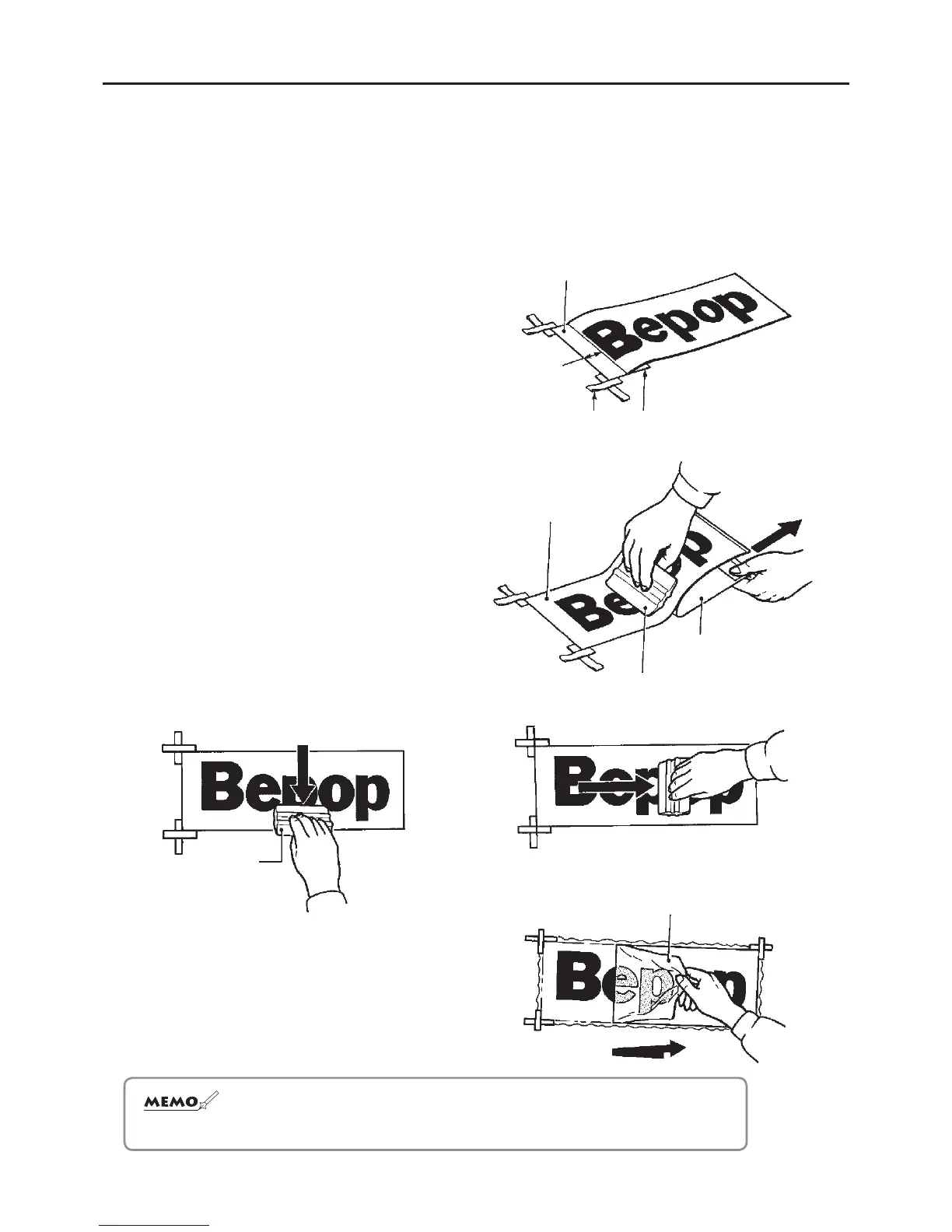
DryAplicationMethod(Lessthan50cm/6in)
1
While the design is attached to the paper backing,
align it with the application surface and apply tape to
mark the surface alignment.
2
Fold back about 2cm (1/2 in) of the tip of the paper
backing.
3
Secure the removed application sheet with tape.
4
Slowly remove the paper backing while applying
pressure to the design.
5
Use a skeegie to apply pressure, moving up and
down and from right to left.
Skeegie
6
Pull the application sheet away from about a 180
degree angle.
☆ Intheeventthattheapplieddesignhasairbubbles,useapintopopthebubbles
and
applypressuretothesheet.
Paper backing
Tape
2cm
Skeegie
Paper backing
Application sheet
Application sheet
Application sheet


 To Next Page