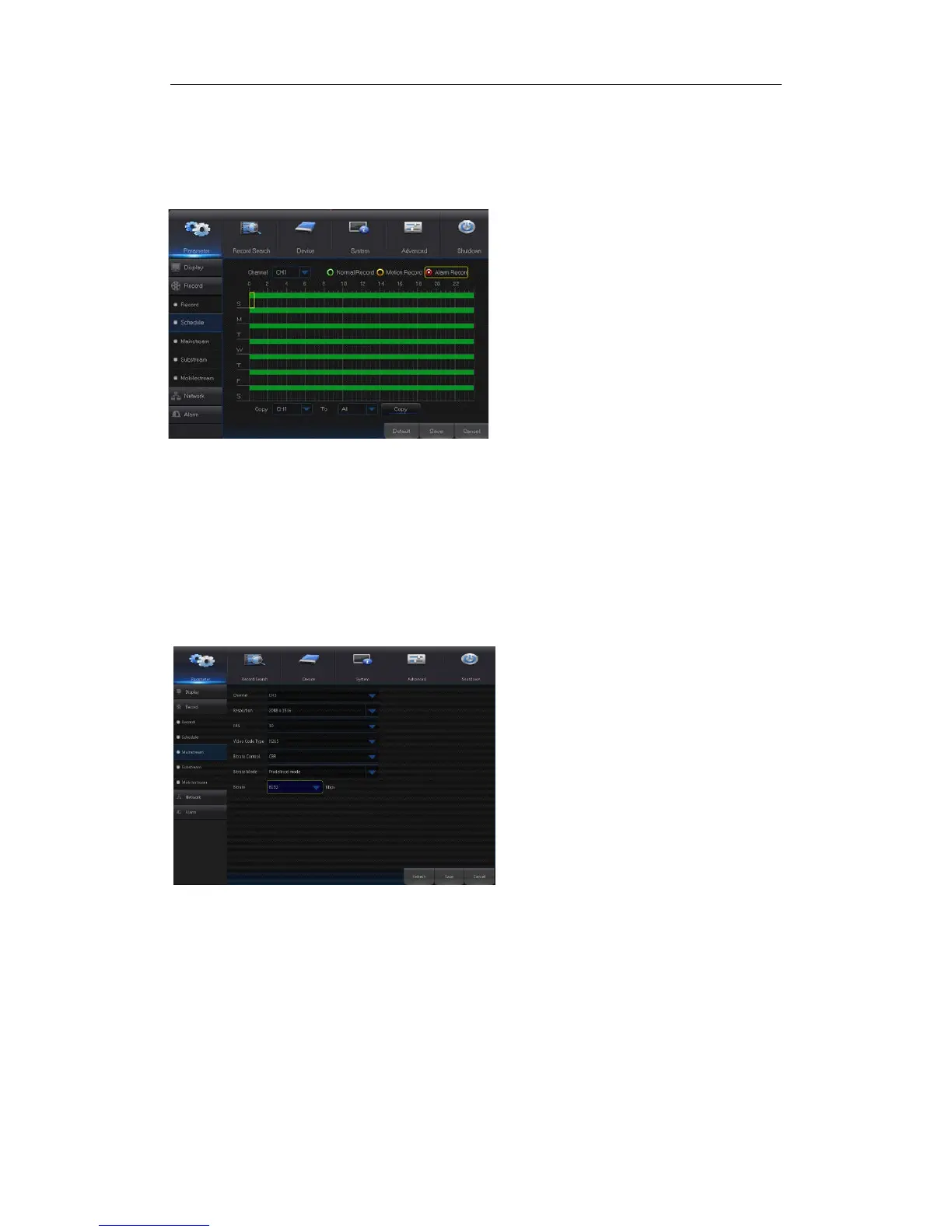
4.2.1.2.2 Schedule
Go to “Main Menu” → “Record” → “Schedule” to enter into the Schedule interface shown as
Picture4-11 and set the record schedule of NVR.
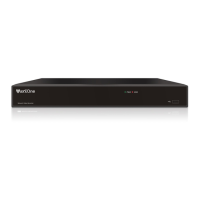
4.2.1.2.3 Mainstream/Substream
Go to “Main Menu” → “Record” → “Mainstream/Substream” to enter into the menu
interface as shown in Picture 4-12.
Select the channel and the date to be set. One
week’s schedule can be set.
The record schedule of the current channel can
be copied to any other channel or all channels.
Note:
1.
In the Record menu and Record Search
menu, No Color stands for no record;
2. “Green” stands for normal record and
“yellow” stands for motion record
3. “Red” stands for alarm record,
Mainstream and substream are the two
video stream of IPC. Mainstream is mostly
used for recording and the substream is
mostly used for remote network monitoring.
Channel
Select a channel
Resolution
Min 1 and max 30
code type: H.264 and H.265
Bite rate control:
Dynamic and Statics
Bitrate Mode:Preview Mode and User-
defined Mode
Bitrate


 To Next Page