Rewinder RW500
71
Operating and display elements, operating modes
Operating and display elements
5.1.8.2 Change password level
Special diagnostic and configuration pages can be unlocked by entering
particular passwords.
Proceed as follows to change the password level.
Prerequisites These prerequisites must be fulfilled:
• You are authorized to change the password level.
Entering the
password
Here's how to enter a password.
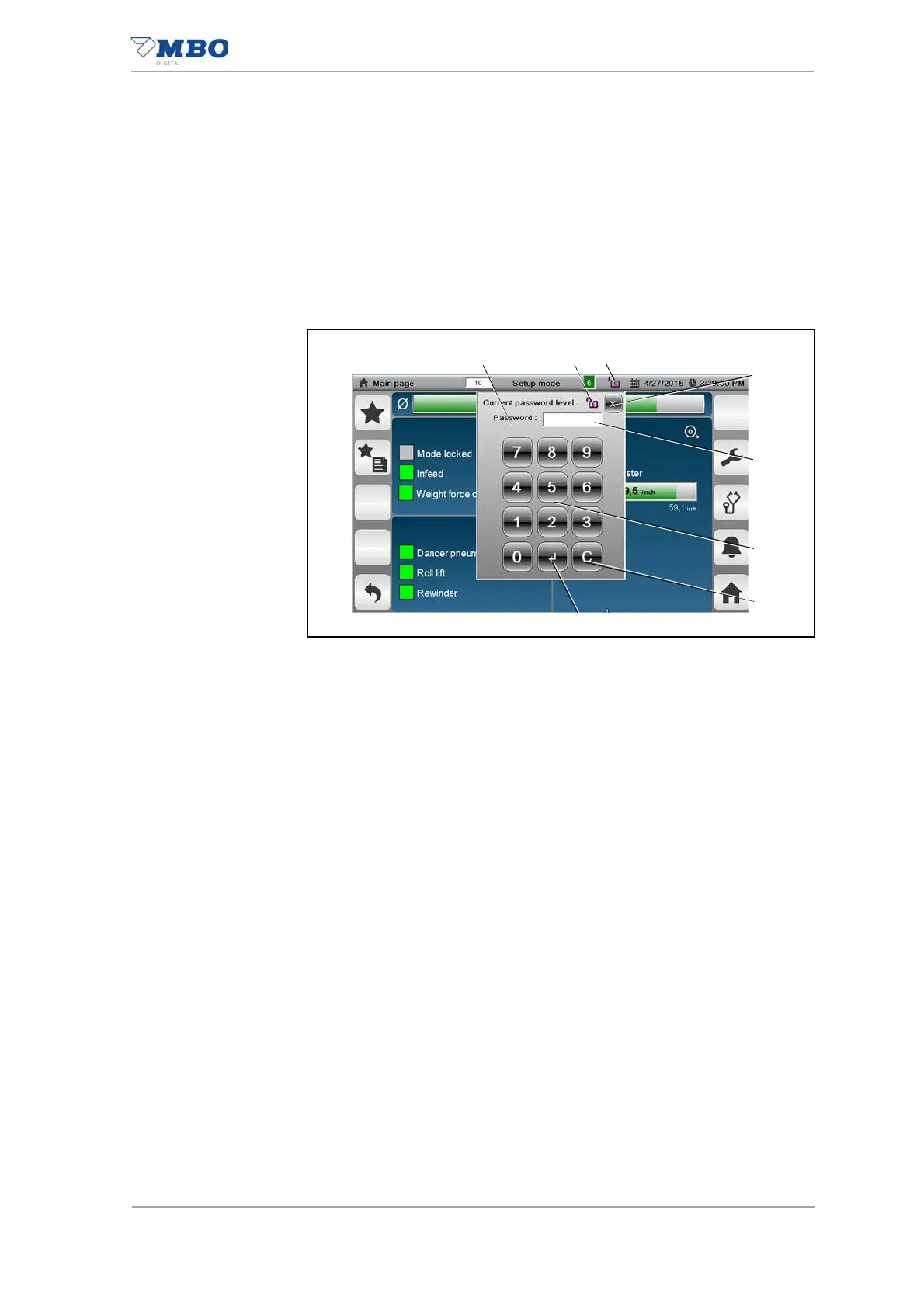
Press the <Password> button (3).
The password input window (1) is opened.
The <Current password level> display (2) shows the current password
level as a number.
Enter the password for the required password level via the numeric in-
put field (6)
Press the <Enter> button (8).
The <Password> button (3) displays an open lock with the correspond-
ing password level.
The password level is changed.
Canceling password
input
Here's how to cancel password input:
Press the <Close window> button (4).
The password input window is closed.
The password input is canceled.
Resetting the
password level
Here's how to reset the password level:
Press the <Password> button (1).
The password input window is opened.
Press the <C> button (7).
Press the <Enter> button (8).
The <Password> button (3) displays a closed lock.
The password level is reset.
Illustration 33: Password


 To Next Page