66
Rewinder RW500
Operating and display elements, operating modes
Operating and display elements
5.1.5 Usage of the touchscreen
5.1.6 Touchscreen structure
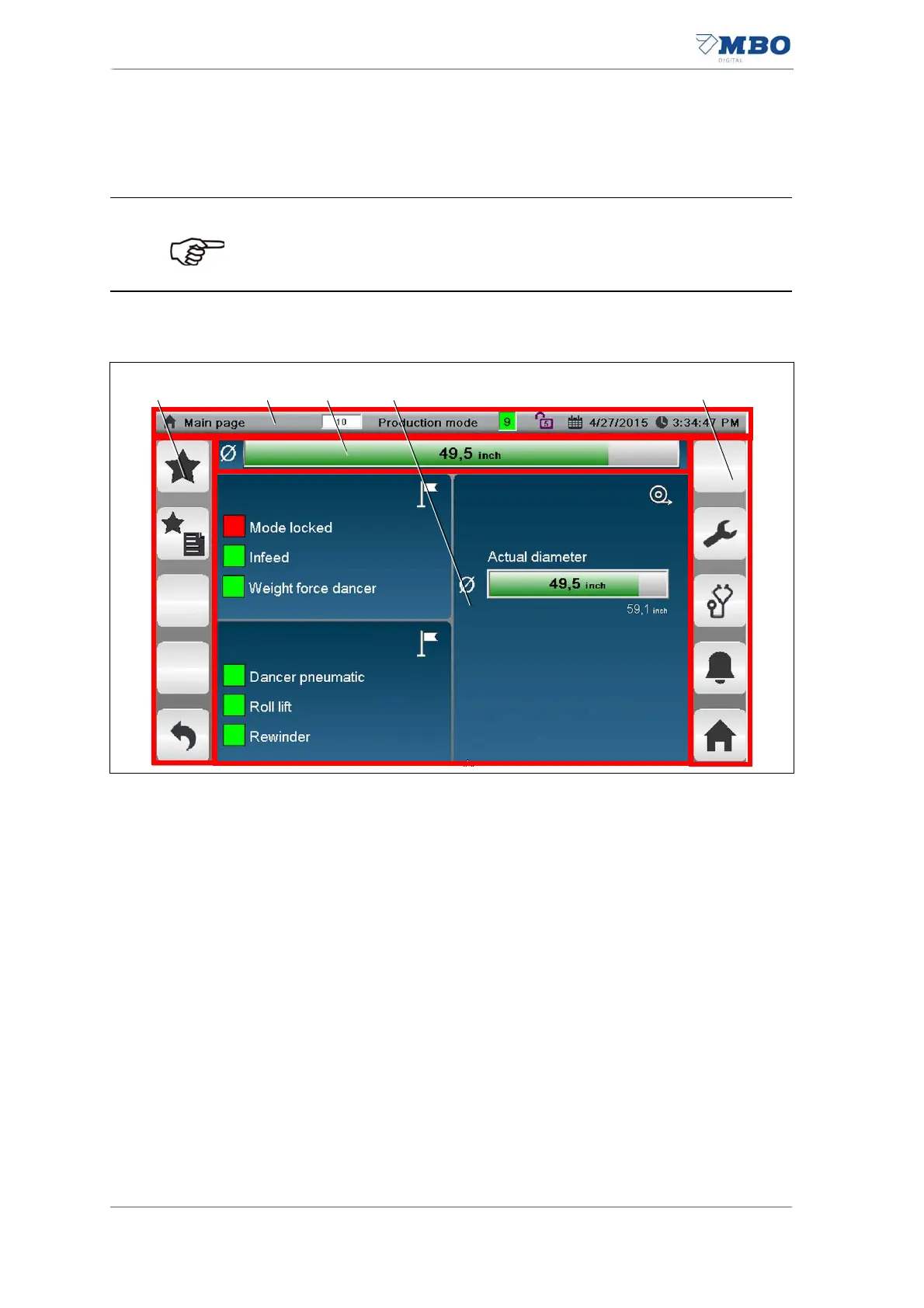
The touchscreen is divided into the following functional groups:
1 Function keys
See chapter "5.1.6.2 Function keys"
2 Info box <Page name, operating mode, machine status. Password level, date
and time>.
See chapter "5.1.6.1 Info box".
3 <Current web diameter, alarms, notices> display field.
See chapter "5.1.9.1 <Start page / main page> page".
4 <Current page content> display
See chapter "5.1.9.1 <Start page / main page> page".
• Only use your finger or a stylus pen (MBO part number 0131900) to
operate the touchscreen.
• Ball-point pens or other metallic objects may damage the surface of
the touchscreen.
Illustration 28: Touchscreen structure


 To Next Page