Rewinder RW500
63
Operating and display elements, operating modes
Operating and display elements
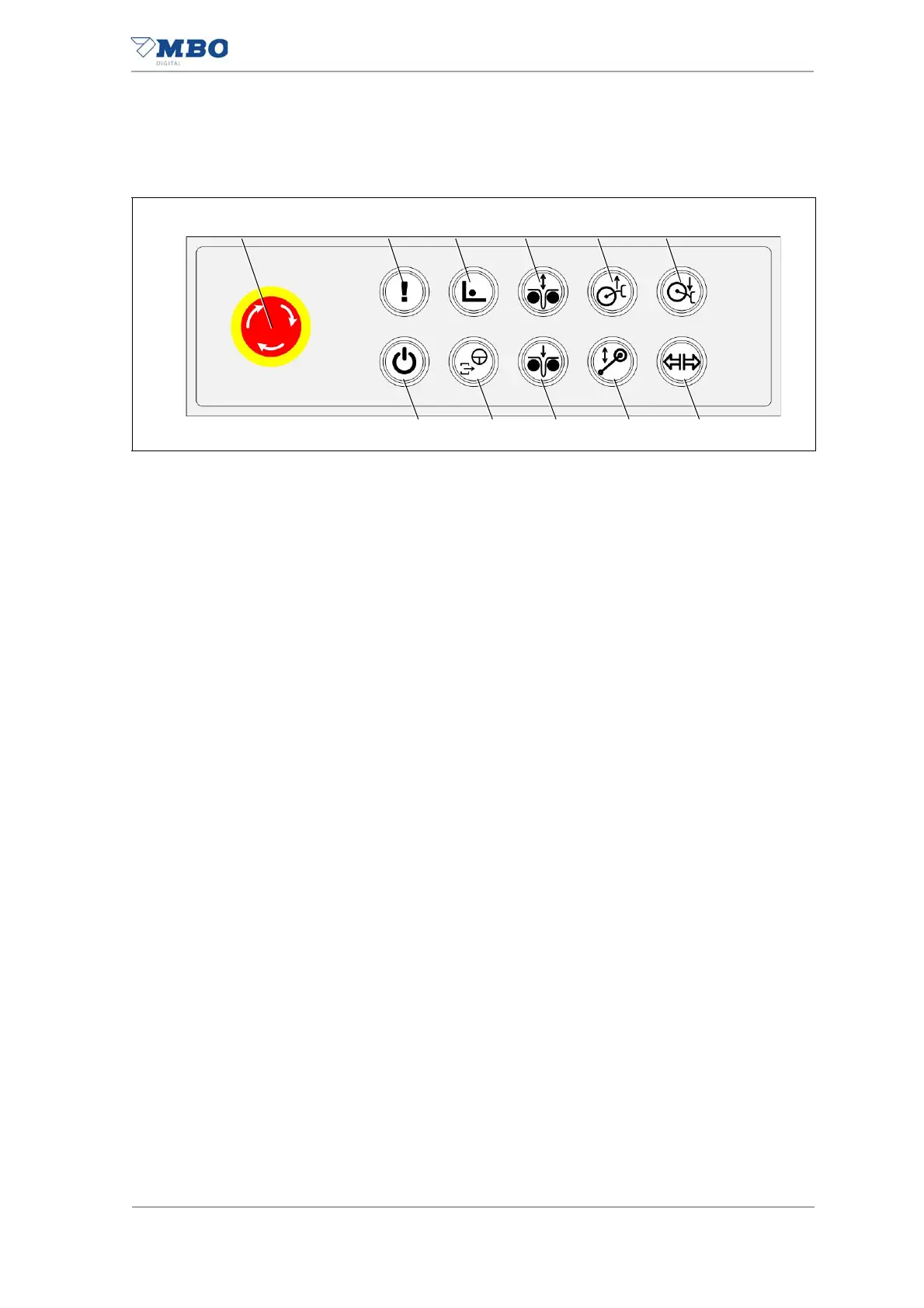
5.1.3 Control panel
1 <EMERGENCY STOP> palm button.
2 <Reset EMERGENCY STOP/confirm error> illuminated button.
Status indicator of the light ring:
Blue = <EMERGENCY STOP> palm button (in the machinery) was or is
activated.
Yellow = an error/warning present.
Off = no error/warning present.
3 <Setup / production mode> illuminated button.
Can only be changed when the <Stop request> illuminated button is off.
Press the illuminated button for approx. 3 seconds to change the mode.
Status indicator of the light ring:
Yellow = <Setup> operating mode is active.
Flashing green = <Production> operating mode in preparation.
Continuous green = <Production> operating mode is active.
4 <Production / setup dancer position> pneumatic dancer illuminated
button.
Only active in the <Setup> operating mode.
Status indicator of the light ring:
Off = <Production> operating mode is active.
Yellow = <Setup / Threading> dancer in position.
Green = <Production> dancer in position.
5 <Raise roll lift> illuminated button.
Only active in the <Setup> operating mode.
Status indicator of the light ring:
White = <Setup> operating mode is active.
Yellow = illuminated button is pressed.
Off = <Production> operating mode is active.
6 <Lower roll lift> illuminated button.
Only active in the <Setup> operating mode.
Status indicator of the light ring:
White = <Setup> operating mode is active.
Yellow = illuminated button is pressed.
Off = <Production> operating mode is active.
7 <Open / close brake> illuminated button.
Only active in the <Setup> operating mode.
Status indicator of the light ring:
Yellow = brake is open.
Green = brake is closed.
Off = <Production> operating mode is active.
Illustration 26: Control panel


 To Next Page