Manualofuseandmaintenance
EN
73
5.2.10 Operating instructions
- Screwontheinsert.
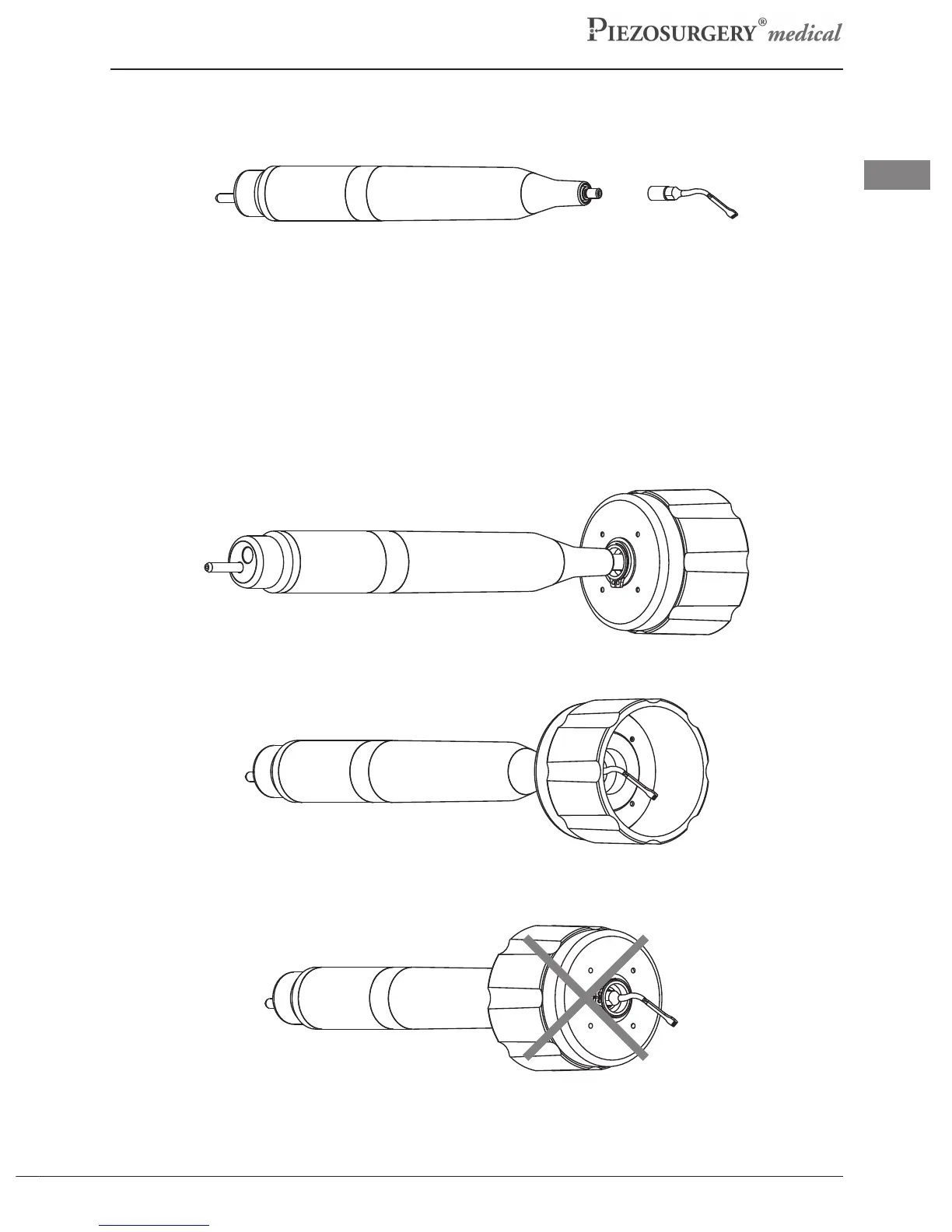
ChoosetheinsertandmanuallyscrewontothePiezosurgeryMedicalHandpiece(Pic.14).
Pic.14
- Fastentheinsert.
UsethePiezosurgeryMedicaldynamometrickeytofastentheinserttothehandpiece.
Foracorrectuseofthedynamometrickeyproceedasfollows:
-PositiontheinsertinthePiezosurgeryMedicaldynamometrickeyasshowninPic.15
-Holdthehandpiecebodyrmly.
-Hold the insert, rmly rotating the key clockwise until it clicks (the external part of the key
rotateswith respect tothe handpiecewith a mechanical“click”) (Pic.16).Theinsertis now
fastenedcorrectly.
Pic.15



 To Next Page