Manualofuseandmaintenance
EN
75
5.3 Conguration of the system
5.3.1 Controls
WARNING:
Donotusepointedorsharpobjectsonthelcdscreen.Thiscoulddamagethetouchscreenorthe
screenitself.Alightpressureofthenger,eveninalatexglove,allowstheoperatortochoosethe
desiredsettings.
- ThePiezosurgeryMedicaldisplayhasanintegratedtouchscreen.Thecontrolscanbeselected
byasimplepressureofthengeronthescreenincorrespondenceofthechosenkey.
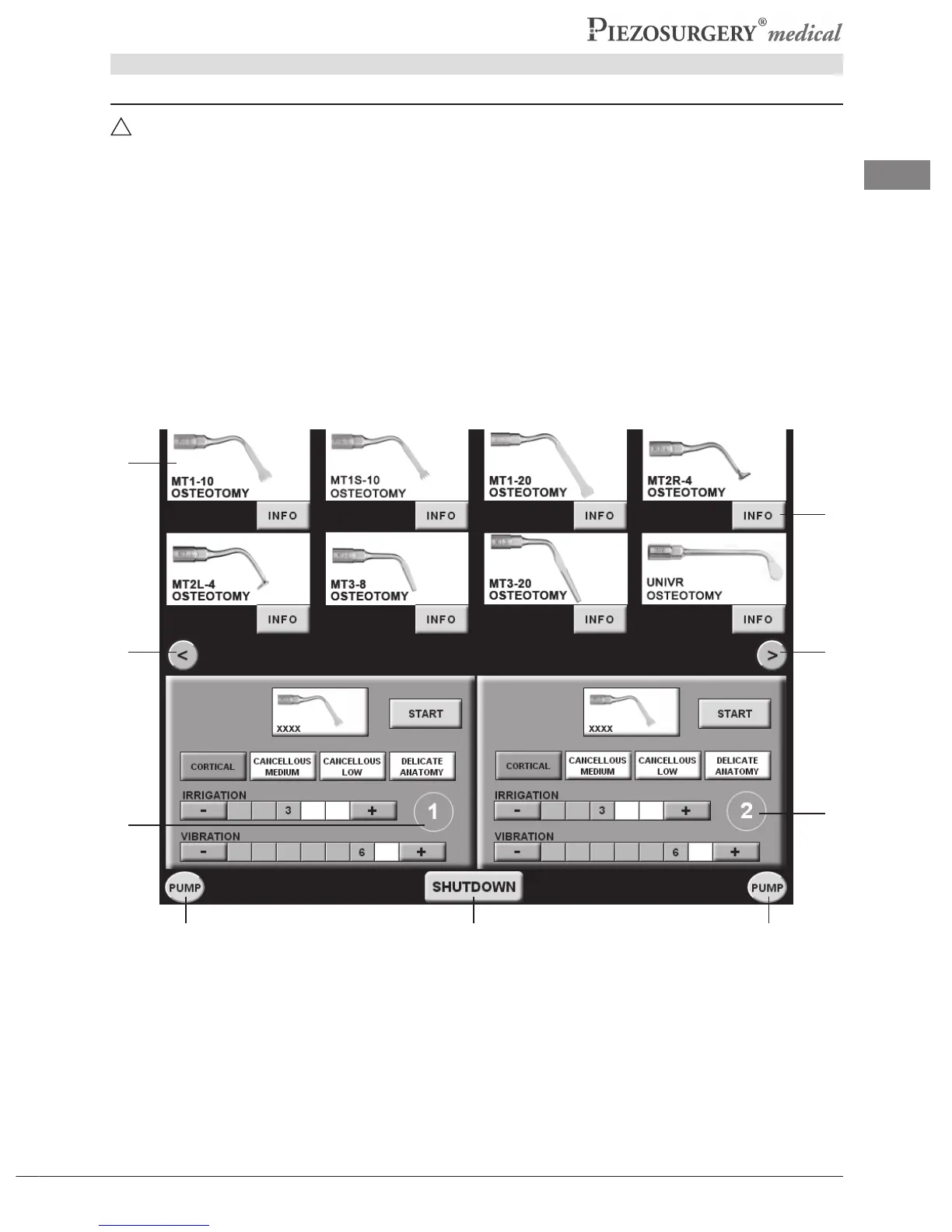
- ThePiezosurgeryMedicalscreencanbegraphicallydividedinto3sections:
-The upper section, which shows the inserts with their picture, name and pertaining family
(Pic.17-Ref.A).
-Thecentralsection,dividedinto2areas-left(Pic.17-Ref.B)andright(Pic.17-Ref.C)-which
showtheinsertsselectedandthesettingsforthe2operatingchannels.
-Thelowersection,whichshowsthecontrolkeys(LANGUAGE,PUMPandSHUTDOWN)and
theindicationofthepresetlanguage.
Pic.17
A
B
C
D
E E
FG G



 To Next Page