Manualofuseandmaintenance
EN
77
5.3.2 Settings
Phase 1: Choice of work channel.
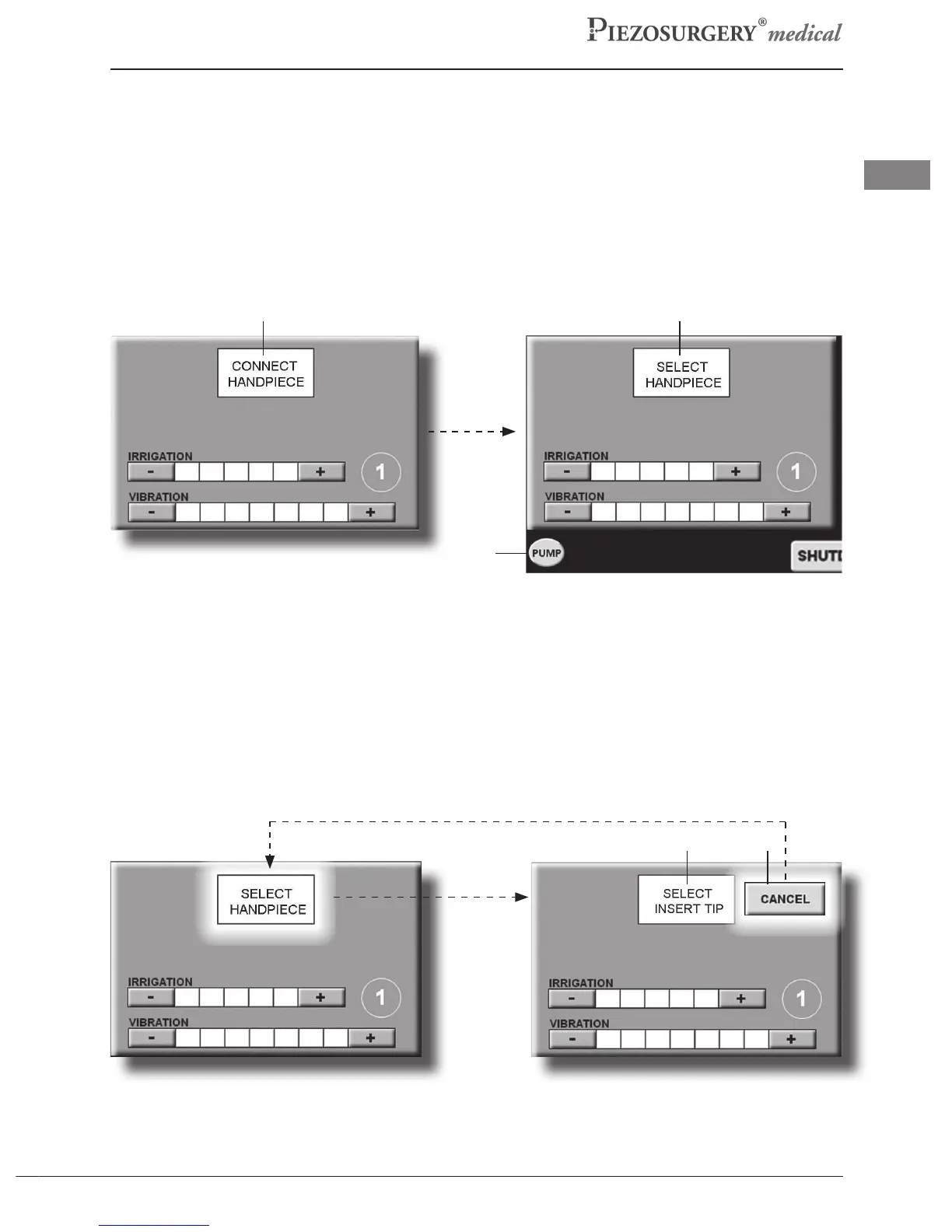
Whenno handpiece-cord isconnected to the device, the two work stationsdisplay the wording:
“CONNECTHANDPIECE”(Pic.18a-Ref.1).
- ConnectthePiezosurgeryMedicalHandpieceinthedesiredworkstation(1or2),followingthe
instructionscontainedinparagraph5.2.9.
Whenthehandpiece-cordisinserted,“SELECTHANDPIECE”willappearinthecentralsection
(Pic.18b - Ref.2).After connecting the handpiece to the device body, the PUMP button will
appearinthelowercornerofthedisplay(Pic.18b-Rif3).
Pic.18b
Pic.18a
1 2
3
- Press “SELECT HANDPIECE” (Pic.19a): “SELECT INSERT TIP” will appear ashing in the
centralsection(Pic.19b-Ref.4)andthe“CANCEL”buttonwillappear(Pic.19b-Ref.5).The
workchannelisthusselected.
- Proceedtothenextstepiftheselectedchannelistheonerequiredorpressthe“CANCEL”button
toreturntothepreviousstepinwhichthe“SELECTHANDPIECE”buttonappears(Pic.19a).
Pic.19b
Pic.19a
4 5



 To Next Page