78
Manualofuseandmaintenance
Phase 2: Select insert.
Selectionoftheinsertisobtainedintheuppersectionofthescreen(Pic.17-Ref.A)whichshowsthe
picturesoftheinserttouse.
Todosoitispossibletoscrollthelistofinsertsusingthe“Page”buttons(Pic.17-Ref.E),untilthe
requiredinsertisidentied.
Iffurtherinformationontheinsertisrequiredusethe“INFO”buttonplacednexttotheinsertitself.
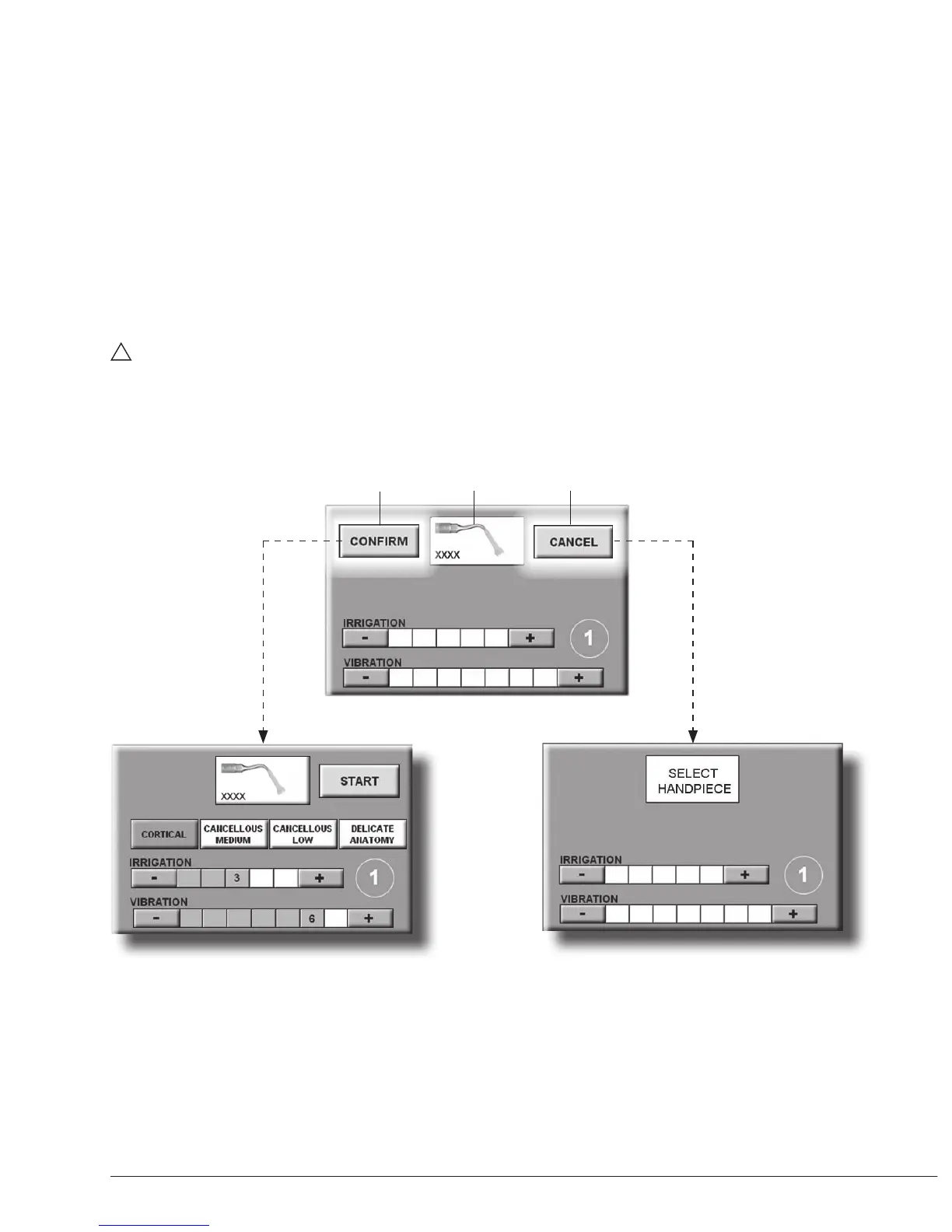
- Pressthepictureoftherequiredinsert:theinsertisshowninthecentralsectionofthechosen
workstation(Pic.20-Ref.6)andthe“CONFIRM”(Pic.20-Ref.7)“CANCEL”(Pic.20-Ref.8)
buttonswillappear.
- Tochangetheinsertselected,pressthepictureofanewinsertfromthelistintheuppersection
ofthescreen(Pic.17-Ref.A)
- Pressthe“CONFIRM”buttontoconrmtheselectionandproceedtothenextstep(Pic.21a)or
pressthe“CANCEL”buttontoreturnto“Phase1:Selectworkchannel”(Pic.21b).
WARNING:
Checkthattheinsertonthehandpiecematchesthatselectedandshownonthedisplay.
7
8
Pic.21b
Pic.21a
6
Pic.20



 To Next Page