Manualofuseandmaintenance
EN
79
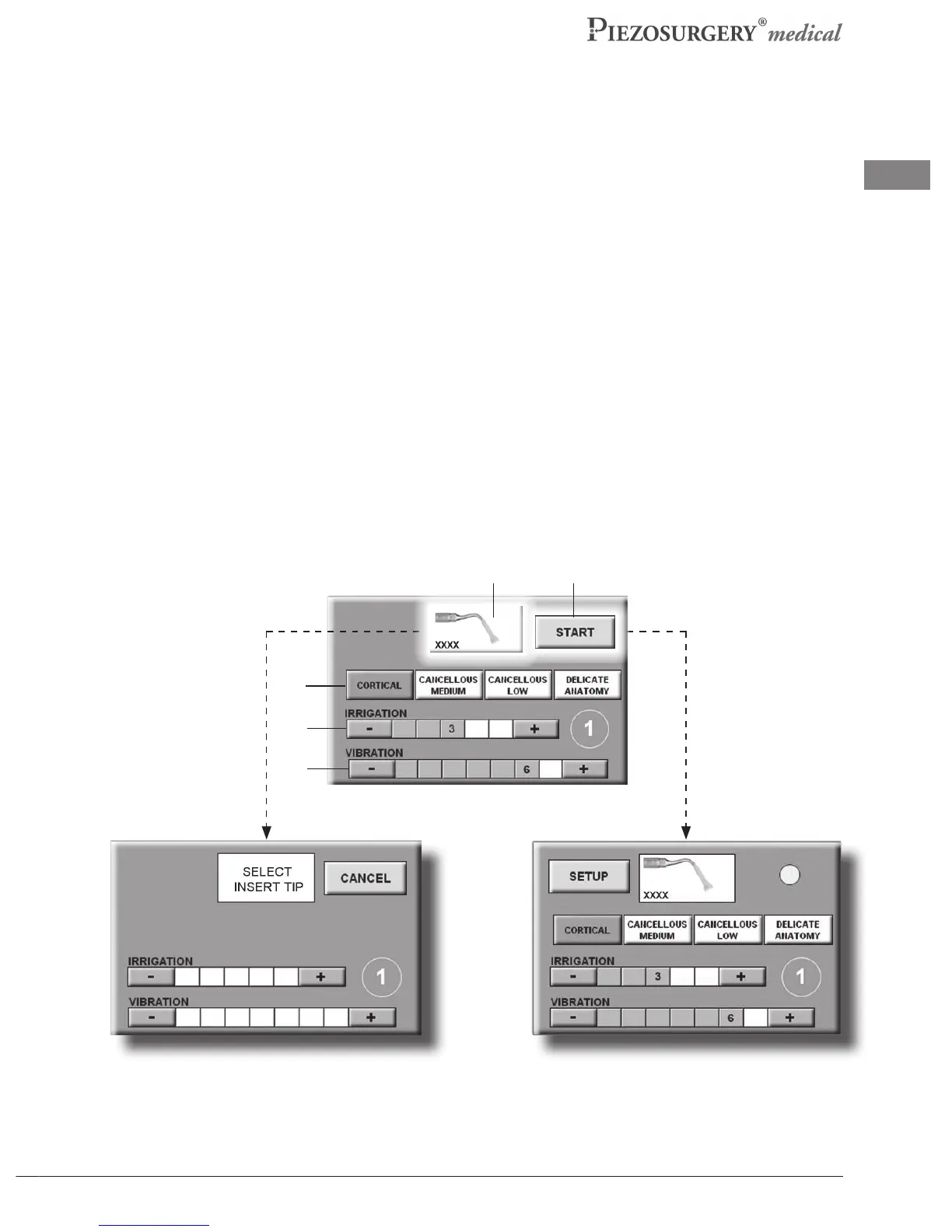
Phase 3: Channel use settings.
Byselecting the “CONFIRM”button, the readingspredened bythe manufacturer relativeto the
selectedhandpiecewillappear.
The manufacturer also establishes the minimum and maximum readings within which operating
settingsofeveryspecicinsertmayvary.
In this phase the operator can set, within the established interval, the readings needed for the
surgicaloperationtobeexecuted.
- Selectthetypeofpowerinrelationtothetypeofbonetotreat(Pic.22-Ref.9)byselectingone
ofthefollowingbuttons(onlythoseforinsertselectionaredisplayed):
-CORTICAL:highlymineralized,densebone
-CANCELLOUSMEDIUM:averagemineralizationcancellousbone.
-CANCELLOUSLOW:lowmineralizationcancellousbone
-DELICATEANATOMY:bonewithamaximumthicknessof1mmorinproximityofneurological
softtissue
- Choose the quantity of liquid to deliver using the +/- keys in the IRRIGATION eld (Pic.22
-Ref.10).
- Chooseoflevelofpowerrequiredusingthe+/-keysoftheVIBRATIONeld(Pic.22-Ref.11).
- Tochangetheinsertselectedandchooseanewone,pressthepictureofanewinsertpositioned
inthecenteriftheworkchannel(Pic.22-Ref.12).Thesettingswillbecancelledandtheoperator
returnsto“Phase2:Choiceofinsert”(Pic.23a).
Pic.23b
Pic.23a
Pic.22
9
10
11
12 13



 To Next Page