80
Manualofuseandmaintenance
Phase 4: Filling the irrigation tube - PUMP function.
Inthecaseinwhichaninsertwithliquidowisselected,itisnecessarytousethePUMPkeytoll
theirrigationcircuit.
- PressthePUMPbutton(Pic.18b-Ref.3)ofthechannelrequiredforllingtheirrigationtubewith
thephysiologicalsolutioncontainedinthebag.Theperistalticpumpisactivatedforthe time
neededfortheirrigationtubetobecompletelylledwithphysiologicalsolution.
Oncethetubeislledwithsalinesolutiontheperistalticpumpwillautomaticallystoppumping.At
theendofthisoperationtheperistalticpumpwillbeautomaticallyactivated,ifnecessary,during
theregularfunctioningofthedevicethroughtheuseofthefootswitch.
NOTA Inserts with ow of liquid:Iftheoperatortriestoactivatethechannelwithoutpreviously
enablingthePUMPfunction,thedevicewilldisplayawarningmessageandwillnotbeactivated.
Phase 5: Activating the work channel.
WARNING:
Beforeproceeding,checkthattheparameterssetaretherequiredones.
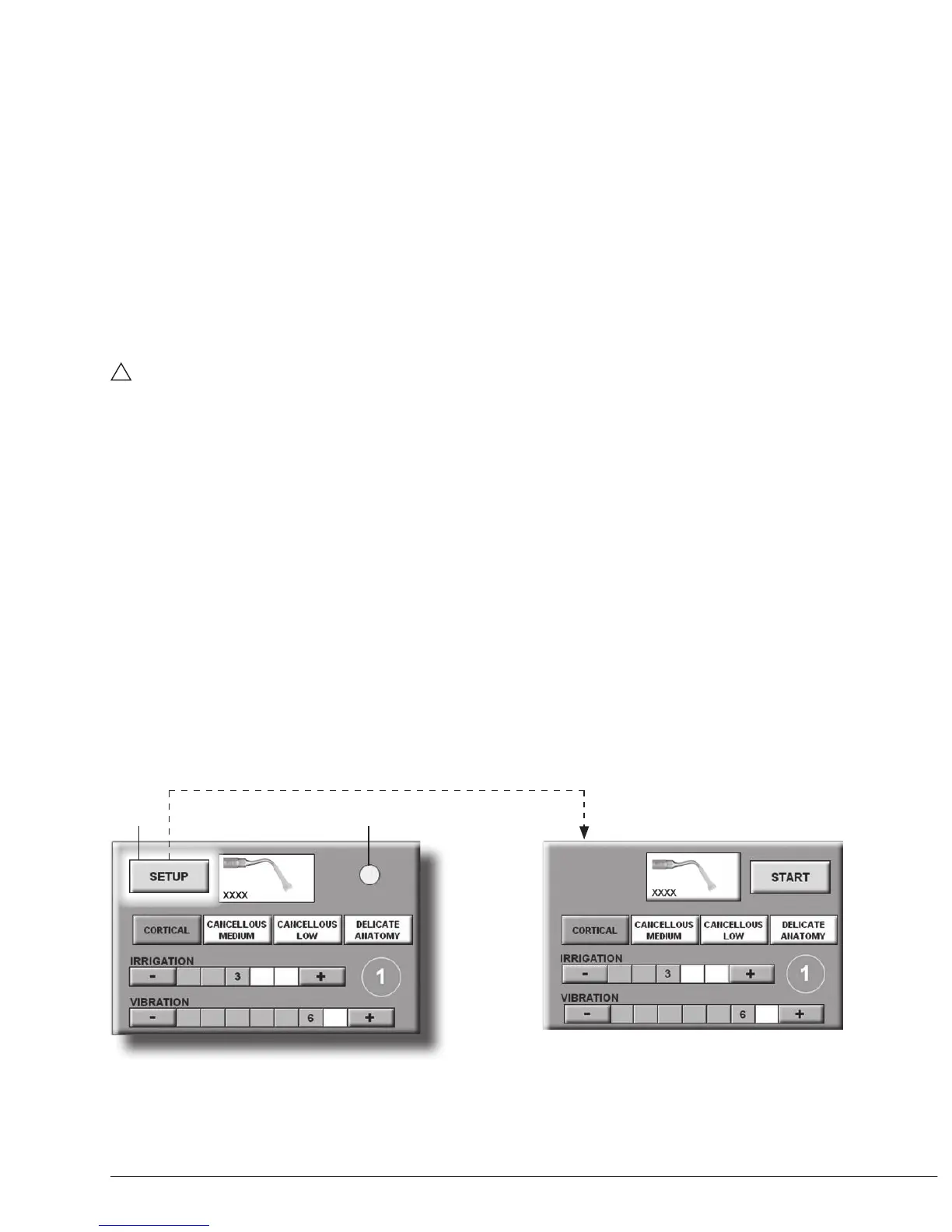
- Pressthe“START”button(Pic.22-Ref.13)toactivatethechannelandusethePiezosurgery
Medical.Axed yellowdot appears inplace ofthe “START” button(Pic.24a -Ref.14) which
indicatesthatthechannelisreadytooperate.
- Pressthefootswitchtoactivatethehandpiecerelativetotheactivatedchannel.Theinsertstarts
tovibrateaccordingtothesettingsselectedandtheyellowdotstarttoash,indicatingacorrect
functionofthedevice.
Phase 6: Changing the settings.
Thesettingscanbechangedonlyafterselectingthe“SETUP”key,onconditionthatthefootswitch
isnotpressed.
- Pressthe“SETUP”button(Pic.24a-Ref.15)tochangetheparameterssetontheworkchannel.
Thisbringsyoubackto“Phase3:Setchanneluse”anditispossibletochangeconguration.
Pic.24b
Pic.24a
15 14



 To Next Page